BeerSmith 4 adds cloud inventory, smarter shopping lists for brewers
BeerSmith 4 now ties inventory, shopping lists and recipes together, making it easier to avoid duplicate buys and brew-day delays.
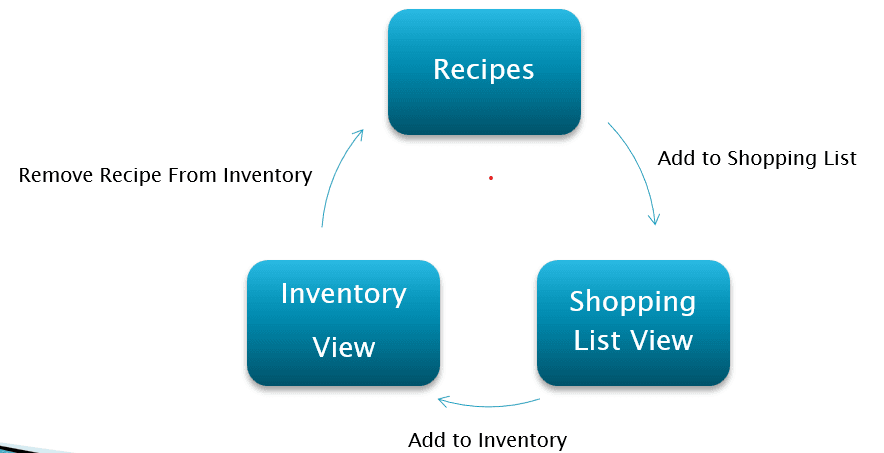
Brad Smith’s latest BeerSmith 4 update goes after one of the most tedious parts of brewing software: knowing what is actually in stock before a grain order goes out. In his April 15 post, Smith said BeerSmith 4 moved inventory into a SQL database, split inventory and shopping lists into separate tables, and brought the cloud-based lists directly into the desktop app.
That matters because the old workflow was clunky. BeerSmith 3 stored inventory in local ingredient files, which made it harder to move between views or keep the same ingredient counts aligned across different devices and workspaces. BeerSmith Web already had shopping list and inventory features, but those functions lived outside the desktop program. BeerSmith 4 closes that gap, letting users work with the same planning tools from the standalone app instead of rebuilding lists by hand in another place.
BeerSmith LLC released BeerSmith 4 for Windows and Mac on March 19, 2026, with Ubuntu Linux and older Mac support set to follow in the weeks after launch. The company also built in import tools for BeerSmith 2 and BeerSmith 3 data, including a full import or a selective import. That selective option is the detail serious brewers will notice first, because it cuts down the risk of dragging years of old recipes, notes and ingredient records into a new system when all you really want is the inventory and a few related tables.

The new cloud and local storage modes make the upgrade more flexible for real brewing setups. In cloud mode, adding to the shopping list or inventory works against cloud-based lists by default, which gives a shared view for a laptop, tablet or phone, and for small breweries or club brewers who need everyone looking at the same ingredient count. In local mode, BeerSmith keeps recipes, ingredients, profiles, shopping lists and inventory on the hard drive unless items are copied into the cloud views manually.
That is where the practical payoff shows up. BeerSmith’s help documentation says the shopping list view can help manage inventory, set prices, print a list and print a store trip sheet. The launch notes also describe a flow that moves data from recipes to the shopping list, then to inventory, and removes items once the batch is brewed. For brewers who already manage recipes some other way, BeerSmith 4 looks worth the jump if the real problem is not recipe design but buying the same hops twice, missing a fermentable, or starting brew day with a half-remembered ingredient list.
This article was produced by Prism’s automated news system from verified source data, official records, and press releases, then run through automated quality and moderation checks before publishing. The system is built and supervised by the people who set the standards it runs under. Read our full AI policy.
Did this article answer your question?