Cherry vs OEM keycaps, how profile changes feel and sound
Cherry trims finger travel and can tighten the sound, while OEM keeps the taller stock feel. The right profile depends on comfort, acoustics, and whether north-facing LEDs matter.
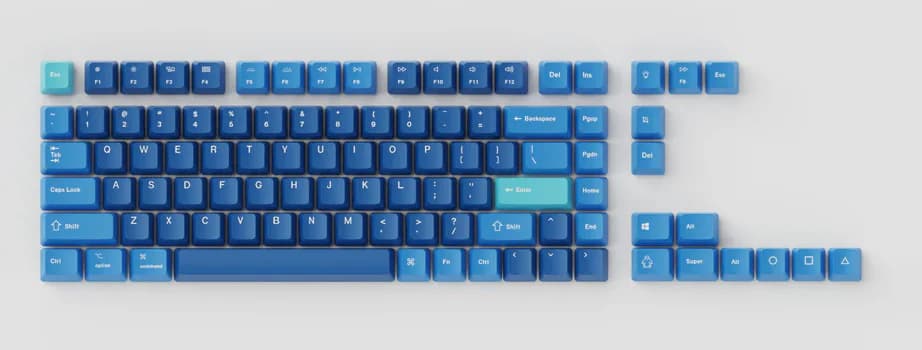
OEM sits at 11.9 mm in a 2026 guide, while Cherry sits lower, and that height gap changes typing feel, row reach, and sound without changing the layout.
Why profile changes the board so much
OEM is the taller, widely shipped default on many prebuilt keyboards. Cherry is shorter, and that lower height makes a board feel a little less stretched under the fingers, especially over long typing sessions. Both profiles are usually sculpted, so the rows do not sit at the same height or angle, but Cherry’s lower overall profile gives a more compact feel without forcing you into a different layout.
Profile affects more than the top surface your fingers touch. That height helps explain why OEM sits in the middle of the common sculpted options rather than at the extreme ends. In practice, the gap between Cherry and OEM is enough to change how quickly you reach the number row, how flat your wrists feel on an office desk, and how long a board stays comfortable when you are typing or gaming for hours.
Cherry’s shape and why enthusiasts keep coming back to it
Cherry profile traces back to Cherry Corp in the 1980s, which is part of why the name still carries weight in MX-era keyboard talk. It has become one of the most recognizable sculpted shapes in the hobby, and in 2023 GMK renamed the common Cherry profile to CYL in that catalog to distinguish it from MTNU.
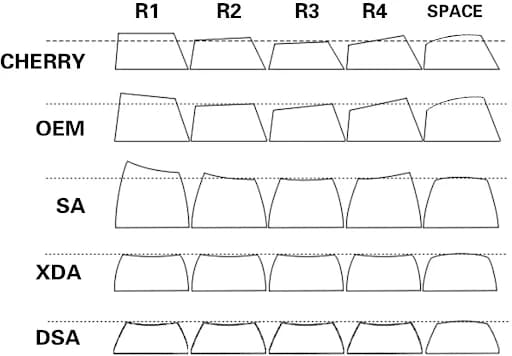
Cherry is the shortest of the common sculpted profiles, with OEM sitting between Cherry and SA.
What OEM gives you that Cherry does not
OEM is still the safer stock-friendly choice. It ships broadly on prebuilts, so the taller shape feels familiar if you are coming from a gaming keyboard, a work laptop accessory, or a board you have used unchanged for years.
That extra height can be a plus if you like a more pronounced sculpt under your fingertips or if you want to keep the feel of the board close to the way it arrived from the factory. OEM is also the path of least resistance if you are replacing worn stock caps and want a set that preserves the original hand position as closely as possible.
Sound is part of the decision, not an afterthought
Keycap profile changes the acoustic shape of a keyboard as much as it changes the ergonomics. Apos and Dygma both tie profile to how a keyboard sounds, and Dygma ties keycap shape and height to resonance and to how sound waves bounce inside the keyboard. That is why keycap swaps can shift perceived pitch, not just comfort.
Cherry and OEM both sit in that sound conversation because wall height and cavity volume matter. Taller profiles can create a different resonance than shorter ones, which means the same switch and plate can land with a noticeably different tone once the caps change.
North-facing LEDs and interference risk
Profile choice also becomes practical when RGB enters the picture. Keychron sells a Cherry-profile double-shot PBT shine-through set that is explicitly labeled for north-facing LED use. Compatibility depends on the specific cap design, not just the profile name. Dygma has also addressed interference in a Cherry-profile, north-facing-switch design, showing that careful shaping can solve the problem instead of forcing you to give up the layout.
North-facing interference is one of the biggest reasons people hesitate before buying Cherry caps for an RGB board. Cherry profile can work well with north-facing LEDs, but you should pay attention to the exact set and its stem clearance. OEM has its own shape and height advantages, but it is not automatically a universal fix for LED clearance either, so checking the product details is part of the purchase.
Where Cherry and OEM fit best
For gaming, Cherry profile often lands as the best compromise. The lower height can feel quicker under the fingers, and the compact sculpt works well if you want a more controlled hand position without moving to a flat uniform profile. OEM still makes sense for players who prefer the taller factory feel and do not want their muscle memory disrupted by a lower front edge.
For office typing and long sessions, Cherry usually has the edge if comfort is the goal. The slightly reduced travel and less stretched reach can make repeated row changes feel easier, especially on boards you use all day. OEM remains a solid choice for anyone who likes the classic prebuilt feel, particularly on work boards where consistency matters.
For sculpted enthusiast builds, Cherry is often the most flexible default. It fits the custom-keyboard habit of changing one variable at a time, and it can alter feel and sound enough to justify an aftermarket set without forcing a full board replacement. OEM, by contrast, is the sensible value choice when you want to refresh a board cheaply and keep the original character intact.
How it compares with the other profiles you will actually see
Cherry and OEM make more sense once you place them beside the rest of the keycap landscape. SA sits at the tall end, with a deep, resonant sound and a retro look that can dominate a build visually and acoustically. DSA and XDA are uniform profiles, so they erase the sculpted row differences entirely and change the typing experience in a much flatter way.
Cherry and OEM are the mainstream sculpted defaults, SA is the tall outlier, and DSA and XDA are the uniform alternatives for people who want a completely different feel.
This article was produced by Prism’s automated news system from verified source data, official records, and press releases, then run through automated quality and moderation checks before publishing. The system is built and supervised by the people who set the standards it runs under. Read our full AI policy.
Did this article answer your question?