Step-by-Step Guide to Band‑Aid, Clip, and Lube Cherry‑Style Stabilizers
Learn how to band‑aid, clip, and lube Cherry‑style stabilizers to reduce rattle and improve large‑key feel and sound.
1. Why stabilizers matter
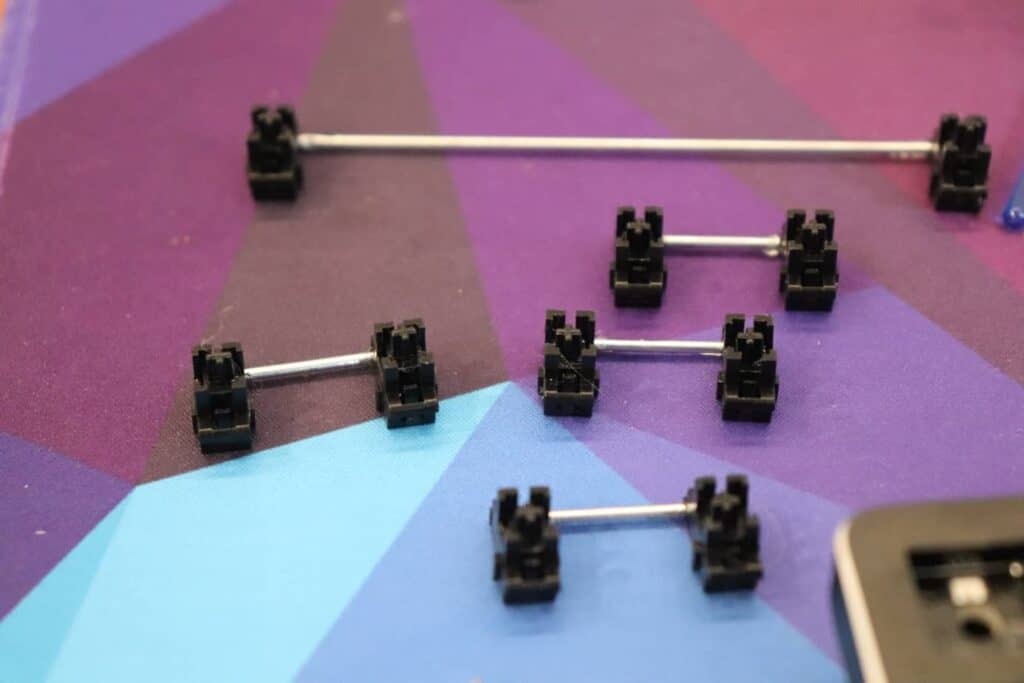
Stabilizers control the feel and sound of larger keys (space, enter, shift, backspace), and poorly tuned stabilizers are the most common source of rattle, scratchiness, and uneven travel. Fixing stabs is one of the highest‑impact, lowest‑cost mods you can do: it transforms typing feel, tightens acoustics, and is often done before more expensive swaps like new switches or plates. Doing these three basic mods, band‑aid, clip, and lube, lets you dial in both tactile smoothness and the acoustic “thock” or muted thump many in the community chase.
2. Tools and materials checklist
Before you start, gather the right tools and materials so the job is clean and repeatable. Essentials: keycap puller, switch puller (or hot‑swap removal tool), small flat and Phillips screwdriver if your board needs disassembly, flush cutters, small paintbrushes (size 0–2), cotton swabs, and a lint‑free cloth. Lubricants: Krytox 205g0 is the community standard for housings and stems; dielectric grease is a viable alternative for stabilizer housings if you prefer a thicker feel. Pads: band‑aids (thin, adhesive), pre‑cut foam pads, or thin felt work for the band‑aid mod, pick pads that are thin enough to let full travel but soft enough to cushion impact.
3. Preparation: remove keycaps, switches, and extract stabilizers
Start by removing the keycaps for the stabilized keys then extract the switches for those positions if you have a hot‑swap board; if not, de‑solder and remove the switches so you can access the PCB and stabilizer housings. Carefully unclip and remove the Cherry‑style stabilizer housings from the plate/PCB, note orientation and which wire goes where (take photos if you’re unsure). Clean the area with a lint‑free cloth; remove dust and old gunk so your lube and pads adhere and perform predictably.
4. Band‑Aid mod (soft landing pad)
Place a small soft pad (band‑aid or thin foam) on the PCB under the stabilizer housing area to soften the downstroke impact and reduce metal‑on‑PCB ping. Position the pad centered under each stabilizer housing so the insert lands on the pad, not the hard PCB; the goal is to absorb the initial impact without restricting travel. Use a band‑aid with a clean adhesive edge or double‑sided tape to keep it stationary, avoid overly sticky adhesives that leave residue or interfere with reassembly. Test with the insert in place and adjust pad thickness or placement until the sound and feel meet your target: thicker pads deepen the thock, thinner pads keep more crispness.
5. Clip the stabilizer insert’s raised nib
Many Cherry‑style inserts have a small raised nib or extrusion that rubs against the housing and creates an initial scratchy bump; trimming that nib smooths the engagement. Remove the insert from the housing and use flush cutters to carefully trim the nib flush, taking small amounts at a time, you can always trim more but you can’t put plastic back. After clipping, lightly sand any rough edges with fine sandpaper so there are no burrs left to cause new noise. Dry fit the insert back in the housing and run the wire through; if the switch‑down travel feels too loose or the insert tilts, you might have clipped too much, stop and compare with the original part before further modification.
6. Lube the housing, stems, and wire contact points
Lube reduces friction and rattle: apply a thin, even coat of Krytox 205g0 (or dielectric grease on housings) to the housing rails where the insert slides, to the legs of the insert, and to the wire where it contacts the plastic. Use a small brush to control application, put only a thin film on surfaces, avoid globbing lube into the housing cavity, and keep lube away from electrical contacts and the PCB. Grease the wire at the two bends and where it seats into the insert; for Cherry stabs you want enough to quiet the click and smooth travel, not so much that the stem feels sluggish. Reassemble the insert into the housing and move it by hand to spread the lube evenly; wipe away excess with a clean swab.

7. Reassembly, hot‑swap or soldering, and testing
With pads in place, inserts clipped, and lube applied, reassemble stabs and reinstall switches and keycaps, or re‑solder switches for non‑hot‑swap boards following your usual workflow. Test each stabilized key by hand and with the keycap installed: listen for rattle on off‑center presses and note any asymmetry in feel between left and right sides of longer keys. Iterate: if you still hear a scratch, recheck the clip and reapply a tiny bit more lube; if the sound is too muted or travel feels mushy, try a thinner pad or lighter lube application.
- Start with the least intrusive changes: band‑aid first, then clip, then lube, many folks get a great result with just the pad.
- Use exactly the same stabilizers in pairs on symmetric keys to keep feel consistent across the board.
- Share before/after audio clips in community threads; small differences are easier to judge with side‑by‑side recordings.
- If you chase a particular sound (“thock” versus “clack”), experiment with pad material and lube thickness, foam pads and heavier grease deepen the thock, thinner pads and lighter lube preserve clickiness.
8. Tips, variations, and community context
9. Common pitfalls and safety notes
Don’t over‑clip: removing too much plastic can make the insert unstable and introduce wobble or new noises. Avoid getting lube on switch stems or PCB contacts, excess lubricant can migrate and affect switch performance or electrical reliability. If you’re desoldering, work safely: use proper ventilation and take care not to heat the PCB pads excessively.
Closing practical wisdom Stabilizer tuning is a small time investment with outsized returns, do the band‑aid, clip, and lube sequence deliberately and you’ll be surprised how much cleaner, quieter, and more satisfying your big keys feel. Start minimally, document your changes, and iterate toward the sound and feel you like; a few careful mods will make typing on your board feel like an upgrade.
This article was produced by Prism’s automated news system from verified source data, official records, and press releases, then run through automated quality and moderation checks before publishing. The system is built and supervised by the people who set the standards it runs under. Read our full AI policy.
Did this article answer your question?