YKB Skadi brings Hall Effect sensing to an open-source split keyboard
Skadi turns Hall Effect into a buildable split board, with open PCB, case and firmware files, a Dactyl-inspired keywell, and 60 keys to tune.
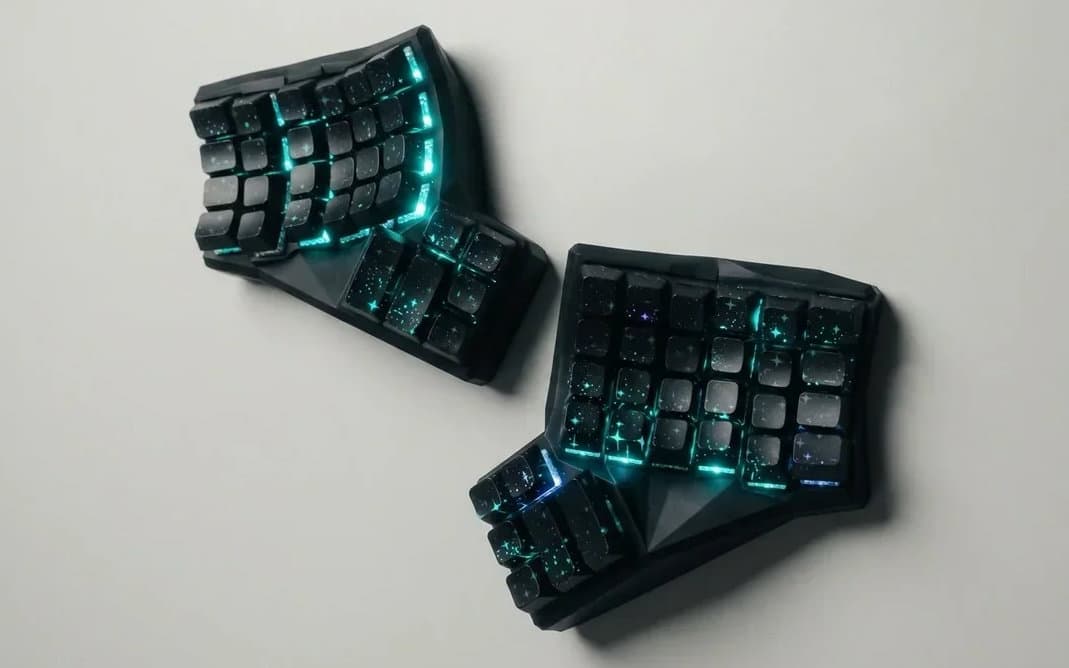
YKB Skadi treats Hall Effect like a hobbyist building material instead of a sealed-up gaming feature. The project pairs a 60-key 6x4+6 split layout with a Dactyl-inspired keywell case, then opens the PCB, case, and firmware files for anyone who wants to study, modify, or extend the design. That shift is the point: Skadi is less about chasing esports speed and more about giving the keyboard community something it can actually inspect, print, and iterate on.
Hall Effect, but built for the open-source side of the hobby
Skadi comes from YarmanKB, with Herman Berdnikov identified behind the release, and it lands in the part of the Hall Effect conversation that usually gets less attention. Mainstream coverage tends to orbit closed, polished boards and their rapid-trigger appeal, but Skadi points in another direction: ergonomic experimentation, firmware freedom, and a hardware stack that is visible from top to bottom. The project name matters because it is not just a keyboard, it is a reference build for people who want to see what magnetic sensing can do outside a locked ecosystem.
That makes it interesting even before the first switch is pressed. The board is framed as a typing tool and a test platform, not as a tournament peripheral, which changes the entire conversation around Hall Effect. Instead of asking only how fast a key can respond, Skadi asks how the sensing tech can support layout changes, adjustability, and a more transparent build path.
A split layout that starts with ergonomics
The physical layout is a 6x4+6 split for a total of 60 keys, and that combination tells you a lot about the target audience. Columnar split boards already attract users who care about reach, hand separation, and a more natural angle for long typing sessions, and the Dactyl-inspired keywell pushes that idea further by shaping the case around finger travel rather than forcing the fingers to adapt to a flat slab. In practical terms, the board is built for people who want to experiment with posture and key placement as much as with switch feel.
That ergonomic angle is where Skadi separates itself from the most common Hall Effect story. A lot of magnetic-switch boards are sold as performance machines, but a split, keywelled design changes the goal entirely. The appeal becomes reduced strain, more deliberate key positioning, and the freedom to explore a shape that already asks different questions than a standard staggered board.

The sensor and controller stack is the real tell
Under the hood, Skadi uses Texas Instruments TMAG5253 Hall effect sensors and a Holyiot-21069 controller module based on Nordic Semiconductor’s nRF5340. TI describes the TMAG5253 as a low-power linear Hall effect sensor with ultra-low-power shutdown mode and fast startup, which is exactly the kind of profile that makes sense in a wireless keyboard where sensing fidelity and battery life have to coexist. The controller side matters just as much: Holyiot’s module documentation identifies the nRF5340 as a dual-core Arm Cortex-M33 wireless SoC, giving the board a modern low-power wireless foundation.
The rest of the hardware stack makes the project feel unusually complete for something so open. Skadi also includes per-key RGB lighting, a 3D-printed case, and custom translucent XDA keycaps. Each of those choices reinforces the same theme: this is not a black-box product with a few mod-friendly touches, but a system built so the parts can be understood, swapped, and remixed.
- TMAG5253 sensors for magnetic sensing
- Holyiot-21069 module for wireless control
- Per-key RGB for per-switch lighting control
- 3D-printed Dactyl-inspired case
- Custom translucent XDA keycaps for the finished build
Firmware freedom is part of the product, not an afterthought
The project’s open stack shows up clearly in YarmanKB’s GitHub profile, where the pinned repositories include ykb-firmware, ykb-skadi-pcb, and ykb-skadi-3d. That structure matters because it makes the board legible as a complete build, with firmware, PCB, and case work all living in the same ecosystem. The firmware repository is titled Firmware for Hall Effect Keyboards, which matches the project’s larger goal: give magnetic-switch boards a shared, hackable software base instead of treating each board as a one-off.
That also places Skadi in the wider open-firmware conversation around custom keyboards. The Zephyr Project’s documentation describes ZMK as an open-source firmware for custom keyboards built on Zephyr RTOS, and ykb-firmware sits comfortably in that same open, modular world. For builders who care about firmware transparency as much as hardware transparency, that is a meaningful distinction.
What Skadi unlocks for advanced users
The most interesting thing about Skadi is not that it uses Hall Effect sensing, but that it makes Hall Effect feel buildable. The magnetic-switch approach is inherently friendly to tinkering, because it encourages actuation experiments without forcing the user into a solder-desolder cycle every time the feel needs to change. That opens the door to tuning, case iteration, and layout exploration in a way that closed HE boards rarely do.
For the hobby, that is the bigger story. Skadi suggests a future where Hall Effect is not only a selling point for premium gaming boards, but also a platform for split ergonomics, firmware work, and parts transparency. It is the kind of project that other builders can study, clone, or fork, and that is often how a niche stops being a niche.
Skadi starts with magnets, but its real value is openness. The layout, the keywell, the firmware, and the parts stack all point in the same direction: Hall Effect does not have to live inside closed hardware to be exciting, and in a board like this, the most compelling feature is the freedom to keep building.
This article was produced by Prism’s automated news system from verified source data, official records, and press releases, then run through automated quality and moderation checks before publishing. The system is built and supervised by the people who set the standards it runs under. Read our full AI policy.
Know something we missed? Have a correction or additional information?
Submit a Tip