Best Mobile Game Controllers in 2026: Upgrade Your Smartphone Gaming Experience
Touch controls are costing you fights you should be winning — the right 2026 controller cuts input lag to near zero, and at just 268 grams the Razer Kishi V3 Pro weighs less than most flagship phones.
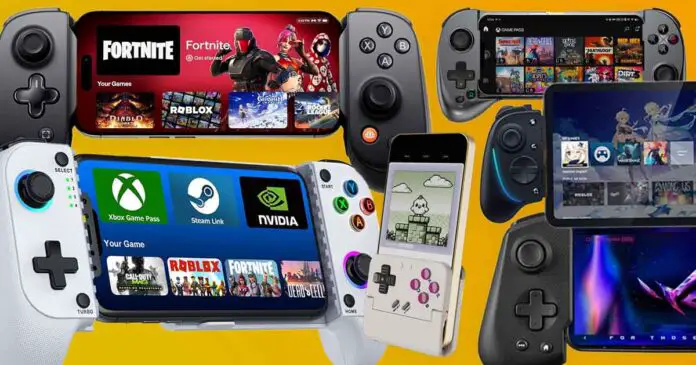
Every ranked match you lose to a touchscreen player who has a controller is a solvable problem. The 2026 mobile controller market has fractured into distinct tiers, phone-type compatibility lanes, and genre-specific sweet spots, so buying the wrong one means spending $80 to $150 on something that barely clears your phone case or adds dead zones to your analog sticks. This guide cuts through the noise with a decision-tree approach: your phone's connector, your genre, and how you actually carry your setup every day.
USB-C Android and iPhone 15 Series and later players, competitive genre:
1. GameSir G8 Galileo - Best overall for USB-C wired competitive play
Reviewed by GamesRadar as "a certified Backbone breaker" and called the clear winner in the mobile controller space, the G8 Galileo plugs directly into USB-C ports on Android and iPhone 15 series devices with zero pairing friction. Its Hall Effect joysticks and Hall Sensor triggers give it drift-free longevity that most clip-on competitors simply cannot match, and back buttons sit exactly where your middle fingers naturally grip the handles, not bolted on as an afterthought. For shooters and MOBAs where a dead zone or a sticky stick costs you a firefight, this is the controller that the rest of the 2026 field is measured against.
2. Razer Kishi V3 Pro - Best premium pick for serious USB-C players
At $149.99 and 268 grams (that is lighter than a standard iPhone 16 Pro Max in a case), the Kishi V3 Pro is Razer's current flagship, replacing the Kishi Ultra that launched at the same price point in April 2024. Razer claims its anti-drift thumbsticks are superior to conventional Hall Effect designs, and the controller ships with two swappable stick caps for customizing reach and grip texture. Two back buttons built into the ergonomic handles, two additional claw grip bumpers, and deep integration with the Razer Nexus companion app for remapping and firmware updates round out a package built for players who treat their phone like a handheld console.
3. Razer Kishi V3 Pro XL - Best for iPad and larger-screen gaming
The XL variant carries the same $149.99-tier feature set as the standard Kishi V3 Pro, but its adjustable clamp accommodates the larger footprints of tablets and plus-sized flagship phones that standard telescopic controllers pinch out. If you run cloud gaming on an iPad or play emulated titles on a 7-inch Android device, the XL removes the screen-size ceiling that eliminates most competitors from consideration. Compatibility gotcha: verify your device's exact width against Razer's clamp range before buying, as camera bumps on some Android models can create a slight tilt when seated in the sled.
Wireless Bluetooth players, iPhone and multi-platform:
4. Backbone Pro - Best wireless option for iPhone 15, 16, and 17
The Backbone Pro launched at $170 and has since settled to $139.99 at major retailers, making meaningful discount windows rare outside Prime Day and Black Friday. It supports both USB-C wired and Bluetooth connections, spans iPhone 15 through iPhone 17 and Android, and bundles three months of Apple Arcade access to give day-one buyers an immediate game library. The familiar Backbone One form factor is its strength and its limitation: ergonomics are well-suited to casual and cloud gaming sessions, but competitive players will notice the controller's lighter trigger feedback compared to Hall Sensor alternatives.
5. GameSir G8 Plus MFi - Best Bluetooth multi-platform controller
At $79.99 and carrying Apple's official MFi certification, the G8 Plus bridges the gap between iOS play and a surprisingly wide device roster. Unlike the wired G8 Galileo, the G8 Plus is battery-powered and connects over Bluetooth, which also unlocks Nintendo Switch compatibility via its six-axis gyroscope, something the wired variant does not offer. Rumble motors added to the Plus version over the original G8 make it the better pick for narrative and adventure titles where haptic feedback adds immersion, while the Hall Effect joysticks carry over for anyone mixing casual play with the occasional ranked session.
Best entry-level / best under $65 for commuters:
6. Backbone One 2nd Gen - Best plug-and-play entry point
The Backbone One 2nd Gen starts at $60, the lowest confirmed entry price among brand-name telescopic controllers in this roundup, and works out of the box with Android and iPhone 15 through 17 series via USB-C without any software setup. Its Backbone+ subscription layer, which adds game recording, a friends list, and a universal launcher, is entirely optional and does not gate basic controller functionality. Compatibility gotcha: the clamp mechanism is designed around phones without cases; if you use a thick protective case, plan to remove it before attaching the Backbone or confirm your case thickness against Backbone's published fit specs.
For emulation and retro players, any phone type:
7. Wireless Bluetooth pads (GameSir G8 Plus, 8BitDo series) - Best for emulation and multi-device setups
High-end Bluetooth controllers from GameSir and 8BitDo support Bluetooth HID alongside native iOS and Android protocols, meaning one controller handles your phone, your Switch, and a desktop emulation rig without re-pairing from scratch each time. For emulation specifically, stick feel and ergonomics matter more than ultra-low latency, since retro titles rarely demand sub-16ms inputs; prioritize controllers with well-regarded stick quality and remapping apps over wired-only designs that chain you to one device.
Compatibility gotchas every buyer needs to check:
8. Case fit, camera bump clearance, and analog dead zones
Three issues kill more controller purchases than any spec sheet: First, most telescopic controllers require a bare or ultra-slim phone, so factor in case removal time if your commute gives you 90 seconds to set up before your stop. Second, camera bumps on recent flagship Android and iPhone Pro models can create a seating gap or tilt angle that shifts the phone's weight asymmetrically during play; check hands-on video reviews that show your exact phone model seated in the controller before ordering. Third, analog dead zones vary unit to unit even within the same SKU, so if a controller lacks a companion app with dead zone adjustment, competitive players are stuck with whatever the firmware ships with.
The single best upgrade path in 2026 is still straightforward: USB-C wired controllers for competitive genres, Bluetooth multi-device pads for emulation and casual play, and XL-class sleds for anything bigger than a standard 6.7-inch phone. Passthrough charging on USB-C controllers is non-negotiable for sessions longer than 90 minutes; the GameSir G8 Galileo and Razer Kishi V3 Pro both support it, keeping your battery topped while you play. Prioritize controllers with companion apps for dead zone tuning and remapping, update firmware before your first ranked session, and always verify your specific phone model's clamp fit before assuming any telescopic controller will seat cleanly around your camera housing.
This article was produced by Prism’s automated news system from verified source data, official records, and press releases, then run through automated quality and moderation checks before publishing. The system is built and supervised by the people who set the standards it runs under. Read our full AI policy.
Know something we missed? Have a correction or additional information?
Submit a Tip