Emulation Works Fine, But Why Does It Still Feel Wrong
Emulation runs your favorite retro games perfectly, yet something still feels off. Here's why that nagging sense is real, and what to do about it.
You boot up a SNES ROM, the title screen looks exactly right, the music hits perfectly, and yet something is just slightly wrong. It's not broken. It's not glitching. It just doesn't *feel* the same. A viral post recently captured this frustration in a way that clearly resonated across the emulation community, sparking a wave of responses from people who had been quietly sitting with the same uncomfortable realization: emulation works fine, but it doesn't always feel like the real thing.
The good news is that this feeling isn't a personal failing or a case of nostalgia poisoning your perception. It's a genuine, diagnosable set of problems. And most of them have solutions, or at least meaningful workarounds.
The Input Latency Problem Is Real
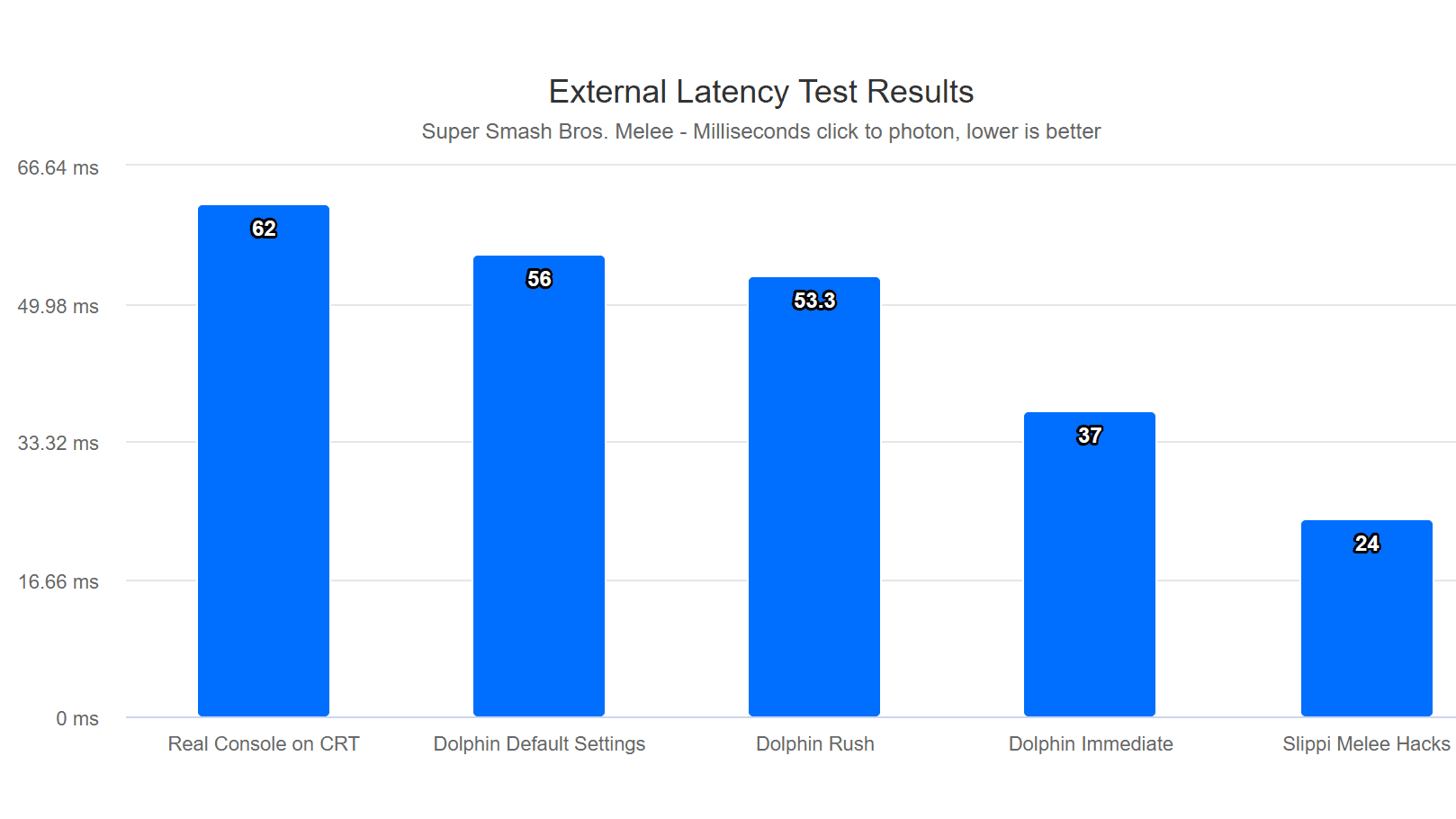
The most commonly cited culprit in community discussions is input latency, and for good reason. When you press a button on original hardware, the signal travels a short, direct path: controller to console to CRT display. The entire loop, from your thumb to the pixel on screen, can complete in a single frame or less. Modern emulation disrupts that chain at multiple points.
Running a core in RetroArch on a modern PC introduces processing overhead, and that signal then has to travel through your operating system's audio and video stack before reaching a display that itself adds anywhere from a few milliseconds to over 100ms of input lag depending on the panel technology. Playing on a phone adds touch-to-response latency on top of everything else. Even a delay as small as 30-50ms, which is imperceptible in a slower game, becomes genuinely disruptive in a fast-action platformer or a fighting game where frame-perfect inputs matter.
RetroArch does offer tools to address this, specifically its Run-Ahead feature, which pre-emulates frames to compensate for latency. It helps, but it requires configuration, has performance overhead, and doesn't fully replicate the zero-latency feel of an original setup.
Your Controller Is Lying to You
Input latency explains some of the disconnect, but the controller in your hands explains a surprising amount of the rest. The original SNES controller, the N64 stick, the PS1 DualShock: these weren't generic input devices. They were engineered alongside specific games, and the physical feedback they provide, the resistance of the buttons, the tension in the analog stick, the weight distribution, shaped how those games feel to play.
Using a modern Xbox or PlayStation controller to emulate is functional, but the muscle memory built around these older devices doesn't transfer cleanly. The D-pad geometry is different. Button resistance is different. The analog stick on an N64 controller had a notoriously specific feel that no modern thumbstick replicates. Community members consistently point to this as a factor that's easy to dismiss intellectually but hard to ignore once you've identified it.
The practical fix here is to use original controllers wherever possible. USB adapters for original SNES, Genesis, and PS1 controllers are widely available and inexpensive. For N64, adapters exist but the controller's age and stick degradation create their own complications. It's an imperfect solution, but it closes a meaningful part of the gap.
The Screen You're Playing On Changes Everything
This one surprises people who haven't encountered it before. The original hardware wasn't designed for a 4K OLED or a 1080p IPS monitor. It was designed for a CRT television. The pixel art in games from the NES, SNES, Genesis, and PS1 eras was drawn with the understanding that a CRT's phosphor glow and natural scanline effect would soften and blend pixels in specific ways. What looks like a jagged, chunky mess on a modern display was intentionally designed to look smooth and painterly on period-correct hardware.

This is why CRT filters and scanline shaders exist in RetroArch and other emulators. A well-configured CRT shader like CRT-Royale or CRT-Geom can genuinely recover a significant portion of the intended visual presentation. It won't be identical, but it addresses something real. The community has spent years refining these shaders specifically because the problem is well understood and worth solving.
For those willing to go further, connecting original hardware or a capable emulation device to an actual CRT remains the gold standard compromise. Thrift stores and estate sales still surface decent Trinitrons and other quality CRT sets, and the community around sourcing and using them is active and knowledgeable. Running RetroArch on an older PC connected to a CRT, a setup frequently mentioned in community discussions, sidesteps the display problem almost entirely while keeping the flexibility of software emulation.
Authenticity Is Not Just Nostalgia
There's a tendency to dismiss the "it doesn't feel right" complaint as pure nostalgia, the idea that people just miss being young and are projecting that onto the hardware. But the responses to this viral discussion consistently push back on that framing. The dissatisfaction people describe is specific and technical, not vague and sentimental. They're identifying real differences in input timing, physical feedback, and visual presentation that have measurable, documentable causes.
That said, authenticity also carries a psychological dimension that's worth acknowledging honestly. Playing on original hardware in an original context carries weight that no emulator can fully replicate, because part of what you're seeking isn't just accurate button response but a relationship with a physical object and a particular moment in gaming history. That's not irrational. It's just a different kind of value, and recognizing it helps clarify what you're actually optimizing for.
Building an Emulation Setup That Closes the Gap
If you're committed to emulation but want to close as much of the perceptual gap as possible, the community's collective advice points toward a few consistent directions:
- Use original controllers with USB adapters rather than modern gamepads
- Enable Run-Ahead in RetroArch for latency-sensitive games, and use a wired connection for your controller
- Apply a quality CRT shader, CRT-Royale is a widely respected starting point, rather than playing on raw integer-scaled output
- If you can access a CRT, even an older PC monitor, connecting your emulation machine to it changes the experience significantly
- Match the core to the game: RetroArch's library includes cores with different accuracy and latency tradeoffs, and choosing the right one for your priorities matters
None of these steps individually solves the problem completely. But applied together, they address the three main contributors, latency, controller feel, and display fidelity, in ways that bring emulation meaningfully closer to the original experience.
The gap between emulation and original hardware isn't going to disappear, because part of what makes original hardware feel right is simply that it is right: a complete, closed system designed to work together. Emulation is, by definition, an approximation. The question is how accurate an approximation you need, and how much effort you're willing to invest in getting there.
This article was produced by Prism’s automated news system from verified source data, official records, and press releases, then run through automated quality and moderation checks before publishing. The system is built and supervised by the people who set the standards it runs under. Read our full AI policy.
Did this article answer your question?