GammaOS Next Guide Unlocks Anbernic RG Vita Pro Emulation Potential
GammaOS Next turns the RG Vita Pro from a promising dual-boot handheld into a sharper, faster emulation machine, with real gains in boot flow, tuning, and usability.
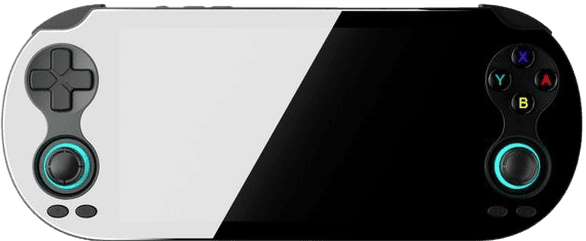
Why GammaOS Next matters on the RG Vita Pro
The RG Vita Pro already looked like the kind of handheld that should work well on paper: Android 14 on one side, Linux on the other, a 5.5-inch 1080p screen, and launch-era extras like Wi-Fi 6, Bluetooth 5.0, DisplayPort output, a 5,000mAh battery, and black or white finishes. The catch was always the same one that trips up a lot of ambitious handhelds: promising hardware does not automatically equal a satisfying emulation device. GammaOS Next is the software layer that makes the promise feel real.
What makes this release worth paying attention to is that it is not being treated like a gated preview. The GammaOS Next build for the RG Vita Pro is public right away, which is a meaningful shift from the earlier RG Vita rollout, where the first GammaOS release lived behind a Patreon window before opening up later. If you just bought the device and want a setup that actually behaves like a finished product, this is the version that matters.
Who should install it
GammaOS Next is for the person who wants the RG Vita Pro to stop feeling like a project and start feeling like a handheld. If you care about quicker access to emulators, cleaner organization, better controller handling, or a firmware stack that gives you more control than stock, this is squarely aimed at you. It is also the right call if you prefer a device that boots into the apps you actually use instead of making you fight through a generic Android layer first.
The project behind it, GammaOS from TheGammaSqueeze, is built around performance and user control on Android 13 and 14 based handhelds, and that philosophy shows up immediately here. Instead of acting like a simple launcher skin, GammaOS Next changes how the device behaves under load, how quickly you get to your games, and how much tuning is available once you are there.
What it changes in everyday use
The biggest gain is practical, not flashy. GammaOS Next includes GammaOS Nano, which can boot straight into RetroArch or DraStic, cutting out a lot of the friction that usually slows a handheld down. That matters every time you pick it up for a five-minute session and do not want to spend two minutes navigating menus first.
It also adds native OTA updates, which is the kind of feature that sounds boring until you have lived with a firmware that requires repeated manual maintenance. On top of that, GammaPad focuses on low-latency controller handling, so the device feels more responsive in the exact moment emulation users care about most: input timing. GammaShader, GammaEQ, GammaRGB, and GammaOS Toolbox round out the package by giving you more control over visuals, audio, lighting, and system-level tweaks without making the whole setup feel stitched together.
How the build is packaged
GammaOS Next for the RG Vita Pro ships in both Lite and Full .pac files, and installation is done with UnisocTools on a Windows PC. That matters because it tells you two things immediately: this is a real firmware flash, not a one-click theme, and you should plan accordingly before you touch the device. If your daily machine is not Windows, you will need access to one for the process.
The two package options are also a good signpost for how you should choose. The Lite build is the one to reach for if you do not want Google Services on the device. The Full build includes Google Services and Play Store access, which makes sense if you want a more familiar Android setup or expect to rely on app installs that live in Google’s ecosystem. That choice alone will determine how close the handheld feels to a clean, gaming-only box versus a more general-purpose Android device.
Why the performance claims matter
GammaOS Next is not just about tidying menus. The release notes call out a factory overclock that pushes the Cortex-A72 to 2304 MHz and the GPU to 1100 MHz, with up to 33.6 percent sustained-load throughput improvement. For emulation, that is the difference between a device that merely starts a game and one that can stay stable when the workload gets heavy.
That performance tuning is especially relevant on a dual-boot machine like the RG Vita Pro, where stock behavior can feel uneven depending on which side of the OS split you are using. GammaOS Next is designed to squeeze more out of the chipset, which can help the handheld feel more consistent across emulators, front ends, and long sessions. If you are the sort of player who notices when a system stutters, drops frames, or takes too long to wake up, these are the kinds of changes that actually matter.
What to do before you flash
The most important setup advice is not glamorous: use a trusted microSD card. Retro Handhelds recommends sticking to a 64GB to 128GB card and warns that bundled cards are often low quality and prone to failure. That is not just a cautious footnote. Bad storage is one of the fastest ways to turn a new handheld into a troubleshooting session.
A sensible approach looks like this:
- Back up or replace the included card before you start
- Decide whether you want Lite or Full based on Google Services and Play Store needs
- Use a Windows PC with UnisocTools ready before flashing
- Treat the firmware swap as the moment to set up the handheld the right way, not the fastest way
That bit of preparation is what keeps the rest of the process smooth. The firmware may be the headline, but the card quality and the package choice are what determine whether the result feels polished two weeks later.
The tradeoffs worth knowing
GammaOS Next is the better answer for most people who want the RG Vita Pro to be a serious emulation handheld, but it is still a custom firmware flash. That means you are choosing control and performance over staying inside Anbernic’s stock environment. If you want a device that behaves exactly like it shipped out of the box, this is not the path for you.
It is also worth remembering that the strongest parts of the experience come from the combination of software and hardware. Anbernic built the RG Vita Pro as a dual-OS handheld with a capable display and modern connectivity, but GammaOS Next is what turns that spec sheet into something more coherent. For players who care about a clean boot path, better responsiveness, and actual control over the device, this is the release that makes the RG Vita Pro feel like it finally knows what it is for.
In the end, GammaOS Next does what good handheld firmware should do: it gets out of the way when you want to play, and it gives you enough control when you want to tune. For the RG Vita Pro, that is the difference between interesting hardware and a machine worth recommending.
This article was produced by Prism’s automated news system from verified source data, official records, and press releases, then run through automated quality and moderation checks before publishing. The system is built and supervised by the people who set the standards it runs under. Read our full AI policy.
Did this article answer your question?

