Retro Multi Tools v5.0 Adds Big Picture Mode, USB and Disc Utilities
SvenGDK's Retro Multi Tools v5.0 brings a couch-friendly Big Picture Mode and USB/disc utilities to the all-in-one ROM management suite.
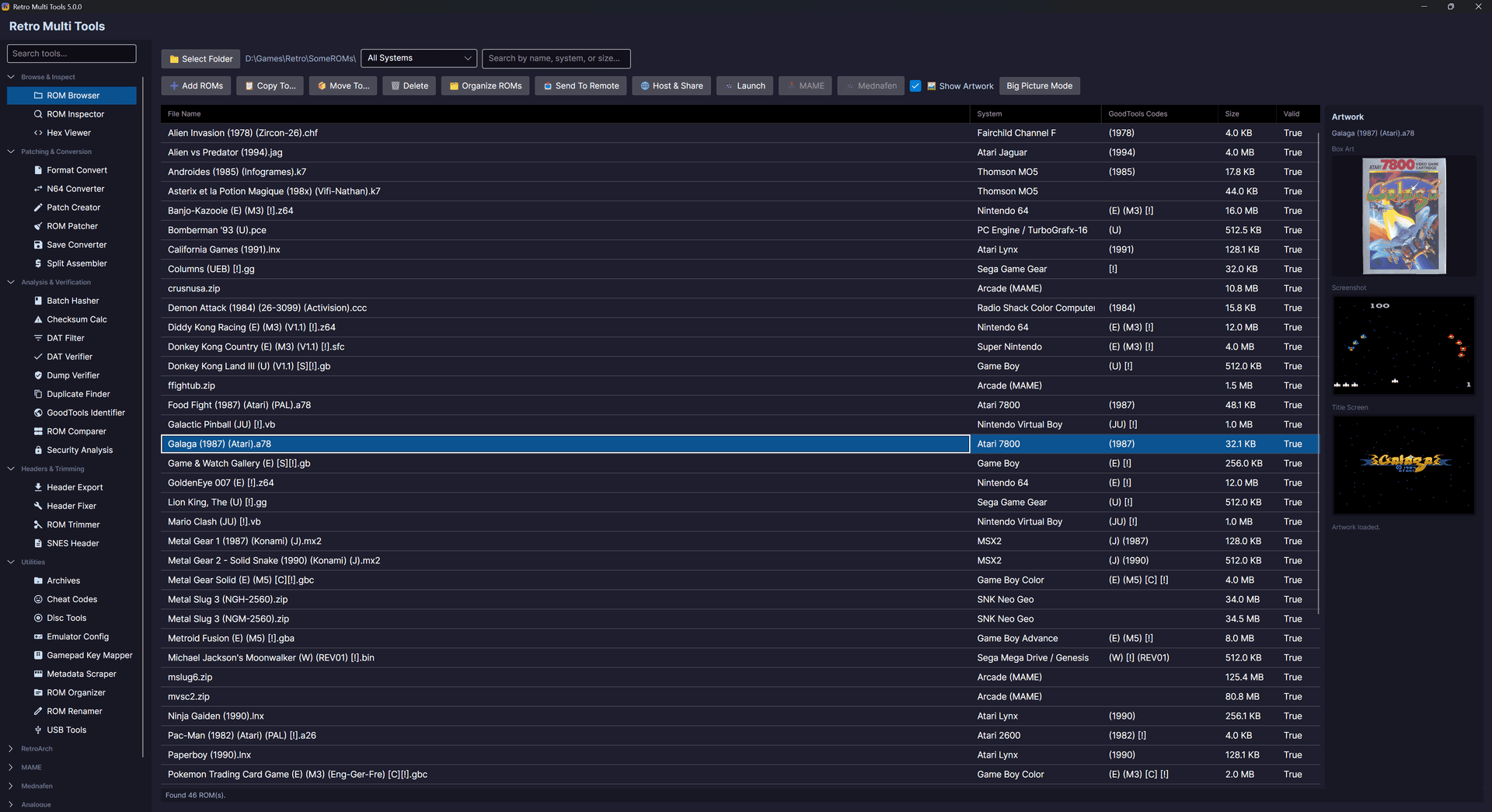
SvenGDK's Retro Multi Tools closed out March 2026 with a burst of development activity, teasing a v5.0 roadmap that adds three major features: a Big Picture Mode theme for TV and couch play, USB and disc utilities for removable media and image management, and an external configurator covering RetroArch, MAME, and Mednafen settings in a single interface.
The project's GitHub repository logged active commits and documentation refreshes across March 26 through 30, with updates covering launcher fixes, controller mapping improvements, and getting-started guides for Windows, macOS, and Linux. That documentation push signals v5.0 is not a distant milestone but an imminent release shaped by functionality already landing in the codebase.
Big Picture Mode is the headline addition, giving users a controller-friendly, console-style interface to navigate their collections from a couch without touching a keyboard or mouse. The mode competes directly with frontend-focused experiences like LaunchBox's BigBox or Steam's own Big Picture layout, but Retro Multi Tools keeps the emphasis on clean library management rather than visual presentation alone.
The USB and disc tools address a specific pain point for collectors who maintain physical-media backups or work with CHD and ISO archives. Rather than switching between standalone utilities for disc image handling, users can interact with removable media and image files directly from within the suite.

The RetroArch, MAME, and Mednafen configurator rounds out the v5.0 feature set by solving a problem familiar to anyone managing multiple devices or sharing a rig: editing config files individually for each emulator. The external settings manager lets users adjust frontend and core options without opening each emulator's own UI, practical for provisioning several machines with a consistent setup.
Earlier in March, Retro Multi Tools had already established its foundation with support for zipped ROMs, a ROM inspector, and conversion tools that handle ISO-to-CHD and similar format transitions. Those core utilities position the suite as a last-mile solution: bridging the gap between raw dumps and a verified, organized library ready to load in any frontend.
The project is cross-platform from the start, with SvenGDK and contributors maintaining support across Windows, macOS, and Linux, and the GitHub repository remains the primary location for releases and changelogs as v5.0 development continues.
This article was produced by Prism’s automated news system from verified source data, official records, and press releases, then run through automated quality and moderation checks before publishing. The system is built and supervised by the people who set the standards it runs under. Read our full AI policy.
Did this article answer your question?

