Nintendo explains Switch 2 microSD Express setup, compatibility and update requirements
Nintendo's new storage rule is blunt: Switch 2 only accepts microSD Express cards, and the system must be updated before the slot works.
A stricter card standard from the start
Nintendo is making the Switch 2 storage story simple in one way and complicated in another. The console only works with microSD Express cards, not older microSD, microSDHC or microSDXC cards, and Nintendo Support now walks buyers through the exact insertion and removal steps to avoid mistakes at setup. That is not just a hardware note. It is a sign that expandable storage is likely to become one of the first real support headaches for the new system.
The stakes are practical. Nintendo launched Switch 2 in the United States on June 5, 2025 at $449.99, and the company is pairing that price tag with a faster storage standard meant to keep games running smoothly on the new hardware. The official product pages and support materials also show removable storage support up to 2 TB, which gives the platform plenty of headroom, but only if players buy the right card and get the setup sequence right the first time.
How to insert or remove the card
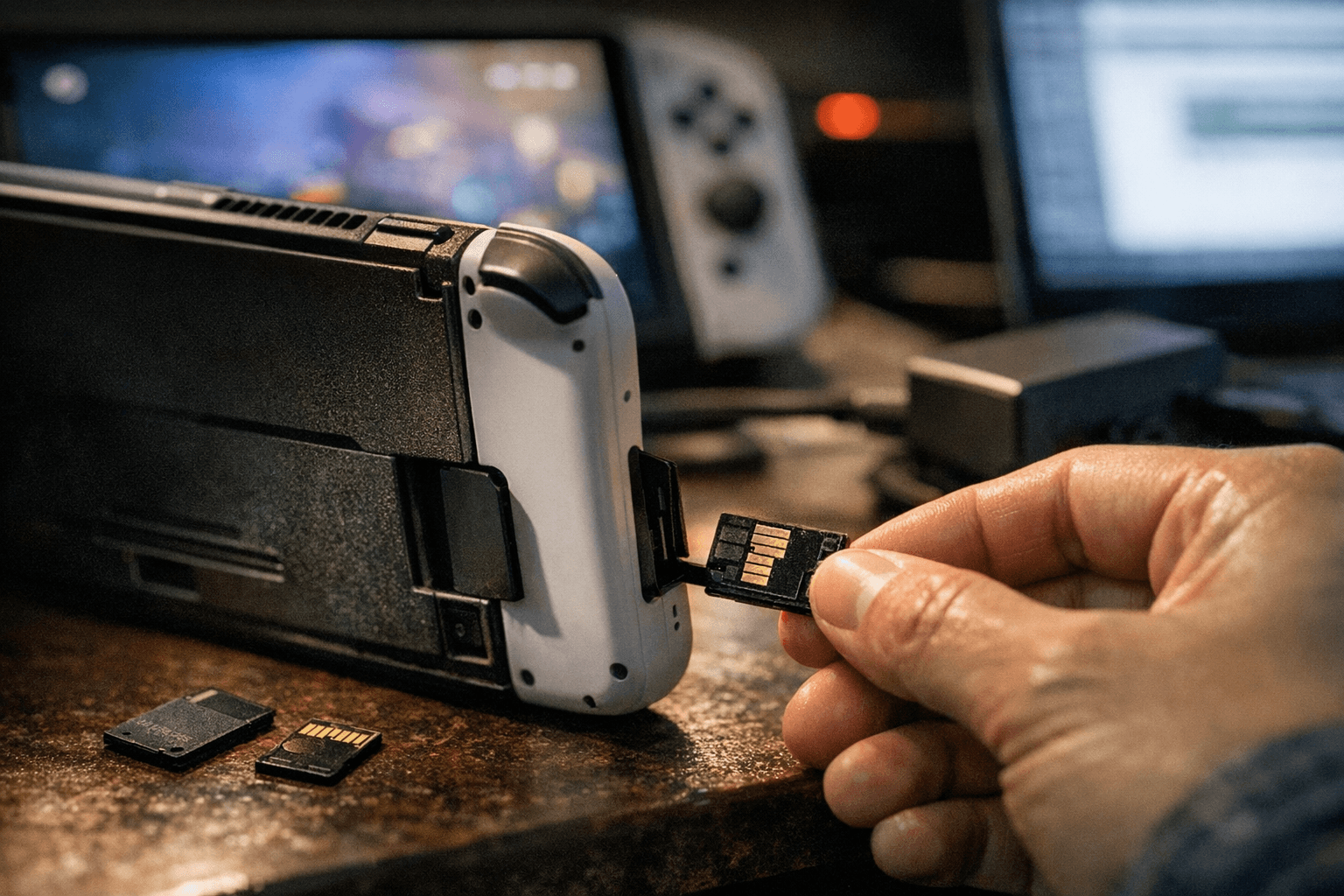
Nintendo’s guidance is unusually specific because the mechanical step is easy to mess up in a hurry. The microSD Express card goes into the slot on the back stand area with the label facing away from the console. Nintendo says to insert it horizontally and gently push down until it clicks into place.
Insert it the way Nintendo intends
1. Make sure the card is a microSD Express card, not an older microSD format.
2. Hold it with the label facing away from the console.
3. Slide it into the slot horizontally.
4. Push down gently until you feel and hear a click.
Removal is just as deliberate. Nintendo says to gently push down on the card until it clicks, then slide it out. That extra click matters because it is the difference between a clean removal and a card that catches because it was not seated properly in the first place.
For players, this sounds minor. In practice, it is exactly the kind of first-run friction that creates support calls. A buyer who sees “microSD” on a package but misses the “Express” part could easily assume an old card will work. Someone who inserts the card at the wrong angle or expects the slot to behave like the original Switch’s expansion bay could also waste time before they ever get to a game download.
What works, what does not, and what can move over
Nintendo’s compatibility page draws a hard line: Switch 2 is only compatible with microSD Express cards for storage use. Older microSD, microSDHC and microSDXC cards are not compatible with Switch 2 storage. That is a big shift for a platform that many players used to treat as a convenient extension of the console’s internal memory.
The exception is migration. Nintendo says screenshots and videos from a standard Switch microSD card can be imported into Switch 2 system memory. Game data from those old cards cannot be loaded. That distinction matters because it tells you exactly what Nintendo expects people to keep and what it expects them to redownload or rebuild.
- your old capture library can come with you
- your old game data cannot be simply plugged in and carried over
- the new storage standard is for Switch 2, not a universal bridge across both generations
For anyone moving from an original Switch to Switch 2, the message is clear:
Nintendo also notes that if a microSD Express card is used in a Nintendo Switch console, its read and write speed is equivalent to that of a microSD card. In other words, the card is built for the newer machine’s performance needs, but it does not magically turn the original Switch into a faster device.
The update requirement is part of the real setup
There is one more catch that could easily trip up ordinary buyers: Nintendo says the Switch 2 system version must be 20.1.1 or higher to use the microSD Express feature. That means the hardware does not fully “just work” the moment the card is inserted. The console needs to be on the right software version before the storage feature is available.
That requirement turns storage into a two-step process instead of a one-step upgrade. A player has to buy the right card, insert it correctly, and make sure the system software is current before expecting the card to function as intended. For a company that prizes low-friction hardware experiences, this kind of setup burden is exactly the sort of thing Nintendo seems to be trying to get ahead of with its support pages.
It also helps explain why Nintendo is emphasizing licensed accessories. The company says licensed microSD Express cards for Switch 2 will be available through the My Nintendo Store, including official Samsung-licensed cards. Nintendo’s own store already lists a Samsung microSD Express Card 256GB for Nintendo Switch 2, and retail partners are also selling officially licensed 256 GB cards. That gives buyers a safer path than guessing at random third-party listings.
What this means for Switch 2 owners and support teams
The practical lesson is straightforward: storage on Switch 2 is faster, but it is also more opinionated. Nintendo is not treating expandable storage as an interchangeable accessory category. It is building a narrow path around one card type, one setup sequence, and one software requirement, which should reduce mistakes once people know the rules, but will likely generate a wave of avoidable confusion before that knowledge spreads.
For players, the benefit is less ambiguity and, ideally, fewer performance problems once the right card is in place. For Nintendo, the early documentation looks like a preemptive strike against the kind of customer-service pressure that usually follows a new console launch: wrong card purchases, failed transfers, and support tickets from people who assumed “microSD” still meant any microSD.
That is the real signal in Nintendo’s guidance. The company is telling buyers, before the confusion starts, that Switch 2 storage is part of the system’s core setup, not a side issue.
Know something we missed? Have a correction or additional information?
Submit a Tip