VoxelMatters tests Snapmaker U1, a fast multi-color printer with toolhead swapping
Snapmaker’s U1 stands out by swapping toolheads instead of purging filament, aiming for cleaner multicolor prints with less waste and less setup friction.
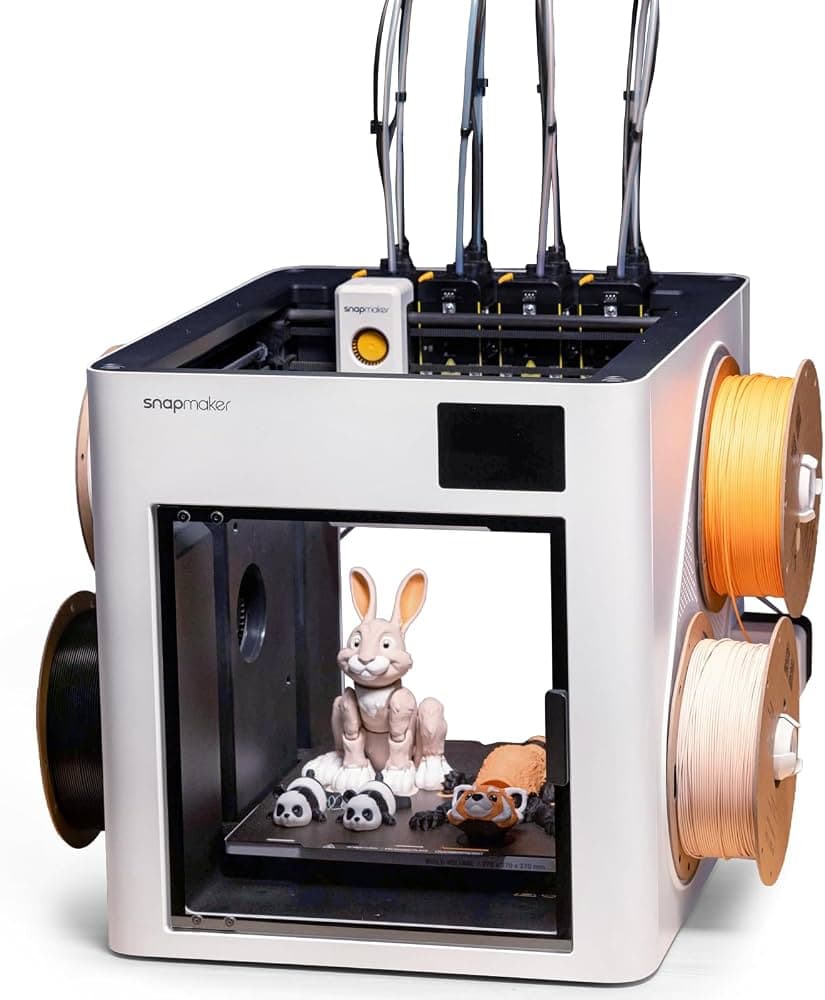
The Snapmaker U1 is interesting because it is not trying to be just another fast desktop printer. Its core pitch is a different workflow: four toolheads, five-second swaps, and a multicolor path that aims to cut the purge waste that makes AMS-style printing feel like a compromise.
What the U1 is really selling
Snapmaker frames the machine as a “Multi-Color 3D Printer with SnapSwap™,” and its campaign materials push the message even harder with the headline “5X More Speed. 5X Less Waste.” The feature list is blunt and easy to read: 4 toolheads, 5s toolhead swap, multi-material support, low waste, 500 mm/s speed, smart calibration, auto filament system, and app control.
That combination matters because most desktop multicolor systems force a trade-off between convenience and waste. A tool-changing design keeps materials separated instead of repeatedly flushing colors through one nozzle, which is why the U1 is being discussed as a cleaner answer for anyone tired of watching purge towers grow taller than the model itself.
Why toolhead swapping changes the daily workflow
The biggest practical win is not just color, it is control. Community discussions around the U1 keep returning to the same point: separate toolheads can reduce the filament waste that AMS-style multicolor systems create, and that makes the printer feel more practical for real hobby use rather than just demo parts.
That difference shows up in support material work too. Forum users have specifically pointed out that separate toolheads make PETG supports on PLA prints easier, and they also make water-soluble support filament more useful because the materials do not have to share the same extrusion path. For anyone printing functional parts, miniatures with tricky overhangs, or multi-part assemblies, that is a real workflow change, not just a spec-sheet flourish.
Speed still matters here, of course. Snapmaker is pushing 500 mm/s, but the important question is whether that speed arrives without turning multicolor printing into a messy post-processing job. The appeal of the U1 is that it tries to make fast printing and clean output feel like the same feature set, not two separate goals.
Where the launch landed in the market
The U1 arrived at a moment when buyers were already very sensitive to multicolor value. It was publicly positioned for Kickstarter in late August 2025, and Snapmaker’s own support FAQ tells users to click “Notify me on launch” on the Kickstarter pre-launch page to get the early-bird reward tier. That early-bird framing tells you what kind of audience the company was chasing: people willing to move quickly for a better price on a machine that promises a different workflow.
The launch pricing story has been unusually important. Fabbaloo reported the U1 launching at $679 on July 30, 2025, while other coverage placed pre-order pricing at $849. Later retail pricing moved again, with the official product page showing $899.00 USD with $999 crossed out and a 30-day price guarantee. That spread matters because the U1 is competing in a segment where buyers compare every dollar against Bambu Lab and Creality-style alternatives, then ask whether the extra workflow flexibility is actually worth it.
The campaign scale explains the attention
The reason the U1 kept showing up in community threads and review feeds is simple: it became a major crowdfunding event. BackerGuardian’s campaign analysis says the U1 raised $20,000,000 from about 12,000 backers, while a Kickstarter update later listed 20,680 backers pledging $20,614,548 as of March 24, 2026.
Snapmaker’s own 2025 recap called the year “defining” and referred to its “record breaking U1 Kickstarter.” That kind of momentum does more than sell machines, it creates a wider comparison point for the whole desktop multicolor category. Once a printer posts numbers like that, it stops being a niche launch and starts becoming the machine everyone else has to explain themselves against.
Who the U1 makes sense for
The U1 is easiest to understand if you already know your pain point. If you want cleaner multicolor printing, less waste, and a more direct path to mixed-material work, the toolhead-swapping approach solves a real problem better than AMS-based multicolor systems do. If you have ever avoided a color swap because you did not want to pay for the purge penalty, this is the machine trying to remove that excuse.
It is also clearly aimed at makers who are comparing it against Bambu Lab’s AMS-based printers and higher-end toolchanging systems like the Bambu H2D and H2C. The U1 is making the case that a desktop printer can be fast, official multicolor, and less wasteful without forcing you into a filament-drain workflow. That is a strong pitch for hobbyists and prosumers who care as much about the print queue as the finished part.
The trade-off is that the U1 is not the most boring possible choice, and that is part of the appeal. You are buying into a tool-changing system, Snapmaker’s calibration and app ecosystem, and a price that has moved around enough to reward close attention. But for anyone who has wanted multicolor printing to feel more like a normal part of the bench and less like a purge-tower ritual, that is exactly the point.
The U1’s real test is the one its first look already sets up: whether five-second tool swaps and low-waste multicolor output can make the machine feel less like a clever experiment and more like the printer you actually reach for.
This article was produced by Prism’s automated news system from verified source data, official records, and press releases, then run through automated quality and moderation checks before publishing. The system is built and supervised by the people who set the standards it runs under. Read our full AI policy.
Did this article answer your question?