Black Ops 6 controls guide helps players fine-tune sensitivity and aim
The quickest Black Ops 6 wins come from tuning sensitivity, dead zones, and layout so your aim tracks cleaner and close-range fights stop slipping away.
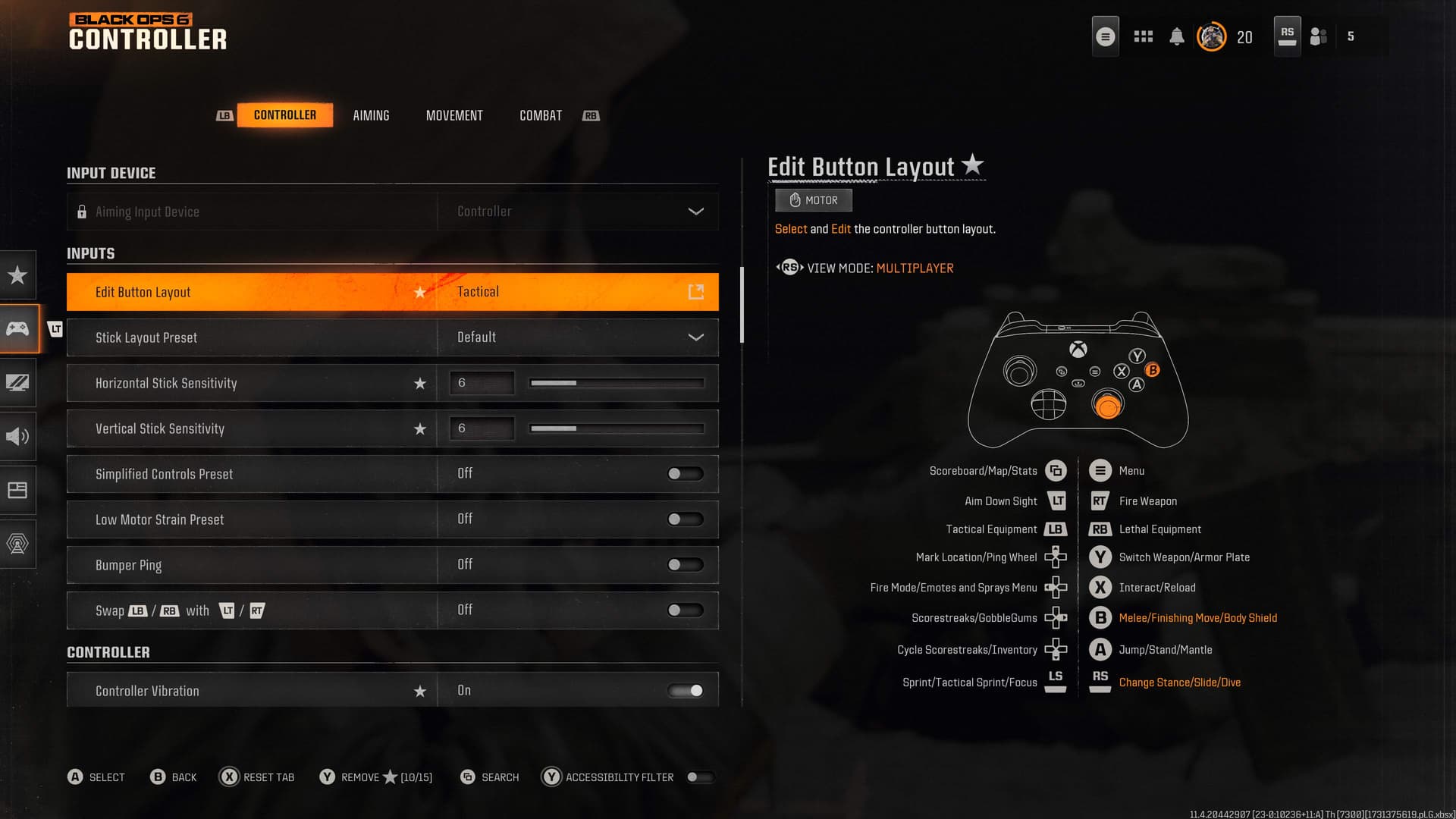
Black Ops 6 splits controls and movement into separate training pages. The fastest way to make the game feel better tonight is to stop treating controller settings like a menu tour and start tuning the inputs that actually decide gunfights.
Start with sensitivity, because it changes whether you over-aim or keep up
Sensitivity is the first setting that most players feel immediately, and it is the one that most often decides whether you miss because you are too slow or because you fly past the target. Call of Duty’s newer titles moved controller stick sensitivity from the old 1-20 scale to a 0.10-4.00 scale, which shows how much precision the series now expects players to use when tuning their aim.
The practical rule is simple: higher is not automatically better. If your reticle keeps snapping past the enemy in mid-range fights, your sensitivity is probably too hot for your hand speed. If you cannot turn quickly enough in close-range fights, especially when someone slides into your face or cuts behind cover, you may need to raise it a little rather than forcing yourself to play slow.
A smart starting point is to adjust sensitivity around the problem you are actually having. If tracking feels shaky, lower it until you can stay on target through a full strafe. If you keep losing fights because your turn speed cannot match the pace of the lobby, add just enough speed to stay competitive without turning every correction into an over-correction.
Dead zones are the difference between crisp input and drifting aim
Dead zones matter because they control how much stick movement the game ignores before it starts responding. Set them too low and you can get the classic stick-drift feeling, where the reticle moves on its own or your aim drifts even when you are trying to hold steady. Set them too high and the controls can feel delayed, which makes your crosshair feel like it is arriving late to every fight.
That makes dead zones one of the best fixes for players who describe their aim as floaty, slippery, or inconsistent. If your crosshair seems to lag before it wakes up, check the dead zone before you start blaming sensitivity. Trigger dead zones matter for the same reason, because they shape how quickly a trigger press becomes input and how much travel the game ignores before acting.
Response curves sit in the same family of settings. They shape how quickly your stick input translates into in-game motion, so they can either smooth out your aim or make it feel overly aggressive. If your tracking feels uneven, changing the response curve can be the difference between a clean follow and a reticle that jerks whenever you make a small correction.
Layout changes fix the fights where thumb movement costs you time
Button layout is not cosmetic, especially in a Call of Duty game built around constant aim adjustment, sliding, and quick repositioning. A Tactical layout lets you crouch or slide without taking your thumbs off the sticks, which keeps your aim active while you move. That matters in close-range fights, where the player who can keep aiming while dropping into cover or sliding past a lane usually gets the cleaner shot.
Call of Duty has been pushing this idea for years. Black Ops Cold War had official controls-and-settings guides on PlayStation, Xbox, and PC, and older Call of Duty HQ pages on Tactical versus Default Controls made the same practical point: if you can keep your thumbs on the sticks, you can keep adjusting your aim while moving. On PC, the same logic applies to mouse sensitivity and keybinds, where the goal is to cut wasted motion and keep your most-used actions close at hand.
Black Ops 6 treats controls and movement as core training, not extras
Black Ops 6’s October 2024 accessibility updates and new features show the same broader focus. Comfort, control, and physical input differences are part of the game’s design conversation.
If your hands get tired on the default layout, if you have stick drift, or if your movement just does not feel natural on a standard preset, the game gives you enough control to build around those issues instead of fighting them.
A quick tune-up for tonight’s matches
When your aim feels off, the fix usually lives in one of three places. If you are over-aiming, lower sensitivity before anything else. If your crosshair feels delayed or haunted by drift, check dead zones and trigger dead zones, then look at response curves if the motion still feels wrong.
- Sluggish tracking usually means your sensitivity is too low for the pace you are playing.
- Inconsistent close-range fights usually point to a layout problem, not just bad aim.
- Floaty aim usually means the stick settings are too loose, too high, or both.
This article was produced by Prism’s automated news system from verified source data, official records, and press releases, then run through automated quality and moderation checks before publishing. The system is built and supervised by the people who set the standards it runs under. Read our full AI policy.
Did this article answer your question?