Fusion Fix 5.0.0 overhauls GTA 4 PC with Vulkan, major fixes
Fusion Fix 5.0.0 is the rare GTA IV mod update that fixes stutter, cleans up visuals, and makes Liberty City feel playable on modern PCs.
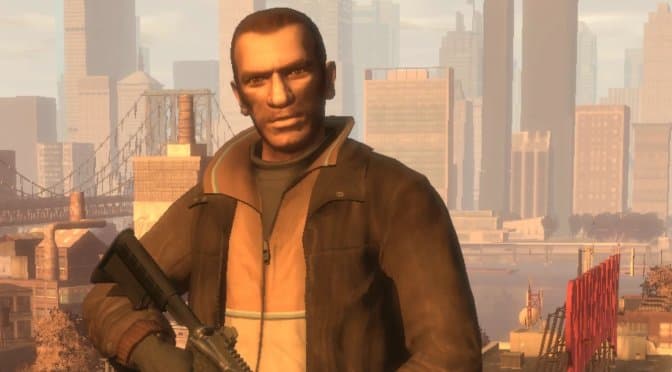
Why Fusion Fix 5.0.0 matters now
Grand Theft Auto IV is still the same 2008 game Rockstar shipped on April 29, 2008, but the PC version has never really stopped needing help. Fusion Fix 5.0.0 is the kind of update that reminds you why the mod has become a must-have foundation for the Complete Edition: it is not dressing up a broken port, it is repairing one. Rockstar’s own shift to Grand Theft Auto IV: The Complete Edition in 2020, plus the fact that disc owners can still be pushed through the Rockstar Games Launcher flow, makes the game feel officially alive even as the PC tech beneath it ages badly.
That is why this release lands differently. It does not just add eye candy. It tackles the stuff that makes people quit after 20 minutes, the stutter, the awkward mouse feel, the cutscenes that misbehave at higher frame rates, and the small UI and camera annoyances that have dogged Liberty City for years. In practical terms, Fusion Fix 5.0.0 is the closest thing GTA IV PC has to a true modern overhaul without pretending to be a remaster.
What 5.0.0 changes in real play
The biggest headline is Vulkan support through DXVK. That matters because DXVK can smooth over the classic PC-port stutter that so many players still associate with GTA IV, and that alone changes how the game feels from the first drive across Broker. Load times are improved too, and the mod continues to smooth out cutscenes at higher frame rates, which is exactly the kind of fix you notice the moment a mission intro stops looking broken.
The input and camera work are just as important. Fusion Fix reworks mouse input, adds always-run, vehicle indicators, smoother sniper controls, and a see-through map, all of which remove friction from routine play. It also gives you sliders for field of view, depth of field, and motion blur, so the game is no longer locked into the old one-size-fits-all presentation that never looked right on modern monitors.
A few quality-of-life changes sound small until you actually live with them for a few hours:
- Always-run keeps the pace up during mission traversal.
- Vehicle indicators make driving and pursuit handling clearer.
- Smoother sniper controls help missions that used to feel clumsy.
- A see-through map keeps the HUD from fighting the city view.
- FOV, DOF, and motion blur sliders let you tune the game instead of tolerating it.
The visual upgrade is bigger than a preset
This is where Fusion Fix 5.0.0 stops looking like a compatibility patch and starts looking like a restoration project. The release adds sun shafts, volumetric fog, improved draw distance, restored rain visibility, better water, softer particles, shinier vehicle reflections, working mirror reflections, glowing building lights, extended lighting reach, and Project2DFX for denser distant city lights. If you want Liberty City to feel like an expensive night drive instead of a murky console conversion, this is the version that gets closest.
The official release notes also add native ambient occlusion, plus new .ini options such as ReflectionMSAAQuality and EnablePreAlphaDepth. Those extra toggles matter because they give you control over how reflections and depth handling behave instead of forcing one fixed look. Fusion Fix’s own site also spells out some of the deeper corrections: it fixes z-fighting using an approach similar to the Xbox 360 version’s depth-buffer handling, rewrites depth of field so it scales properly up to 4K, separates depth of field from the game’s Definition setting, and makes motion blur independent from frame rate.

That combination is the real story. This is not just prettier weather and brighter lights. It is a cleaner rendering path for a game that was always fighting itself on PC.
Why the scripts and high-FPS fixes matter
The less glamorous part of the update may end up mattering just as much. The v5.0.0 release notes call out a scripts overhaul and fixes for high-FPS issues, which means the mod is not only handling visuals but also patching the logic layer that missions and animations depend on. That is the part that saves you from weird behavior where a game looks fine but falls apart when you push frame rates higher than the original code expected.
DSOGaming’s coverage of the update highlighted exactly that practical value, treating Fusion Fix 5.0.0 as a major technical upgrade rather than a cosmetic mod. John Papadopoulos’ write-up makes the same basic point every frustrated GTA IV PC player eventually reaches: once the technical foundation is fixed, the whole game opens up. The stutter eases, cutscenes behave better, controls feel less hostile, and Liberty City starts to resemble a polished modern classic instead of a port you keep around out of nostalgia.
Who should update immediately, and who should be careful
If you are on GTA IV: The Complete Edition and you want the cleanest, most stable, most flexible version of the game, Fusion Fix 5.0.0 is the install to make first. LibertyCity’s mod page is explicit that the mod supports the Complete Edition and that is the branch this whole ecosystem has settled on. It is also the right move if you care about the game’s basic playability on modern hardware, because DXVK, the input fixes, and the script cleanup all address issues that were never properly solved by official updates.
You should be more cautious if your setup already depends on other mods that touch the same systems. Anything that changes rendering, post-processing, scripts, camera behavior, or the input stack deserves a careful test, because Fusion Fix is not a tiny cosmetic add-on, it is a deep technical layer. The same goes for anyone still trying to hang onto an older pre-Complete Edition setup, because this is not the branch for that world anymore.
The verdict
Fusion Fix 5.0.0 is not hype. It is the rare GTA IV PC mod that earns the word essential because it fixes the things that make people stop playing. Vulkan support through DXVK, the high-FPS script work, the cleaned-up mouse input, the new ambient occlusion, and the broader visual pass together make Liberty City feel far closer to the game fans always wanted on PC.
If you have the Complete Edition, update now. If your stack is already heavily modded, treat it like a serious foundation change and rebuild carefully around it. Either way, Fusion Fix is no longer a nice extra for GTA IV. It is the version of the game that should have existed from the start.
This article was produced by Prism’s automated news system from verified source data, official records, and press releases, then run through automated quality and moderation checks before publishing. The system is built and supervised by the people who set the standards it runs under. Read our full AI policy.
Did this article answer your question?


