LCPDFR wiki guides GTA V modders through post-update fixes
When GTA V patches break your mods, the safest move is not panic. The LCPDFR wiki maps the recovery order: back up first, wait on core loaders, then restore in layers.
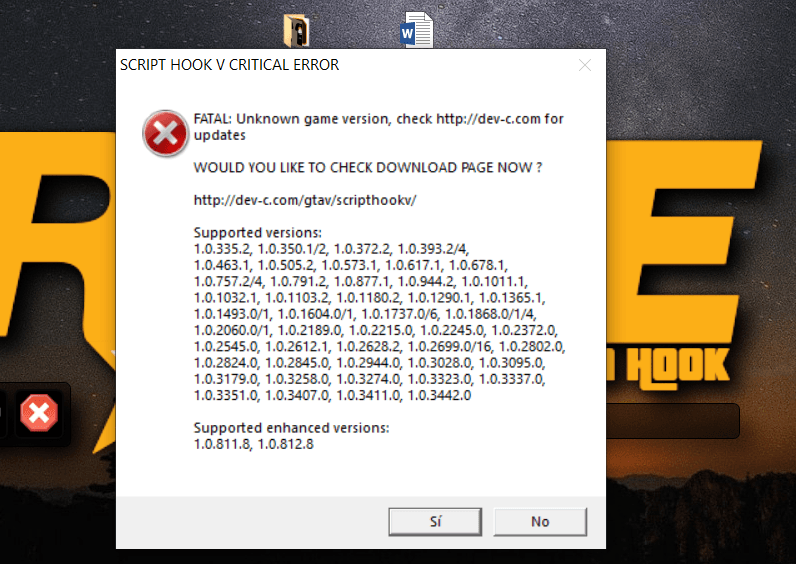
GTA V v3725.0 already had a ScriptHookV compatibility update available, and the LCPDFR wiki treats a dead launch as a compatibility problem, not a catastrophe. Script Hook V, LSPDFR, RAGE Plugin Hook, OpenIV-based add-ons, trainers, and other script-driven tools all depend on the same game version.
Treat the patch like a compatibility check
The key mistake after a title update is assuming every broken file needs fixing right away. Identify which parts of your setup actually depend on the current GTA V version, then check whether the core loader has been updated before you touch anything else. Rockstar keeps issuing GTA V title updates, so this is a recurring maintenance job, not a one-off headache.
Script Hook V sits at the center of that process. It is the library that lets custom .asi plugins use GTA V script native functions, and it includes the latest ASI Loader and Native Trainer. Because so many single-player mods rely on it, one Rockstar patch can knock out a big chunk of the modding stack at once.
The first 30 minutes: stop making the break worse
When a patch lands and plugins stop loading, the first move is not to reinstall the whole game or start swapping random files. Start with a backup, then move through GTA V, LSPDFR, RAGE Plugin Hook, and Script Hook V in a deliberate order. A modded install is easier to recover when you can roll back a clean copy instead of trying to repair a live one.
Use that first half hour to do four things:
- Back up your current install before you overwrite anything.
- Keep your modded setup isolated, using a mods folder or an equivalent split from the base game.
- Stop testing outdated scripts and add-ons until the core loader is confirmed compatible.
- Read the change log and patch notes before deciding whether to update now or wait.
A broken launch does not always mean the same thing. Sometimes the base game changed, while the plugin hook is still waiting for its own compatibility update. Sometimes the issue is an add-on layered on top of a stable foundation. If you keep pushing a mismatched setup, you make it harder to tell which layer failed first.
Know which tools usually fail first
The most fragile parts of a modded GTA V install are usually the ones tied directly to the game version. Script Hook V is the first checkpoint, because it underpins custom .asi plugins and includes the ASI Loader. If it is out of date, a lot of other scripts will look broken even if they are not the root problem.
For LSPDFR users, the stack is even more sensitive. The police-roleplay ecosystem can depend on the base game, Script Hook V, the plugin hook, the mod itself, and extra files such as gameconfig changes or vehicle packs. When one layer shifts, the others can fail in ways that seem unrelated, which is why a crash on startup might look like a vehicle pack problem when the real issue is an outdated hook.
Community advice keeps returning to the same names: wait for ScriptHookV, RAGE Plugin Hook, and LSPDFR compatibility updates before you rebuild the install from scratch. A December 10, 2025 community note made the same point plainly, telling players GTA V had been updated and asking them to wait for RAGE and Scripthook to update.
Restore in the right order
Once the core pieces are ready, rebuild the install in layers instead of dumping everything back in at once. A practical order is: back up first, update GTA V, update LSPDFR, update RAGEPluginHook and Script Hook V, then transfer the new update. That step-by-step flow keeps you from chasing secondary errors before the foundation is stable.
A safe restore usually looks like this:
1. Confirm that Script Hook V has a compatibility update for your GTA V version.
2. Bring GTA V up to the current title update only when you are ready to sync the rest of the stack.
3. Update LSPDFR and RAGE Plugin Hook next, since both sit close to the core launch path.
4. Add OpenIV-based files, trainers, scripts, and vehicle packs one at a time, testing between each change.
5. Leave any outdated add-ons out until you have a clean boot with the full core stack.
When to wait, when to roll back, and when you are safe
If Script Hook V has not been updated yet, waiting is usually the smart play. If you have a clean backup and need your old setup back quickly, rolling back is the safer move than force-fitting a fresh patch into a broken stack. The test is not whether one plugin loads. GTA V, LSPDFR, RAGE Plugin Hook, and Script Hook V all match the same version path, with the extra scripts reintroduced cleanly.
This article was produced by Prism’s automated news system from verified source data, official records, and press releases, then run through automated quality and moderation checks before publishing. The system is built and supervised by the people who set the standards it runs under. Read our full AI policy.
Did this article answer your question?