MaxTrafficSpeed mod makes GTA traffic drive at extreme speeds
MaxTrafficSpeed pushes Los Santos traffic into full-throttle chaos, with no keybind and a tiny install. It works best as a pursuit, crash, and filming sandbox, not a full traffic overhaul.
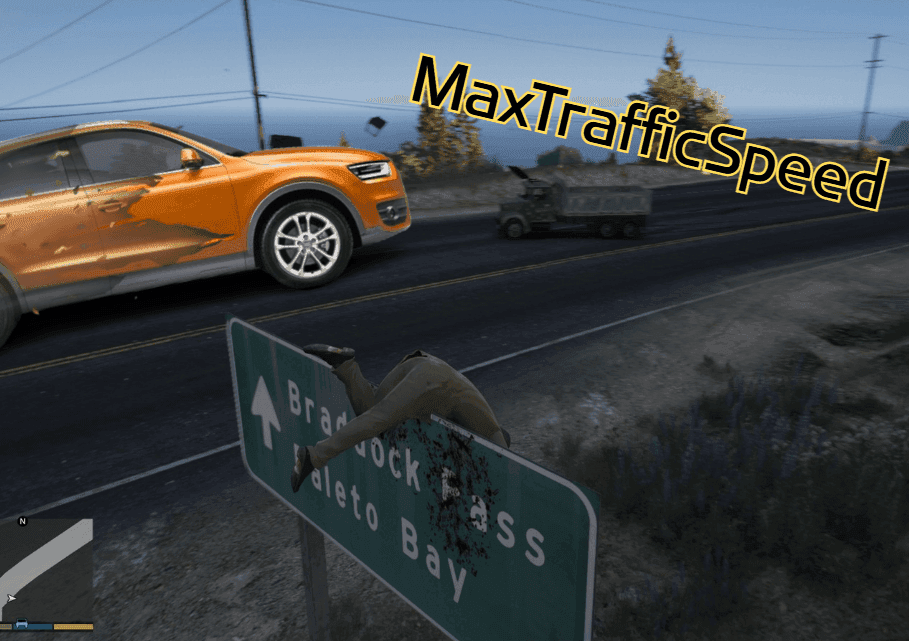
What MaxTrafficSpeed actually changes
MaxTrafficSpeed does one thing with almost no fuss: it makes AI-controlled traffic vehicles drive at extremely high speed automatically. The effect is immediate and obvious, because the usual Los Santos commuter rhythm disappears the moment the script loads and the road network starts behaving like a high-speed stress test.

That narrow focus is exactly why the mod stands out. It is not trying to replace the whole traffic system, add new vehicles, or rebuild the city’s driving logic from scratch. It takes the existing AI traffic and pushes it into a much more aggressive lane, which changes pursuit difficulty, crash frequency, and the feel of everyday driving in a way that is hard to ignore.
Why this is more than a one-joke download
At first glance, MaxTrafficSpeed sounds like a novelty. In practice, it is closer to a sandbox chaos modifier than a prank mod, because it changes how the entire city plays moment to moment. Police chases, civilian traffic flows, and intersection timing all become less predictable once nearby cars are moving at extreme speed.
That makes it useful in several clear scenarios. It works well for cinematic filming when you want rush and danger without scripting every car by hand, for stunt setups where faster traffic raises the stakes, and for traffic stress tests where you want to see how the game behaves under pressure. It can also be a legitimate challenge mod if your goal is to make ordinary driving and pursuit situations far more punishing.
Installation is deliberately simple
The setup is refreshingly small. You need Script Hook V and ScriptHookVDotNet 3, then you copy MaxTrafficSpeed.dll into the GTA V scripts folder. If the mod includes an INI file, that can be copied too for optional configuration.
That lightweight install matters because it keeps the mod easy to slot into an existing build. There is no key press required and no activation routine to remember, so once the script loads, traffic speed is boosted automatically. For players who prefer small scripted changes over huge vehicle packs or sprawling overhauls, that simplicity is part of the appeal.
What you need for it to work cleanly
MaxTrafficSpeed depends on the Script Hook V ecosystem, so the usual ScriptHookVDotNet setup rules still apply. Script Hook V, maintained by Alexander Blade through AB Software Development, is the library that lets custom .asi plugins use GTA V script native functions, and it does not work in GTA Online. That restriction is important, because entering multiplayer closes the game through the loader rather than letting the script continue.
ScriptHookVDotNet adds the .NET layer. Its current getting-started guidance calls for GTA V, Script Hook V, .NET Framework 4.8 or higher, and the Visual C++ Redistributable for Visual Studio 2019 x64. The wiki’s setup flow is straightforward: copy ScriptHookVDotNet.asi and the ScriptHookVDotNet2 and ScriptHookVDotNet3 DLLs into the GTA V game directory, then create a scripts folder for mods like MaxTrafficSpeed to live in.
Version matching matters more than most players expect
The biggest compatibility wrinkle is not MaxTrafficSpeed itself, but the exact GTA V build you are running. The ScriptHookVDotNet wiki says that until stable v3.7.0 is released, players on GTA V v1.0.3258.0 or later need v3.6.0-nightly.89 or later, or else they need to downgrade to v1.0.3179.0 or earlier. That means a script can be perfectly fine and still fail if the runtime and game build are out of sync.
For anyone keeping a heavily modded install, that is the part worth checking first. A tiny traffic mod can look like the problem when the real issue is a mismatched ScriptHookVDotNet build. In other words, MaxTrafficSpeed is easy to install, but it still lives inside the same version-sensitive chain that governs most GTA V script mods.
How it fits into GTA traffic modding
MaxTrafficSpeed belongs to a long-running GTA V modding tradition: changing not just what cars appear, but how they behave on the road. GTAMods documents vehicleaihandlinginfo.meta as the file that controls ped-driver behavior, and vehicles.meta as the file that defines vehicle properties. GTAForums has hosted years of discussion about realistic traffic behavior, traffic speed, and improved traffic density, which shows how central this kind of tuning has become.
That context matters because MaxTrafficSpeed is not isolated from the wider traffic ecosystem. Even though it is compact, it sits in a space where other mods may already be adjusting handling, density, or realism, and those projects often aim at the same driving feel from different angles. If you already use traffic behavior or realism mods, expect this one to push against them rather than quietly complement them.
What it is likely to disrupt
MaxTrafficSpeed is most likely to conflict with or overpower mods that also change traffic speed, lane behavior, or driver logic. Anything that edits vehicleaihandlinginfo.meta, vehicles.meta, or related traffic density and realism systems could be affected, because those mods are trying to shape the same on-road behavior from a different direction.
That does not automatically make it unstable, but it does mean you should treat it as a targeted override rather than a passive add-on. If your current build depends on believable city flow, slower traffic pacing, or hand-tuned vehicle behavior, MaxTrafficSpeed will cut across that design hard. If your goal is pure chaos, that is the point.
The bottom line
MaxTrafficSpeed is not a full traffic overhaul, and it is not pretending to be one. It is a sharp, focused modifier that turns ordinary AI road behavior into a high-speed hazard and can make Los Santos feel instantly more volatile. That makes it best understood as a cinematic chaos tool with real challenge value, not a disposable gag, and its tiny install, automatic activation, and version-sensitive runtime needs make it easy to evaluate as long as you know what it will disrupt before you drop it into a modded build.
This article was produced by Prism’s automated news system from verified source data, official records, and press releases, then run through automated quality and moderation checks before publishing. The system is built and supervised by the people who set the standards it runs under. Read our full AI policy.
Did this article answer your question?


