Dan Bowles builds Klorball35 split keyboard with integrated trackball
Dan Bowles’s Klorball35 packs a 35-key split and a trackball into one tight board. It is a niche fix for home-row reach, not a universal keyboard.
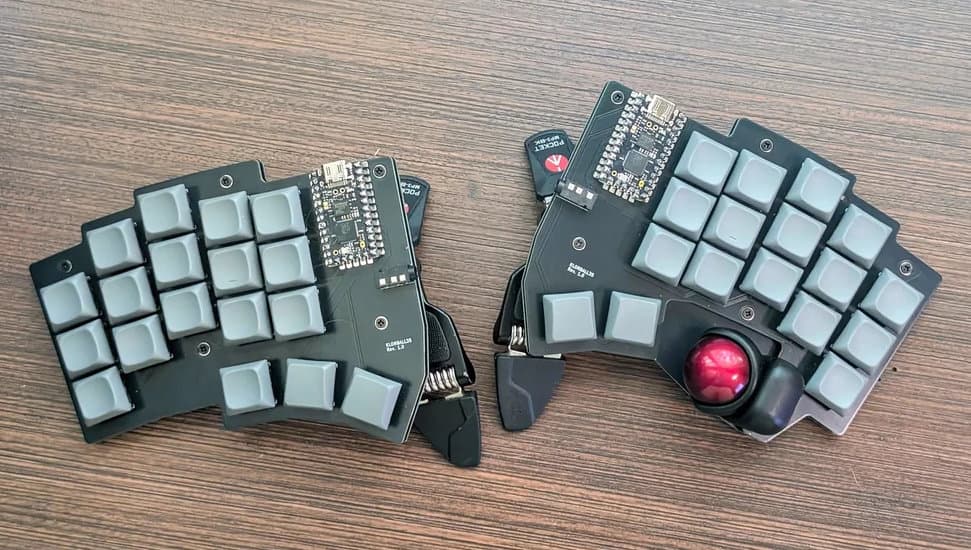
Dan Bowles’s Klorball35 is the kind of board that only makes sense once you have already felt the pain it is trying to solve. It is a 35-key, column-staggered, low-profile split with an integrated trackball, and that combination says everything: keep the hands close, keep the pointing device close, and stop making the user leave the home position for every little cursor move.
What Klorball35 is actually trying to fix
The appeal here is not novelty for its own sake. Klorball35 is built for the small but stubborn ergonomics problem that shows up on tiny splits: you save motion with the layout, then give some of it back every time you reach for a separate mouse. By putting a PMW3360 optical trackball inside a board that already favors compact, efficient hand placement, Bowles turns pointer control into part of the typing loop instead of a second task bolted on beside it.
That matters most for people who already know they like staggered columns, but still feel the friction of moving between keyboard and mouse. The integrated trackball also makes the board easier to imagine as a travel or laptop companion, because the pointing device travels with the keyboard instead of taking up another pocket in the bag. In other words, this is not a board for everyone. It is a very specific answer to the question of how to preserve comfort while shrinking the whole desk footprint.
The layout choices that make sense here
Klorball35 uses a 5x3+3/2 split layout with 35 keys and 18x17 mm spacing. That puts it firmly in the compact ergonomic camp, but the real story is the combination of column stagger and splay. Bowles wanted the board to be splayed, and that detail is doing serious work here: it helps the halves sit in a more natural angle instead of forcing a square, cramped hand posture.
The switch choice backs that up. Klorball35 returns to Choc V1 switches, which fits the low-profile brief and keeps the board in the lightweight, portable lane. If you like the feel and height of Choc boards, this is exactly the kind of build that benefits from them. If you prefer taller MX-style setups, the whole design starts to look less like a sweet spot and more like a compromise you would have to justify.
Why the trackball is the headline feature
The integrated trackball is the move that changes how the board is used. A 35-key split is already asking you to trust layers, chords, and careful placement; adding a trackball means you do not need to reach away just to nudge the pointer. That is the practical payoff. It keeps the hands centered, which is the whole reason many people go down the split-keyboard rabbit hole in the first place.
The choice of a PMW3360 optical sensor keeps the build in familiar enthusiast territory. That sensor is well known in the hobby for precise tracking, and it shows up again in related projects like Keyball39 and Kivipallur. Here, though, it is embedded in a tighter, lower-profile design, so the question is not whether the sensor works. The question is whether a trackball belongs on a board this small. For users who already live on layers and value movement reduction, the answer is obviously yes.
The build lineage matters
Klorball35 did not appear out of nowhere. Bowles started after seeing what Ergogen could do with Kivipallur, then extended that experimentation through a KLOR and later a Keyball39 kit. That lineage tells you the project is iterative, not speculative. It is a builder taking one idea, trimming it down, then rebalancing it around his own habits.
Kivipallur is the closest reference point in feel: a 38-key split ergo board with a 25 mm thumb trackball, hot-swap Choc V1 support, diodeless construction, and 0xCB Helios compatibility. Keyball39 pushes in a slightly different direction, with 39 keys, a five-column staggered layout, and a 34 mm trackball. Holykeebs describes Keyball39 as part of the Keyball family that uses the widely used PMW3360 sensor, and notes that the trackball is sold separately from the base kit.
That comparison makes Klorball35 easier to place. It is narrower than Kivipallur, more aggressively compact than Keyball39, and more committed to a low-profile splayed split than either. If those other boards are the broader templates, Klorball35 is the version that trims away everything not needed for Bowles’s preferred hand position.
The hardware and firmware choices are deliberately practical
Klorball35 is described as diodeless and uses Helios MCUs, specifically 0xCB Helios with RP2040. That matters because it keeps the design relatively clean for a project this small. Fewer parts, less clutter, and a layout that can stay focused on the geometry instead of the electrical overhead.
The rest of the spec sheet stays nicely in the same lane: TRRS connection, QMK and ZMK firmware support, and LDSA keycaps. Those details point to a board that is meant to be actually built and used, not just admired as a one-off concept. QMK gives you the familiar custom keyboard path, while ZMK opens the door to a more wireless-minded, modern firmware stack if you want to take the project in that direction.
Who this board is for, and who should pass
Klorball35 makes sense if you already know the value of a small split and want to collapse pointer control into the same footprint. It also makes sense if you are comfortable living with layers, if Choc V1 is already your preferred switch family, and if you want a board that can travel without asking for a separate mouse. The splay, the low profile, and the trackball all point toward a user who cares more about efficient motion than about a conventional typing feel.
It is less compelling if you want a board that feels plug-and-play, or if you do not want to source around an uncommon layout. Specialized builds like this always ask for more from the builder: more learning, more parts hunting, and more time spent getting comfortable with a layout that is not trying to be universal. That is the trade-off, and Klorball35 does not pretend otherwise.
The maker behind it
Dan Bowles, who also goes by longwave, is not approaching this like a pure concept artist. His GitHub profile lists him as a software developer, LEGO model builder, and photographer living in Burlington, Vermont, which is exactly the sort of mixed maker background that tends to produce sensible keyboard experiments instead of empty flexes. That combination of software, building, and visual design shows up in the board itself: compact, deliberate, and tuned for a specific use case.
Klorball35 is not the keyboard you buy because you want the biggest feature list. It is the one you build because you are trying to stop wasting motion. Once you understand that, the unusual layout stops looking eccentric and starts looking like the most honest part of the design.
This article was produced by Prism’s automated news system from verified source data, official records, and press releases, then run through automated quality and moderation checks before publishing. The system is built and supervised by the people who set the standards it runs under. Read our full AI policy.
Did this article answer your question?