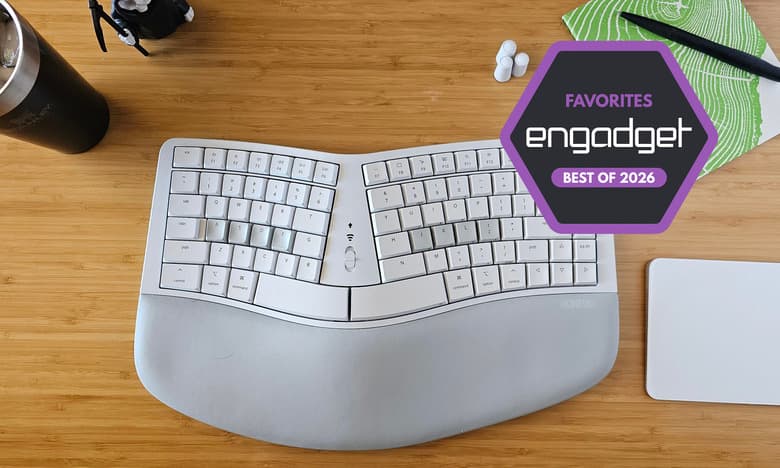
Engadget updates 2026 ergonomic keyboard guide, spotlighting split and Alice layouts
Engadget’s refreshed ergonomic keyboard guide turns layout into a real comfort choice, not just a spec-sheet debate, with split and Alice boards leading the practical conversation.
Why this update matters
Engadget’s updated ergonomic-keyboard guide puts the right question front and center: what actually changes after a full day at the desk. The answer is not just softer keypresses or extra features, but less wrist bend, less shoulder tension, and less reaching, which is why layout decisions matter so much once you move past a standard row-staggered board.
That framing fits the way mechanical keyboard fans already shop. Split, Alice, mechanical ergonomic, and ortholinear designs are the categories that keep coming up when comfort starts to matter more than RGB or a gaming badge. Engadget’s guide treats those options as real tradeoffs, which is useful because ergonomics is not a one-size-fits-all upgrade.
Split keyboards are the clearest comfort move
Split boards remain the most direct answer if your priority is reducing strain. A CDC and NIOSH-cited study of 90 experienced office workers found that, when set up correctly, split keyboards reduced mean ulnar deviation to within about 5 degrees of neutral. Another CDC and NIOSH summary reported that a conventional keyboard typically required about 10 degrees of ulnar deviation, while split fixed-angle and adjustable-angle boards maintained neutral wrist posture.
That matters because the physical benefit is not abstract. When each half can sit at shoulder width, your hands no longer have to collapse inward to meet a fixed keyboard shell. Add tenting or a concave keywell and the board can push your hands toward a more natural position, which is exactly why split layouts keep showing up in serious ergonomic discussions.
OSHA backs up that logic in plain workstation terms. It says proper keyboard selection and placement can reduce awkward postures, repetition, and contact stress, and it recommends placing the keyboard directly in front of you with shoulders relaxed and elbows close to the body. If your current board forces your arms to angle inward or your shoulders to hunch, split is the layout category most likely to change the way your desk feels by the end of the day.
Alice layouts hit the middle ground
Alice-style keyboards are the compromise position in this whole debate. They keep a familiar staggered typing experience, but they separate the left and right hand paths enough to ease strain for many users without asking for the full retraining split boards demand.
That middle ground is why Alice layouts are so appealing to people who want ergonomic benefits without giving up too much muscle memory. You still get a more familiar typing surface than with more radical layouts, but the board geometry is less rigid than a standard full-size or tenkeyless shell. For many desks, that is the sweet spot: better comfort and a smaller adaptation curve.
The limitation is also clear. Alice boards are not as aggressive about alignment as true split designs, so if wrist posture or shoulder tension is your main complaint, they may only partially solve the problem. They are best understood as a step toward ergonomic typing, not the final destination for every setup.
Ortholinear boards ask for commitment
Ortholinear keyboards take a very different route. Das Keyboard describes them as a compact but fully functional layout with equally sized keys arranged in a uniform grid, which is part of the appeal for people who like consistency and cleaner spacing across the board.
That consistency is also why ortholinear boards pair well with layers and programmable firmware. If you are already comfortable remapping keys, using layers, or living in a more customized keyboard ecosystem, the layout can feel efficient and deliberate rather than odd. The grid makes every row feel the same, which can be satisfying if you like systems that reduce visual and spatial clutter.
But ortholinear remains a niche choice for a reason. How-To Geek notes that these boards are still relatively uncommon and often tied to DIY or enthusiast builds, and their ergonomic value is still debated because comfort gains vary from user to user. Some people love the compact uniformity; others find the learning curve outweighs the benefit. If your priority is immediate comfort rather than experimentation, ortholinear is usually the least forgiving of the three major layout families here.
The long history behind the layout debate
This discussion is older than the current crop of enthusiast boards. An ergonomic-keyboard overview traces split-keyboard concepts back to a 1926 study by Klockenberg, with later work by Kroemer in 1972 suggesting that adjustable split designs could reduce pain.
That history matters because it shows these layouts were not invented for boutique keyboard culture. The design goal has stayed consistent for decades: keep forearms parallel and wrists straight instead of forcing shoulder elevation and wrist deviation. The modern mechanical keyboard scene has just given people more ways to experiment with that idea, from fixed split boards to tented, adjustable, and programmable builds.
How to choose based on your desk life
If your day involves long typing sessions, the first decision is not switch type or case material. It is how much your current board makes you twist, reach, and hold tension. If comfort is the main problem, split remains the strongest play because it directly addresses wrist angle and shoulder width. If you want something easier to adopt, Alice gives you part of the benefit with less retraining. If you care most about compactness, layers, and a tight, uniform key field, ortholinear is the most specialized option.
A practical way to think about it:
- Choose split if your wrists flare outward, your shoulders feel crowded, or you already know you want a more neutral desk posture.
- Choose Alice if you want a familiar typing feel but still want to reduce strain.
- Choose ortholinear if you value symmetry, programmability, and compactness more than a conventional typing shape.
Engadget’s guide is useful because it does not pretend these categories solve the same problem in the same way. The real question is not which layout is “best” in the abstract, but which one fits the way you type, where your keyboard sits, and how much adaptation you are willing to absorb. For mechanical keyboard fans moving into ergonomics, that is the difference between buying another board and actually improving the way the desk feels every day.
This article was produced by Prism’s automated news system from verified source data, official records, and press releases, then run through automated quality and moderation checks before publishing. The system is built and supervised by the people who set the standards it runs under. Read our full AI policy.
Did this article answer your question?