Keychron explains Launcher setup and firmware flashing for B-Pro keyboards
Keychron’s B-Pro support page shows the real product is software too: a browser Launcher for setup, plus manual firmware flashing when recovery gets messy. The catch is knowing when not to flash at all.
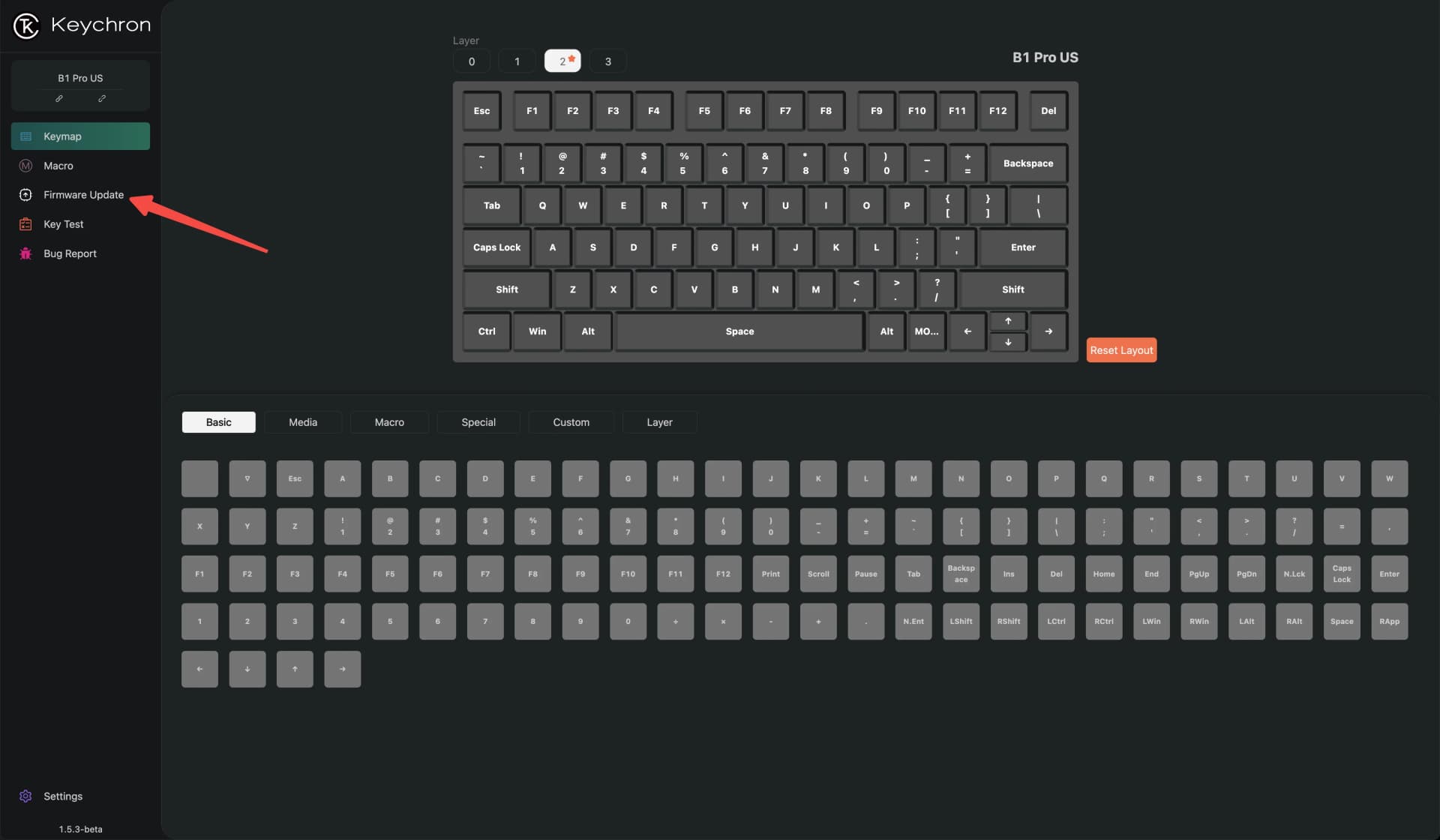
On July 4, 2025, Keychron published a help article titled “My keyboard is not recognized by Keychron Launcher, what should I do,” with fixes that start at the basics: use the latest Chrome, Edge, or Opera browser version and make sure the keyboard is in a wired connection. For a B-Pro buyer, the biggest question is simple: does Keychron make setup easier than the usual enthusiast hassle, or just move the hassle into a browser tab?
Launcher first, firmware second
Keychron’s Launcher pitch is straightforward. It offers “endless possibilities for key remapping, macros, shortcuts, and more,” and the browser-based tool supports Windows, macOS, Linux, and more. It puts the basic customization workflow into a place that does not depend on one desktop app surviving every operating system quirk or update.
The catch is that Keychron is not treating Launcher as the only path. Its support documentation also includes a separate article for flashing firmware with QMK Toolbox, a more direct recovery route. That split is sensible, but it also means the buyer has to know which lane to use before a problem turns into a panic session at the desk.
Why the browser workflow changes the buying equation
The browser-first approach lowers friction for the average owner. If you bounce between Windows at work, macOS at home, and maybe Linux on a daily driver, a web app is far easier to live with than installing a separate launcher on every machine. Launcher works with a cable or a 2.4G receiver, which makes the setup feel closer to a modern device workflow than an old-school driver install.
Firmware and web-based launchers are where layers, macros, shortcuts, and lighting behavior usually live, so the software workflow becomes part of the feature set you are actually paying for.
What can still go wrong
Keychron’s own support center makes clear that Launcher is not always plug-and-play. The browser route still depends on basics like cable quality and browser compatibility.
Keychron Singapore takes the recovery mindset even further. If something is off, it tells users to try a factory reset first. Keychron New Zealand and Keychron Singapore both publish similar Launcher and factory-reset firmware instructions, which suggests Keychron is standardizing the recovery story across regions rather than leaving owners to piece it together from scattered forum posts.
The real warning is the one buried in Keychron’s support center: do not flash firmware if everything works fine, because there is a chance it can damage the keyboard. If your B-Pro is behaving, leave the firmware alone.
Manual flashing is the escape hatch, not the default
That warning makes the manual route feel less like a feature and more like a recovery tool. QMK Toolbox exists for exactly that kind of job, whether you are fixing odd behavior, recovering a board that is not responding properly, or trying to get a stubborn keyboard back into a known state. It is there for the moment the web app stops being enough.
The manual path matters because a good configuration system also needs a way out. Web tools are great until a bad setting, bad cable, or bad firmware leaves you with a board that will not cooperate. At that point, a direct flash path is what separates a manageable problem from a dead-looking keyboard sitting on the desk.
How Keychron fits into the wider enthusiast stack
Keychron’s approach makes more sense when you put it next to VIA and QMK. VIA calls itself “your keyboard’s best friend,” says it is compatible with 1400+ keyboards, and positions itself as a place to configure, test, and design in one spot. QMK Configurator is the online tool used to create firmware files for keyboards supported in qmk_firmware. Those two names define the expectation now: keyboard software should be accessible, web-based when possible, and not locked behind one operating system.
Keychron Launcher slots into that same ecosystem logic, but with the company owning the whole path for its own boards. That can be an advantage because the instructions are built around the hardware you actually bought, not a generic workflow. It also means the quality of the support pages becomes part of the product review, because the keyboard’s after-sale usability depends on whether the software stack is understandable under pressure.
There is also a community signal in the mix. A Reddit post in the search results shows users being pointed by support toward the Launcher site for configuration, which fits the broader picture: owners are reaching for official browser tools first, then falling back to recovery pages when setup gets weird.
What B-Pro buyers should take from it
The browser Launcher is the easy lane, the QMK Toolbox path is the recovery lane, and the factory reset advice sits between them as a basic first move when the board starts acting up.
This article was produced by Prism’s automated news system from verified source data, official records, and press releases, then run through automated quality and moderation checks before publishing. The system is built and supervised by the people who set the standards it runs under. Read our full AI policy.
Did this article answer your question?