RTINGS explains why keyboard sound depends on the whole board
RTINGS’ rule is simple: the same switches can sound wildly different once the case, plate, foam, and stabilizers enter the mix. A 5 dBA gap is noticeable, so the whole board matters.

Under 50 dBA counts as a good typing-noise result in RTINGS' keyboard tests. Sound depends on the switches, stabilizers, keycaps, case material, plate material, mounting system, and any sound-dampening material inside the board. That is why two boards with the same switch can end up sounding nothing alike, and why a keyboard that looks tame on a spec sheet can still land as clacky, thocky, or muted once you start typing.
How to hear the board before you buy
RTINGS measures keyboard noise in average loudness using dBA. The difference between two boards is not just a matter of taste: in RTINGS' testing, a 5 dBA gap is noticeable. Once you know that, the usual “this switch sounds nicer” debate gets a lot more concrete, because you can start thinking in terms of actual noise output instead of marketing adjectives.
Typing noise sits alongside keystrokes, typing experience, and latency, which is the right framework if you care about office use, gaming, comfort, and feel at the same time. A quiet board is not automatically a better board, but if you share a room, sit in calls, or just hate hearing every stroke through thin case walls, sound is part of the buying decision, not a side effect.
Start with the switches, because that is where most of the noise begins
Most keyboard noise comes from the switches themselves, which is exactly why switch choice is the first thing to look at when you are trying to predict a board’s voice. Near-silent switches are one of the newer noise-reduction trends, and they are the obvious move if the goal is to keep typing noise low without redesigning the rest of the board. If you want a louder, sharper board, a more resonant switch can push you in the opposite direction before you ever touch foam or lube.
But the useful part of this framework is that it refuses to stop there. Mechanical keyboards are not loud by definition. A board can use the same switches and still sound different because the case material, plate material, dampening treatments, and even switch or stabilizer lubrication change how the sound travels and how much of it reaches your desk and ears.
That is the practical takeaway for prediction: if you already know a switch is known for a bright, sharp downstroke, expect a board to read more clacky unless the rest of the build is actively pushing back on that sound. If the switch is already soft and the rest of the board is built to absorb vibration, you are much closer to muted territory.
Big keys are where cheap tuning pays off first
If the board sounds ugly on spacebar, enter, shift, or backspace, stabilizers are usually the first suspect. Stabilizers are one of the key variables, and the Keychron Q6 Ultra 8K shows why that matters in practice: the board uses improved pre-lubed stabilizers, along with a double gasket-mounted design and multiple layers of sound-dampening material, to create a softer typing feel and quieter operation. That is a classic enthusiast recipe because it attacks the rattly, hollow stuff that makes a board feel unfinished.
This is where the upgrade order gets practical. If your board is already in hand, stabilizer tuning usually gives you the biggest improvement per dollar after switches. The goal is not to make every key identical, because the long keys will always have their own character. The goal is to kill the obvious rattle and wobble that makes a board sound cheap, even when the main switches are solid.
Lubrication matters here too. Switch or stabilizer lubrication can change the result, and that detail is easy to underestimate. A little lube will not turn a bright board into a pillow, but it can clean up the scratch, ping, and tick that stand out when the rest of the acoustics are already fairly controlled.
Case, plate, mount, and foam decide whether the board rings or settles
Once the switch and stabilizers are under control, the rest of the board decides whether the sound blooms, echoes, or gets swallowed. Case material, plate material, mounting system, and internal sound-dampening material are major contributors, and that is the whole reason two boards with identical switches can sound like different machines. A rigid case and plate tend to let more energy bounce around; a more isolated mounting system and damping layers usually soften the note and trim the hollow stuff.
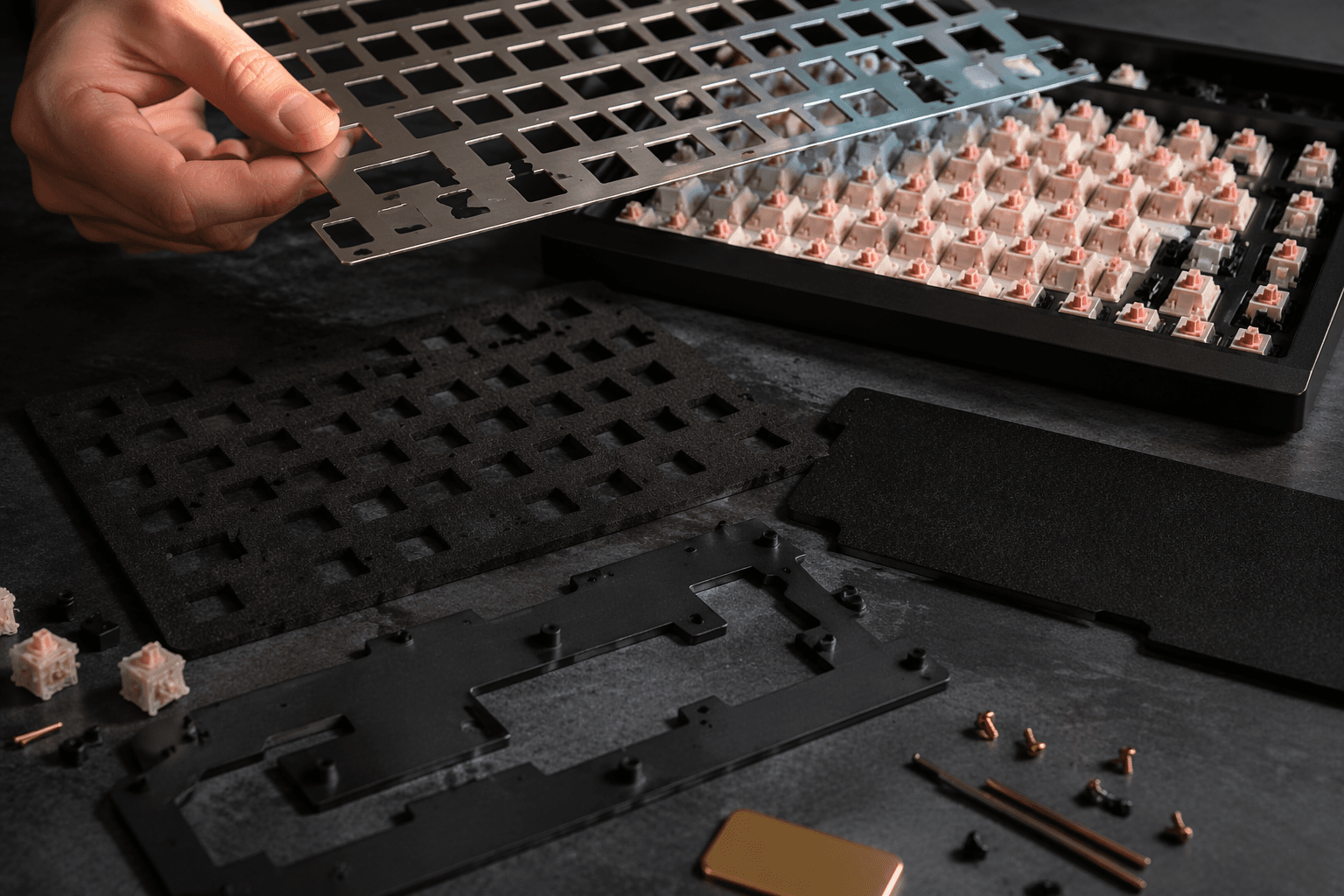
The Keychron Q6 Ultra 8K is a good modern example because it stacks multiple acoustic choices instead of relying on one magic part. The double gasket-mounted design is there to decouple the typing feel from the shell, and the sound-dampening layers help suppress resonance inside the case. Put that together with pre-lubed stabilizers and you get a board that is being tuned like an instrument, not assembled like a generic office peripheral.
This is also where the common sound labels become useful. A board that is stiff, reflective, and lightly damped is more likely to come across as clacky or pingy. A board with more isolation, damping, and softer stabilizer behavior will usually land in thocky or muted territory.
Why mechanical does not automatically mean loud
Mechanical and membrane keyboards register keystrokes differently, and they come with different trade-offs, but the sound result still depends on the whole build. That means a mechanical board can be tuned down, and a membrane board can still have its own audible personality depending on construction and force profile.
The historical context makes that easier to understand. IBM’s Selectric typewriter used a buckling-spring mechanism in 1961, and that spring created audible tactile feedback by buckling and striking a contact. IBM’s Model M keyboard family followed in 1985, and that lineage still matters because buckling spring remains one of the most recognizable loud, tactile sounds in computing.
The upgrade order that saves the most money
If you are trying to improve a board you already own, the smartest order is simple. Start with the switches if you need a bigger shift in sound profile, then clean up the stabilizers, then think about keycaps, and only then move into the more structural stuff like plate, case, mount, and internal damping. The switches matter most, but the rest of the board can still move the result enough to be obvious.
Here is the rough rule of thumb when you want to predict a board’s voice before you spend money:
- Want quieter and more muted: look for near-silent switches, a gasket or similarly isolated mount, pre-lubed stabilizers, and internal damping.
- Want clacky and lively: expect a more rigid case, a firmer plate, less damping, and a switch that already has a sharper top-end.
- Want thocky without chasing hype: prioritize cleaner stabilizers, a softer mounting system, and a case that does not ring.
The desk under the board matters too, because a hard surface will throw more noise back at you than a softer mat or a more forgiving setup.
This article was produced by Prism’s automated news system from verified source data, official records, and press releases, then run through automated quality and moderation checks before publishing. The system is built and supervised by the people who set the standards it runs under. Read our full AI policy.
Did this article answer your question?