Tofu Dactyl pairs Dactyl ergonomics with a minimalist split design
Tofu Dactyl turns Dactyl ergonomics into a cleaner, boxier split that feels less intimidating to build. Its two variants trade soldering, hotswap, and keywell aggressiveness for different comfort and complexity levels.
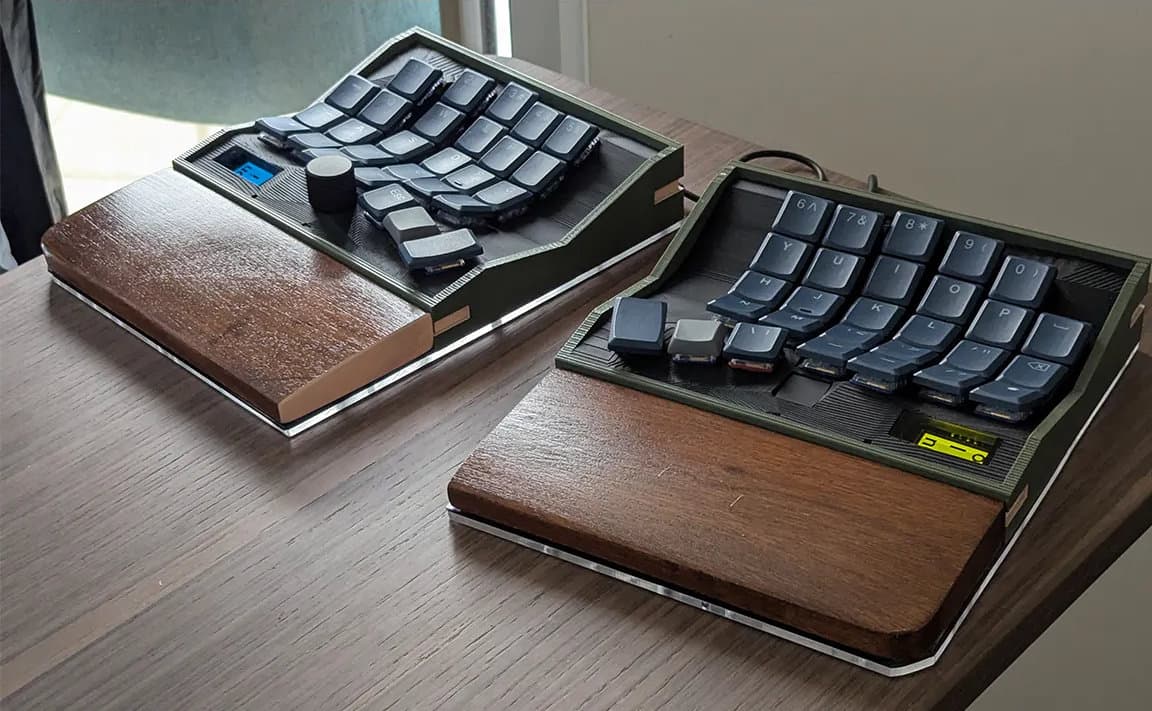
To Tofu Dactyl turns Dactyl ergonomics into a cleaner, boxier split that feels less intimidating to build. Its two variants trade soldering, hotswap, and keywell aggressiveness for different comfort and complexity levels.
A familiar shell around an unfamiliar shape
Tofu Dactyl is the sort of project that makes an ergonomic split look like a custom board first and a science experiment second. The design shared by yanos626 is a pair of 3D-printed split keyboard variants that keep the Dactyl-style keywells at the center, but wrap them in a minimal, boxy case language inspired by KBDfans’ Tofu65 and Qi65.
That change matters immediately at the bench and on the desk. The organic, almost sculptural curves that define many Dactyl builds can look daunting before the first print ever starts. Tofu Dactyl softens that barrier with a more architectural outer shell, which can make the project feel easier to imagine, easier to finish, and easier to live with in a normal desktop setup.
What the two builds actually change
The project does not present one fixed answer to ergonomics. It offers two distinct builds, and the differences are practical rather than cosmetic. The green version uses MX-spaced Choc switches, soldered mounting, and a more aggressive keywell curve. The purple version switches to Choc-spaced Choc switches, adds hotswap sockets, and relaxes the curve into a subtler posture.
That split in approach gives builders a real decision point. If you want the more dramatic concavity and do not mind committing to soldering, the green board pushes further into the classic Dactyl idea of a hand-shaped typing cradle. If you want something a little less extreme, the purple version lowers the barrier with hotswap sockets and a softer curve that still keeps the split ergonomic core intact.
The choice also changes the build experience. Soldered mounting rewards builders who want a permanent, tuned-in board. Hotswap sockets appeal to people who prefer experimentation and want to swap switches without committing the whole build to one setup. In other words, Tofu Dactyl is not just offering two colorways; it is offering two levels of involvement.
Why the boxier case makes the ergonomics feel more approachable
The most interesting part of Tofu Dactyl is not just that it is split, and not just that it uses keywells. It is the way the shell reframes those features. A Dactyl can be deeply comfortable, but it often looks like a deeply specialized object. Tofu Dactyl borrows the visual discipline of KBDfans’ TOFU family, which the company describes as minimalist and architectural, to make that ergonomic core feel less alien.
That is useful for real builders in a few ways. A more rectilinear case can be easier to print cleanly than heavily organic surfaces. It can also be simpler to finish and less visually noisy on a desk, especially if you want an ergonomic keyboard that still sits comfortably among other custom boards. The result is a split keyboard that can read like a premium custom build instead of a prototype from a lab.
The shape also affects how the board fits into daily use. A split layout gives room for adjustable thumb clusters and reduced finger travel, two traits that matter when the goal is to type for long sessions without constantly reaching or twisting. The Dactyl-style keywell keeps the hands angled into a more natural typing arc, while the boxier outer profile keeps the whole project from looking overly experimental.
The CAD workflow is part of the appeal
Tofu Dactyl was made with the Cosmos generator and Fusion 360, and that combination says a lot about how the modern ergonomic keyboard scene works. Cosmos is designed to build keyboards around a hand scan, with options to incorporate trackballs, trackpads, encoders, and OLED displays. That makes it part ergonomics tool, part layout engine, and part playground for builder-specific features.
For hobbyists, that matters because the process is no longer just about copying an old split shell. It is about fitting a keyboard to a hand, then deciding how much extra functionality belongs on the board itself. Fusion 360 adds the familiar parametric CAD layer on top, which makes the project feel grounded in a workflow many custom-keyboard builders already understand.
Where Tofu Dactyl sits in the Dactyl family tree
The original Dactyl is a parameterized, split-hand, concave, columnar ergonomic keyboard, and its files and build instructions have been openly available on GitHub for years. The repository’s early work dates back about 11 years, which helps explain why the design has had time to branch into a whole ecosystem of forks and descendants.
One of the best-known descendants is Dactyl-ManuForm, which adapts the thumb cluster from ManuForm. That lineage matters here because Tofu Dactyl is not inventing a new ergonomic language from scratch. It is taking an established one and translating it into a cleaner visual dialect, which is exactly the kind of move that keeps open hardware communities fresh without abandoning their roots.
Why the ergonomics argument still holds
There is a reason split keyboards keep attracting serious builders. Ergonomics literature tied to CDC and NIOSH work has long pointed to the way split geometry can influence wrist and forearm posture. More specifically, published research on split keyboards found that opening angle and separation distance affect wrist ulnar deviation and typing efficiency.
That puts Tofu Dactyl in a useful middle ground. It preserves the core ergonomic logic of a split, lets builders choose how aggressive the keywell should feel, and gives enough visual restraint to make the board easier to adopt than a heavily organic Dactyl clone. For someone deciding between a conventional Dactyl and a standard split, that is the real pitch: you get the posture benefits and the custom feel, but in a form that looks more like a keyboard you already know how to welcome onto your desk.
Tofu Dactyl works because it removes one of the biggest psychological hurdles in ergonomic building without removing the ergonomic idea itself. The keywells are still there, the split is still there, and the posture-first logic is still there, but the boxy shell makes the whole thing feel like a deliberate custom keyboard rather than a leap into the unknown.
This article was produced by Prism’s automated news system from verified source data, official records, and press releases, then run through automated quality and moderation checks before publishing. The system is built and supervised by the people who set the standards it runs under. Read our full AI policy.
Did this article answer your question?