Meshtastic adds Signal Meter guide, explains why negative SNR can be normal
Negative SNR is not a failure flag. Meshtastic's new Signal Meter guide shows Apple users how to stop blaming the wrong reading and troubleshoot the actual link.
Why the wrong reading wastes the most time
A weak-looking number can send an operator down the wrong path fast. Meshtastic’s new Signal Meter deep-dive for Apple clients is built to stop that habit by showing that negative SNR is often normal on LoRa, and that RSSI alone never tells the full story. The practical win is simple: if you read the meter correctly, you stop swapping antennas, moving nodes, and second-guessing healthy links for no reason.
What the Apple-side guide is actually for
Meshtastic-Apple is the client family for iOS, iPadOS, macOS, visionOS, and watchOS, built as SwiftUI apps for those platforms. That matters because the new documentation is aimed squarely at the moment users are pairing radios, checking links, and deciding whether a node is underperforming or just reporting an unfriendly-looking number. The Signal Meter page is a deep dive into how the LoRa signal quality meter works, and it gives Apple users a cleaner way to interpret what they are seeing on screen.
That is a real upgrade for day-to-day mesh use. In a network where range, antenna placement, and node location can all change what the radio reports, a readable signal meter is less about polish and more about making the mesh intelligible.
Stop treating RSSI like a verdict
The core mistake is reading RSSI and SNR as if they are the same thing. They are not. Meshtastic’s glossary defines SNR, or signal-to-noise ratio, as a measure of the desired signal compared with background noise, and its overview says higher SNR means a cleaner signal. RSSI, by contrast, is received signal strength in dBm, so higher RSSI means a stronger signal, but not necessarily a better one.
Meshtastic’s overview makes the key point clearly: RX SNR and RX RSSI together show both how the packet moved through the network and what the radio conditions were when it was received. That is the mental model this guide reinforces. RSSI tells you strength; SNR tells you how well that signal stands out from the noise floor. If you chase only one number, you can miss what is actually happening on the air.
Negative SNR is where many people get misled. On paper, a negative number looks bad. In LoRa, it can still be perfectly usable, which is why the new Apple documentation makes a point of explaining that negative SNR values are not automatically a sign that something is broken. The field reality is more nuanced than a simple good or bad label.
What the issue tracker already showed users
This problem did not appear out of nowhere. A September 13, 2024 GitHub issue reported that the Apple node UI showed “signal good” even when RSSI was unavailable or zero. In that thread, a Meshtastic Apple maintainer said RSSI is not always stored and that the code should ignore missing RSSI values. The same issue also notes that when RSSI is absent, users may only see SNR.
That detail explains why the Signal Meter page matters. If the interface is willing to declare the link “good” or “bad” while the radio is only surfacing part of the story, operators need a better framework than a single color or label. The discussion involving garthvh, powersjcb, and RicInNewMexico shows that the gap between raw radio data and user-facing interpretation was already being felt in the field.
A related Meshtastic design issue on signal meter behavior had already been active by September 2, 2024. Taken together, those threads show that the page is not a cosmetic documentation update. It is a response to a long-running problem of signal readability in the Apple clients.
How to use the meter without chasing the wrong problem
The practical lesson is to interpret the meter as a diagnostic pair, not a score. A low RSSI with workable SNR may still mean the link is fine. A decent RSSI with poor SNR can point to noise, interference, or a marginal path that only looks strong because the signal power is still present.
A better troubleshooting flow looks like this:
- Check both RX SNR and RX RSSI before deciding a link is bad.
- Treat missing RSSI as missing data, not proof of failure.
- Pay attention to whether only SNR is visible on the screen.
- Compare nodes in the same conditions before assuming hardware is at fault.
- Use the meter to decide whether the issue is signal strength, noise, placement, or path quality.
That is exactly where the antenna-testing guidance fits in. Meshtastic recommends comparing real message reception across locations and antennas rather than relying only on theory. In practice, that means sending messages from different places, watching which ones are received, and then comparing those results against other antennas. The meter becomes useful when it supports that kind of field comparison instead of replacing it.
Why this matters beyond one app screen
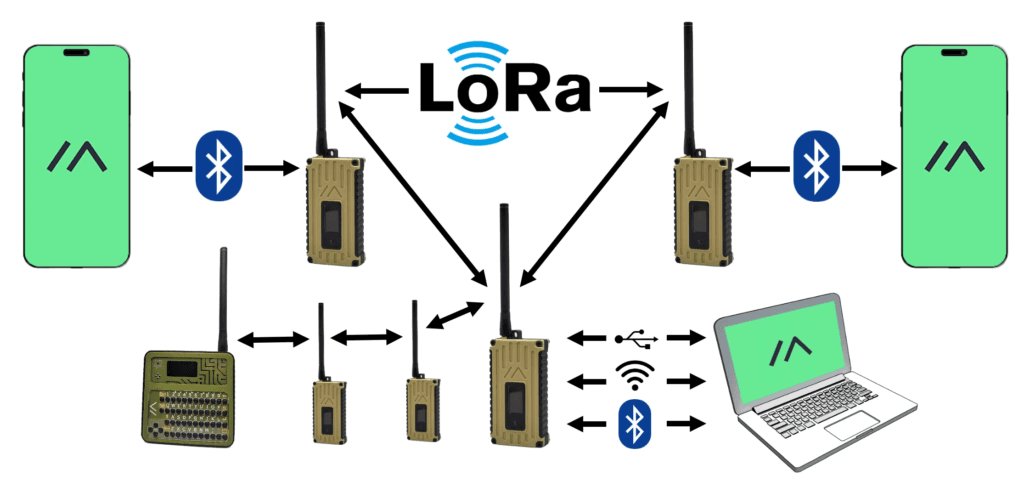
Meshtastic’s traceroute module adds another useful clue. From firmware version 2.5 onward, the return route is recorded along with SNR for each link. That makes link-quality interpretation part of the broader mesh workflow, not just an Apple app concern. If the route back is being recorded with per-link SNR, then understanding what that number means becomes part of understanding the mesh itself.
That is the real value of the new Signal Meter guide. It gives Apple users a better working model for the readings they already see, and it pushes the community away from the old habit of treating every negative number like a fault. In a LoRa mesh, the right answer is often not to chase a bad signal at all, but to understand which signal you are actually looking at.
This article was produced by Prism’s automated news system from verified source data, official records, and press releases, then run through automated quality and moderation checks before publishing. The system is built and supervised by the people who set the standards it runs under. Read our full AI policy.
Know something we missed? Have a correction or additional information?
Submit a Tip