Meshtastic explained, how LoRa mesh radios work in practice
Meshtastic looks simple on the box, but the real story is setup, channel discipline, and sober range expectations. The ThinkNode M1 shows why a ready-made node lowers the barrier.
What Meshtastic actually is in practice
Meshtastic is not a magic long-range chat app. It is an open-source, off-grid, decentralized mesh network built to run on affordable, low-power radios when cell towers and internet access are out of the picture. That simple pitch hides the real appeal: you are trading bandwidth for resilience, using LoRa to move short messages, position data, and other lightweight packets over distances that a direct phone-to-phone link would not cover.
That tradeoff is the whole game. LoRa is slow by design, but it is efficient, which is why Meshtastic makes sense for remote trails, infrastructure gaps, and backup communications. The project is community-driven and volunteer-supported, and it has grown large enough to support more than 100 devices, with hardware now split into officially supported and community-supported categories.
Why the ThinkNode M1 is a useful reality check
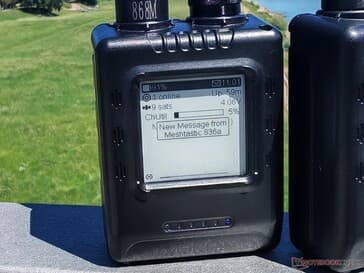
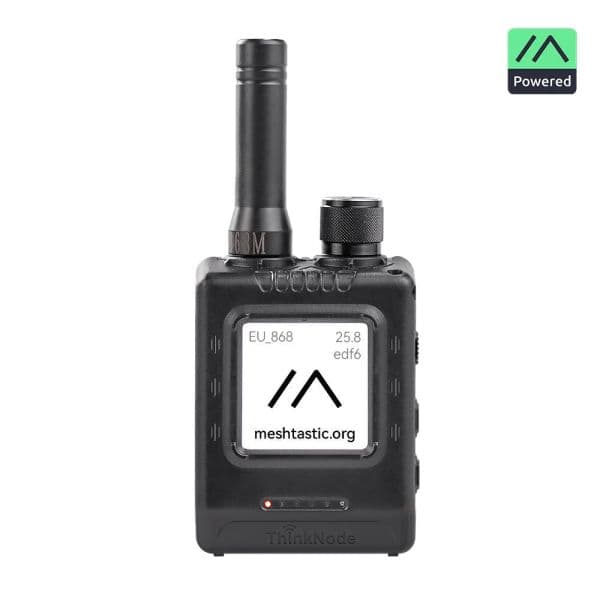
The ThinkNode M1 is a good example because it is not just a board and a battery. It has an e-ink display, GNSS, a rotary control, buttons, USB-C, RP-SMA antennas, an nRF52840 MCU, a Semtech SX1262 LoRa transceiver, and an L76K navigation module. Meshtastic lists it for US 902.0 to 928.0 MHz and EU_868, which tells you right away that this is a purpose-built endpoint, not a generic gadget pretending to be one.
That matters for newcomers because the M1 lowers the friction that usually scares people off a DIY build. A phone can connect over Bluetooth and act like an external LoRa modem, so your handset becomes the messenger interface while the node does the radio work. In practice, that means less soldering, less flashing, and fewer chances to discover that the one antenna you bought is wrong for your region.
Pairing is easy, channel setup is where the real learning starts
The polished explainer gets one thing very right: Meshtastic begins with a companion app and a radio that talks to it over Bluetooth, Wi-Fi, Ethernet, or serial. That part is genuinely approachable. You pair the device, get it talking to the app, and then start configuring the mesh identity, which sounds casual until you realize the channel settings are the whole privacy and interoperability story.
Meshtastic’s radio mesh only works when nodes share the same LoRa spreading factor, center frequency, and bandwidth. Those settings are grouped into presets, and on top of that sits the channel layer, where the logical messaging actually happens. Nodes can belong to up to 8 channels, and the default channel uses an empty name and the key “AQ==,” which is the kind of detail that newcomers often miss when they assume every Meshtastic radio on the air is automatically in the same conversation.
That is where a ready-made node like the ThinkNode M1 helps. You are not just learning how to send a message, you are learning how the radio layer and the channel layer fit together. The app can feel deceptively simple until you try to match settings with another node and discover that one mismatch in LoRa parameters will make a mesh look dead even though both devices are powered on.
The limits of range are the part people overpromise
This is where a lot of beginner-friendly coverage gets too rosy. Yes, Meshtastic can extend your practical range through multi-hop relays, but it is still a mesh of small packets, not a substitute for broadband. Messages can be relayed from the companion app to the radio over Bluetooth, Wi-Fi or Ethernet, or serial, and the radios can rebroadcast packets up to three times if they do not get confirmation. That gives you reach, but it also means every hop costs time and precious airtime.
The other constraint is memory, because disconnected nodes store only around 30 packets in memory. That is a good reminder that these devices are designed for low-power efficiency, not for buffering a flood of traffic. If you come in expecting image transfers or large file sharing, you are already in the wrong mental model. LoRa in Meshtastic is about short text payloads, location updates, and the occasional telemetry message moving across a mesh that can outlast a direct link.
Encryption and the privacy story are more nuanced than the hype
Meshtastic does encrypt LoRa packet payloads with AES256-CTR, and each channel gets a different key. Direct messages use public-key cryptography, which is reassuring for normal use, but the docs are clear that the exchange is not quantum-resistant. That is not a scare line, it is just the sort of honesty you want from a project that expects people to use it outside a lab.
The public MQTT service adds another wrinkle. Meshtastic uses it with a zero-hop policy and filters specific packet types, including text, position, telemetry, and routing data, while also limiting location precision on the default PSK to reduce privacy risks. That makes the system more flexible, but it also means Meshtastic is not purely air-gapped unless you keep it that way on purpose. If you are building for privacy, you need to understand where the mesh ends and where optional internet bridging begins.
What the explainer gets right, and where it oversimplifies
The best thing about a polished walkthrough is that it makes Meshtastic look usable, not mythical. It correctly frames LoRa as low-bandwidth, long-range radio transmission built for efficiency, and it shows why a device like the ThinkNode M1 feels less like a science project and more like a finished tool. That is the right first impression.
Where it oversimplifies is in the implication that setup ends after pairing. In reality, the important work is choosing the right radio settings, understanding how channels sit on top of the mesh, and tempering your range expectations. Meshtastic is usable, but it is not carefree. The project rewards people who pay attention to the details, especially when a perfectly good node looks useless simply because it is not speaking the same LoRa language as the rest of the mesh.
Ready-made node or DIY build?
For a first entry, a ready-made node like the ThinkNode M1 is the smarter buy if you want to spend time using Meshtastic instead of assembling it. The screen, buttons, GNSS, battery-powered design, and built-in radio stack make it feel like an actual device, not a parts bin experiment. It is especially attractive if you want something you can hand to another person without explaining flashing tools and breadboards first.
DIY still has its place, of course. If you want to learn the radio stack from the ground up or tailor the hardware to a very specific use case, building your own node remains part of the Meshtastic culture. But for most newcomers, a polished handheld like the M1 gets you to the interesting part faster: understanding how a small LoRa packet can hop through a mesh, carry just enough information to matter, and work when the usual networks are gone.
That is the real Meshtastic lesson. The hardware is only the entry point. The moment you set the channel, match the LoRa parameters, and send your first short message across a mesh, the platform stops feeling like a novelty and starts feeling like the practical communications tool it was designed to be.
This article was produced by Prism’s automated news system from verified source data, official records, and press releases, then run through automated quality and moderation checks before publishing. The system is built and supervised by the people who set the standards it runs under. Read our full AI policy.
Know something we missed? Have a correction or additional information?
Submit a Tip