NBA 2K Twitch Drops let viewers earn in-game rewards on streams
NBA 2K Twitch Drops are the quickest freebie on the board if you catch the right stream. Miss the watch time or the claim window, and the reward never makes it to your account.
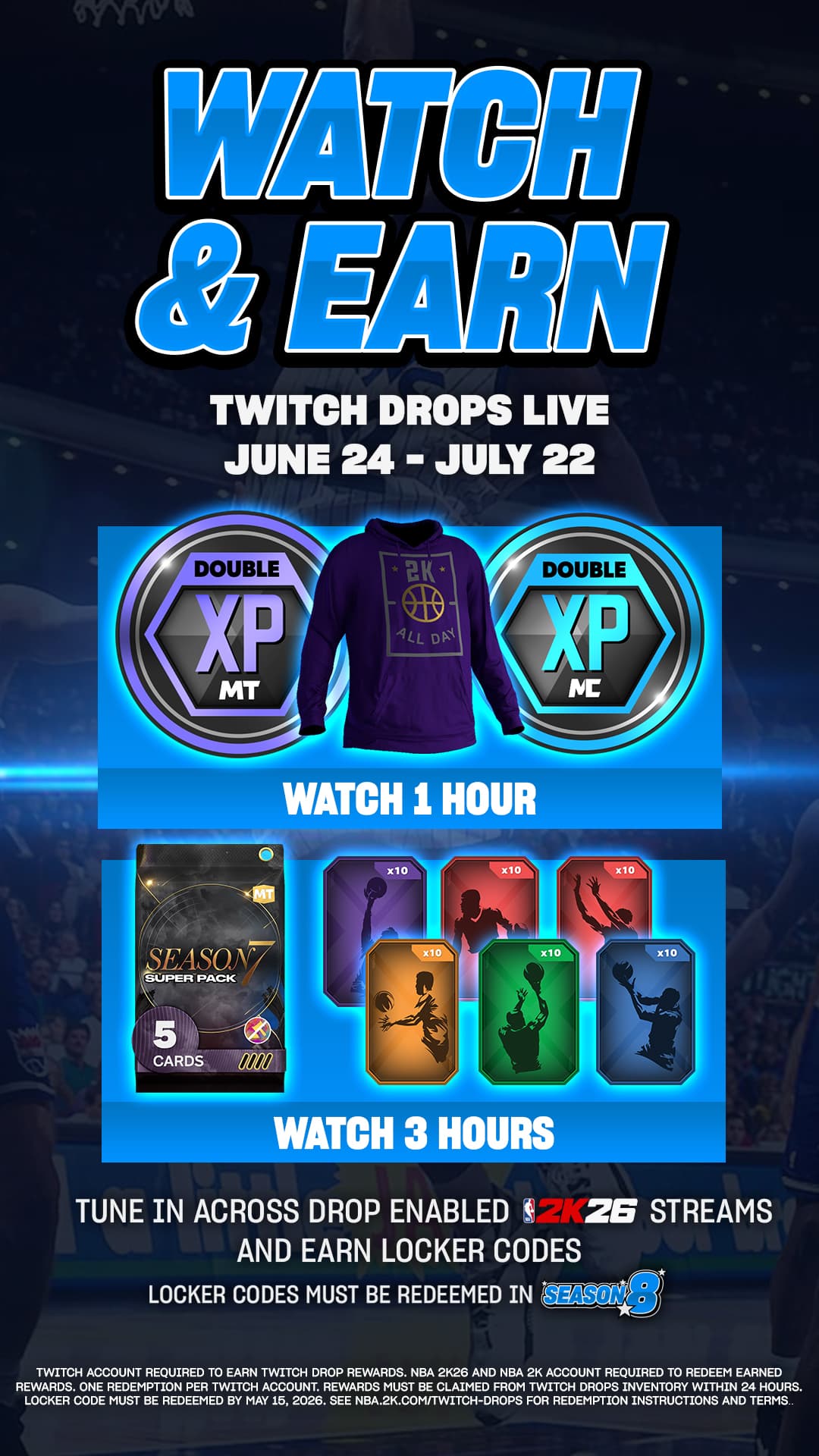
The official Twitch Drops setup lets you earn in-game rewards by watching eligible NBA 2K livestreams, but only if you watch the right stream, meet the posted watch-time requirement, and claim the reward in time.
How NBA 2K Twitch Drops actually work
The process has two steps: watch a livestream with Twitch Drops enabled, then claim the reward after you hit the required watch time. When you open an eligible stream, Twitch shows a Drops notification at the top of chat that tells you how long you need to watch for each reward, and the page lists the active campaigns and their watch-time requirements.
Not every NBA 2K broadcast is eligible. The official NBA2K Twitch channel is part of the picture, but the Drops flag on the stream itself is what counts. If you are watching the first stream that looks active without checking for Drops, you can easily burn an hour and end up with nothing to claim.
The account setup you need before you watch
2K has a dedicated page for linking your NBA ID and 2K Account, which is the same account ecosystem that powers other franchise rewards, so it is worth making sure your profile is already connected before you chase Twitch loot. NBA 2K26’s reward pages also sit inside a larger system that includes Daily Spin, Daily Pick ‘Em, 2KTV, and locker codes.
For Twitch Drops specifically, the process assumes you are logged into Twitch with the account you plan to use. PGA TOUR 2K25 uses the same logic: players need to tune in using their linked Twitch account when Drops are active. In practice, the safest move is to have your Twitch login sorted first, then open the eligible NBA 2K stream and keep an eye on the progress bar or Drops notice in chat.
The claim flow, step by step
Once you are on the right stream, the on-screen flow is straightforward:
1. Log into Twitch.
2. Open an NBA 2K livestream that has Twitch Drops enabled.
3. Watch until the required time is met.
4. Go to your Twitch inventory and claim the reward.
You track and claim what you earned in Twitch inventory. That is the part people forget most often, because the reward does not always land in-game the second the watch time is complete.
Why Drops do not appear when you think they should
The most common failure point is simple: you watched, but not on an eligible stream. If the broadcast does not have Twitch Drops enabled, your watch time will not count, even if it is an official NBA 2K stream. The second trap is skipping the claim, since 2K’s own instructions send you to Twitch inventory instead of assuming the reward will appear automatically.
On PGA TOUR 2K25, rewards must be claimed in Twitch within 24 hours. 2K support also notes that some event rewards can take up to 24 hours after an event ends to show up, and if a reward still has not appeared after 72 hours, the next step is a support ticket.
How long you should expect to wait
The best-case scenario is quick: you watch, the Drops progress updates, you claim in Twitch, and the reward shows up shortly after. The less friendly version is a delay window that stretches beyond the stream itself, especially when the reward is tied to the end of an event rather than a simple watch-time completion.
The active campaign page lists the current campaigns and the specific watch-time requirements, which lets you know up front whether you are dealing with a short watch, a longer grind, or a campaign that needs immediate claiming. If you are farming rewards around launch week or a live event, check that detail first.
Are the rewards worth your time for MyTEAM and MyCAREER?
If you already watch NBA 2K reveals, season launches, or official live events, Drops are usually worth the attention. The value depends on the campaign, but the reward pool can fit both ends of the NBA 2K lifestyle: MyTEAM players can benefit from consumables or squad-boosting items, while MyCAREER players are often the ones who care about cosmetics, event rewards, or other limited-time unlocks.
Twitch Drops ask for attention, not VC. 2K is already using Daily Spin, Daily Pick ‘Em, 2KTV, locker codes, and Twitch Drops to keep players checking in, so the smartest play is to watch the eligible stream you were going to open anyway and claim the reward properly.
This article was produced by Prism’s automated news system from verified source data, official records, and press releases, then run through automated quality and moderation checks before publishing. The system is built and supervised by the people who set the standards it runs under. Read our full AI policy.
Did this article answer your question?