NBA 2K26 adds Animation Breakers, letting MyTEAM cards change moves permanently
MyTEAM’s Animation Breakers let you overwrite a card’s shot, dribble, and dunk packages permanently, so the right swap can matter more than a raw OVR bump.
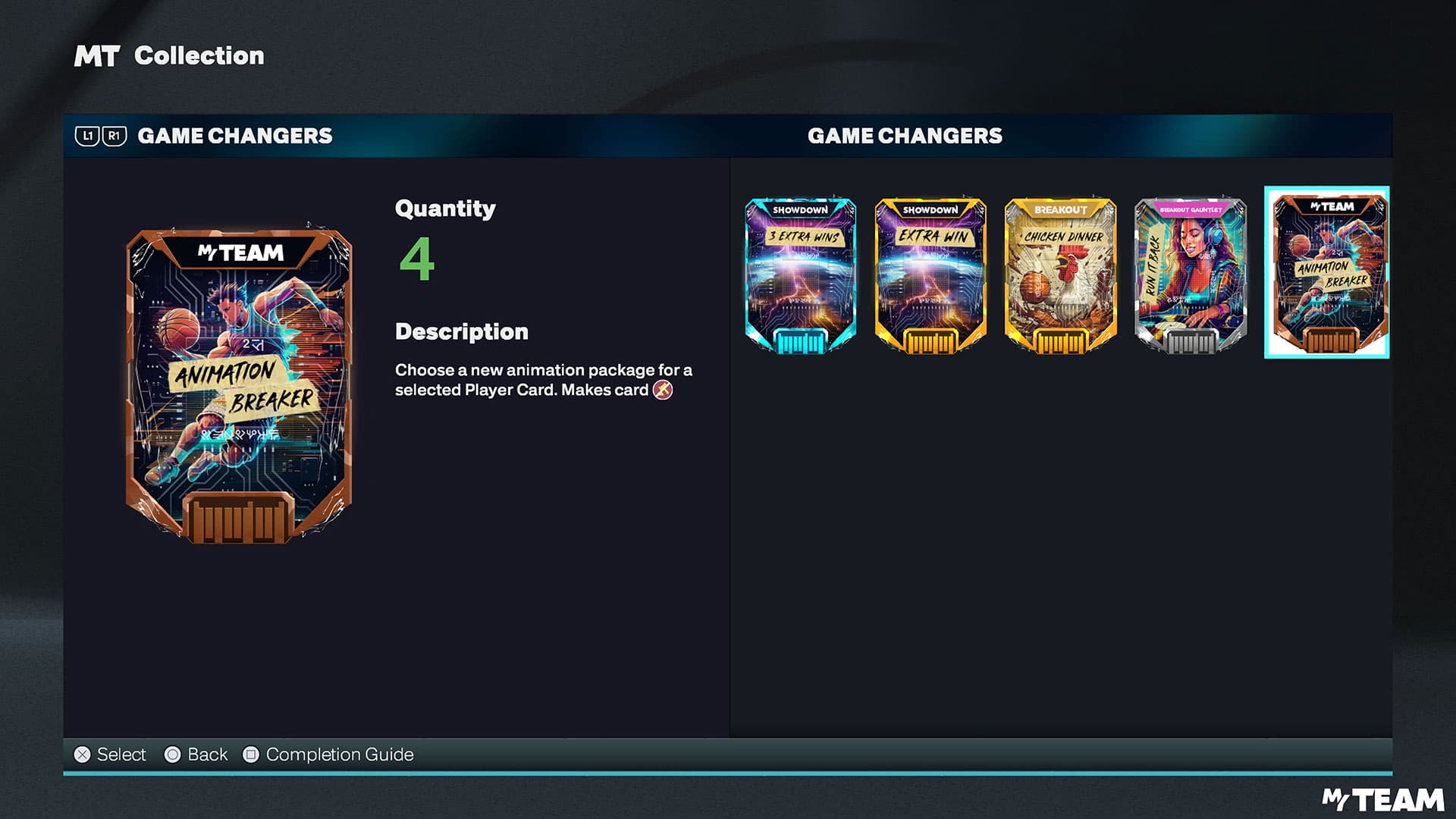
A MyTEAM card in NBA 2K26 can keep the same ratings and still play completely differently once its jumpshot, dribble package, and dunks are replaced. That also makes the choice consequential, since the card becomes unauctionable the moment you attach one.
How Animation Breakers work
Animation Breakers are a new type of card inside MyTEAM’s Game Changer system. Open a Player Card in your MyTEAM Collection, go to the Game Changer option, and select Animation Breaker, then choose the package you want.
The important detail is that the breaker is tied to that card permanently once it is applied. You can restore the card to its default animations later, and you can switch to a different package without spending another breaker, but the breaker itself stays linked to that Player Card. That makes the decision less about testing a novelty and more about committing to a card you expect to keep.
The unauctionable tag is the other big line in the sand. If you like to buy, sell, and cycle through cards in the market, that restriction matters immediately, because the feature is built for keepers rather than short-term rentals.
Which cards get the most out of a breaker
The best targets are cards whose animation issues hold them back more than their attributes do. A guard with a clunky dribble package, a wing with a release that does not fit your timing, or a big who needs better dunk animations can all gain far more from a package swap than from another incremental stat bump. If a card already has smooth movement and a release you trust, the upgrade is much smaller.
- primary ball handlers who live on dribble combos and quick separation
- scoring wings who need a jumpshot that matches their rhythm
- rim-running bigs who finish possessions at the rim and benefit from stronger dunk packages
That is why this feature is especially valuable for three archetypes:
If a card is already performing the way you want, spending a breaker there is usually a cosmetic move dressed up as a gameplay upgrade. The cards that benefit most are the ones you hesitate to use right now because the base package feels off.
What to chase first in the current animation pool
NBA 2K26 launched Bronze-tier animation packages first, with higher tiers promised later, so the first wave is about functional testing rather than final-tier chasing. The Bronze list already includes Shaquille O’Neal, Paul Pierce, and Rashard Lewis.
The smartest way to think about the first tier is to match the package to the role of the card. If the card is your engine, prioritize the jumpshot and dribble package. If the card is a finisher, care more about dunks. If the card is a secondary creator, you want the package that improves the action you use most often, not the one with the flashiest name.
Players will naturally chase a famous package because it sounds elite, but the real upgrade comes from whether it changes your possession outcomes. A package that helps you create space, release faster, or finish through contact is valuable; one that only changes the feel of a card you barely use is not.
How to avoid wasting a breaker
The feature works best when you treat it like a permanent roster decision, not a temporary experiment. Since the card becomes unauctionable, the safest use is on a player you already expect to keep for a long stretch. That is especially true now that MyTEAM includes NBA and WNBA players together for the first time, which makes lineup building more varied and makes card identity even more important.
A practical approach looks like this: 1. Identify the card that has the most obvious animation problem. 2. Ask whether that card is already locked into your rotation. 3. Use the breaker only if the new package changes the card’s role, not just its appearance. 4. Save additional changes for later if a better tier arrives, since you can update the selected package without spending another breaker.
That last part is easy to miss, and it is one of the feature’s biggest advantages. You are not locked into your first choice of animation package just because you used a breaker once. You are locked into the card.
Release timing and platform context
2K says it has delivered basketball games for 20 years. Early Access begins August 29, 2025 for qualifying Superstar Edition and Leave No Doubt Edition pre-orders, and the Leave No Doubt Edition is available only until September 7, 2025.
NBA 2K26 is available on PlayStation 5, Xbox Series X|S, PC, and Nintendo Switch 2.
This article was produced by Prism’s automated news system from verified source data, official records, and press releases, then run through automated quality and moderation checks before publishing. The system is built and supervised by the people who set the standards it runs under. Read our full AI policy.
Did this article answer your question?