NBA 2K26 face-scan guide helps players create realistic MyPLAYERs
The best face scans in NBA 2K26 come from setup, not luck. Front light, steady distance, and the new face-tracking cursor are what turn a rough capture into a MyPLAYER that actually looks right.
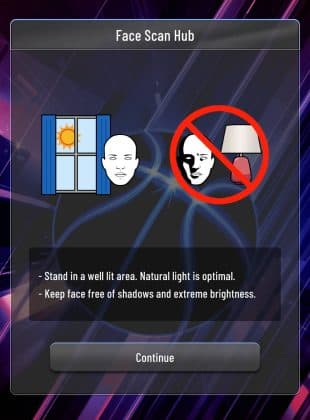
The scan only works if the setup is clean
The fastest way to waste a face scan is to treat it like a casual photo. NBA 2K26 still leans on the MyNBA 2K Companion App to import a real-world likeness, and the process works best when you control the basics before you ever hit capture. The goal is not just to “scan a face,” it is to get a usable MyPLAYER that looks like you instead of the generic template the game gives you by default.

2K’s own guidance points to three things that matter most: even front lighting, a steady phone position, and a controlled head turn. If any one of those is off, the scan can come out flat, warped, or inconsistent, which is exactly how players end up deleting and redoing the whole thing.
Use the companion app, not a workaround
The official MyNBA 2K Companion App is still the core tool here. On the NBA 2K26 app page, 2K says you can connect your console account, redeem locker codes, check your VC balance, and use face scan to personalize a MyPLAYER. That matters because the app is not just a scan tool, it is part of the wider NBA 2K26 account setup.
Before you start, make sure the app is installed on a compatible iOS or Android device, and that your console account is linked correctly. A bad login setup can be just as frustrating as bad lighting, because you can take a decent scan and still not get it over to the right profile. If the game does not recognize the account connection cleanly, stop and fix that first rather than trying to brute-force another scan.
Lighting decides whether the scan looks real or melted
Lighting is the biggest quality swing in the whole process. The 2K25 support guide, which still applies as the best practical baseline, recommends even front lighting, and that advice is hard to improve on. You want light coming from in front of you, not overhead and not from the side, because face scan systems hate deep shadows under the eyes, nose, and jawline.
The easiest bad setup is a room lit by a ceiling lamp with your face angled toward a window behind you. That leaves half the face darker than the other half, which makes the capture less reliable. A bright, even source in front of you is the move, and if the scan area is too dim, step out and reset the lighting instead of hoping the software will “figure it out.”
Distance and head movement matter more than people think
2K’s support advice says to hold the phone about 46 cm from your face and slowly turn your head up to 45 degrees. That is the part most players get wrong. They either hold the phone too close, which crowds the frame, or too far away, which makes the face too small for the camera to read cleanly.
The head movement should also be slow and deliberate. Do not jerk your chin around or try to speed-run the capture, because the scan needs a smooth read of your face from multiple angles. If the app is asking for a turn, give it exactly what it wants: a steady, controlled motion up to 45 degrees, not a dramatic rotation that sends your likeness off-center.
NBA 2K26 is pushing realism harder than ever
This guide matters because NBA 2K26 is selling realism everywhere, not just in the scan screen. The official game site leans on immersive MyCAREER, MyTEAM, and MyNBA modes, with authentic gameplay powered by ProPLAY. Shai Gilgeous-Alexander is the cover athlete, and the whole presentation is built around the idea that the game should feel more lifelike on the floor and off it.
That is why a face scan is not a throwaway feature. If your MyPLAYER appears in The City, MyCAREER, or another personalized mode, the face is one of the first things you see every time you load in. A decent scan does not just improve cosmetics, it makes the entire run feel more like your player and less like someone the game assembled from presets.
Why likeness accuracy is a bigger deal now
Player likeness has become a louder conversation across the 2K community, especially with WNBA attention raising the stakes. ESPN identifies Aliyah Boston as the Indiana Fever center and the No. 1 overall pick in the 2023 WNBA draft, which is part of why her criticism of how her avatar looks in-game landed so hard with fans. When a high-profile player says the resemblance is off, it reminds everybody that accuracy is not a side issue anymore.
NBA 2K26 also added WNBA players to MyTEAM for the first time in the series’ history, according to Bleacher Report’s coverage of 2K’s announcement. That moves likeness from a niche customization feature to a broader identity question across the mode ecosystem. If the game is asking players to buy into realism, then the face scan has to do more than vaguely resemble a human being. It has to hold up under the same scrutiny the rest of the presentation is getting.
The common bad-scan outcomes and the fixes that actually help
When a scan comes out wrong, it usually fails in a predictable way. Here is what to look for and what to fix:
- Flattened face or washed-out details: This usually means the lighting was too harsh, too dim, or not even. Reset with front-facing light and remove shadows from the cheeks and eye sockets.
- Blurry or incomplete capture: The phone was probably too close, too far, or moving during the scan. Put the device back around 46 cm away and keep it still.
- Odd jawline or distorted symmetry: The head turn was too fast, too extreme, or not centered. Use the slow turn up to 45 degrees and keep your shoulders square.
- Generic-looking result: The app may have gotten a passable scan, but not a sharp one. Rerun it with better lighting and a cleaner background rather than trying to “fix” the face later in the builder.
The new and improved face-tracking cursor is supposed to make this easier in NBA 2K26, and that is a welcome change if you have ever fought a scan that seemed to drift off your face halfway through. Faster capture is nice, but it only helps when the setup is already clean.
A better scan gives you a better start
NBA 2K26 gives you more reasons than ever to care about how your player looks, from MyCAREER and The City to the game’s larger push for authentic presentation. Early access begins August 29, 2025 for players who pre-order the Superstar Edition or Leave No Doubt Edition, which makes the scan even more of a day-one concern for anyone who wants their MyPLAYER ready immediately.
That is the real lesson here: the scan is not hard, but it is unforgiving. Get the front lighting right, hold the phone about 46 cm away, move the head slowly up to 45 degrees, and use the companion app the way 2K intended. Do that, and you get a face that looks like you the first time, instead of another generic MyPLAYER you plan to replace later.
This article was produced by Prism’s automated news system from verified source data, official records, and press releases, then run through automated quality and moderation checks before publishing. The system is built and supervised by the people who set the standards it runs under. Read our full AI policy.
Did this article answer your question?