Linear camera profiles give photographers more cinematic RAW control
Linear profiles turn RAW files into a more gradeable starting point, preserving highlight room and giving you a cleaner path to cinematic color control.
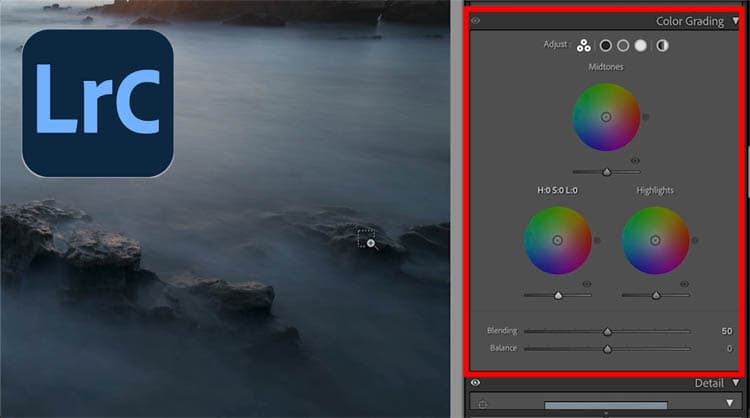
Linear camera profiles are one of those Lightroom-era tools that can quietly change the way a file feels before you touch a single slider. Instead of beginning with a built-in contrast curve that already pushes the image toward a finished look, they start flatter, giving you more room to shape tone, color, and mood from the RAW data itself. That makes them especially useful when the goal is not just a clean edit, but a more deliberate, filmic result.
Why linear profiles matter
The core idea is simple: RAW files are unprocessed sensor data, and Adobe says they can be reprocessed later without changing the original raw data. That flexibility is what makes profile choice so important. Adobe also says imported RAW photos default to Adobe Color for color images and Adobe Monochrome for black-and-white images, which means many edits begin with a baked-in rendering choice before the rest of the workflow even starts.
Linear profiles shift that starting point. Adobe says profiles control how colors and tonality are rendered, but they do not change the values of your other edit sliders, so you can treat a profile as a foundation rather than an adjustment. That matters because a flatter profile can preserve more breathing room in the highlights, make tonal separation easier to manage, and give you a cleaner base for color shaping.
The cinema lesson behind the still-photo workflow
The strongest argument for linear profiles comes from video post-production. In that world, footage is often captured in a flat logarithmic or low-contrast state, then shaped later with color grading and a final gamma transform. The point is not to make the preview look attractive on day one. The point is to preserve latitude so the image can be designed later with more control.
That same philosophy translates well to still photography. If you begin with a flatter tonal baseline instead of a contrast-heavy default profile, you are working more like a colorist than someone simply correcting exposure. The result can be especially useful for portraits, landscapes, and fine-art work, where soft highlight rolloff, stronger tonal separation, and more intentional color shaping can make the difference between a standard RAW edit and something that feels cinematic.
When to switch from your usual profile
The practical question is not whether linear profiles are “better” in every case. It is when they earn their place in the workflow. The best time to switch is when the image will benefit from more control over contrast and highlight detail, rather than from an immediate, polished preview.
A linear profile is worth trying when:
- The scene has bright skies, reflective surfaces, or other highlight-heavy areas that you want to protect.
- You plan to do meaningful color grading instead of relying on the camera’s default rendering.
- You want a softer, more controlled tonal rolloff for portraits or fine-art work.
- You want the edit to start from the RAW data, not from a strong baked-in look.
- You prefer a more neutral in-camera preview and histogram so the image feels less shaped by the camera’s contrast curve.
That last point matters more than it sounds. Adobe’s Camera Raw help notes that the histogram can show highlight and shadow clipping, and that the histogram display includes clipping indicators in the preview. A more neutral profile can make that preview feel more trustworthy because it is less affected by the camera’s own tonal curve. In practice, that gives you a clearer read on what is actually happening in the file.
How Lightroom and Camera Raw support the workflow
Adobe’s current documentation makes profiles easier to use as a creative starting point. In Camera Raw, profiles can be selected from the Profile Browser, and Adobe says they can be used either at the beginning of the edit or later as a finishing touch. That flexibility is the key to understanding why linear profiles are useful now: they are not a niche technical detour, but a first-class way to choose how a RAW file enters the editing pipeline.
Adobe’s help pages also reinforce a related principle. They note that camera and lens-specific corrections are best applied to RAW files for best results, because RAW files preserve more flexibility for interpretation and correction. That fits the same logic as linear profiling: start with the most malleable version of the image, then make your decisions with maximum room to move.
From enthusiast trick to practical workflow
This idea has been circulating for years. An Adobe Community discussion from 2018 includes Ivor Rackham and other contributors talking about creating camera profiles in DNG Profile Editor and choosing a linear tone curve instead of Adobe’s standard tone curve. That history matters because it shows linear profiles are not a new invention. They have been part of advanced RAW conversations for a long time, even if they have often lived in forum threads and profile-building tutorials instead of everyday editing advice.
What has changed is the framing. Adobe now presents profiles more clearly as a starting point or a finishing touch, which makes the workflow less obscure and much more approachable. That is exactly why linear profiles deserve more attention: they sit right between technical control and creative intent, and they let you decide how much of the image is camera interpretation and how much is your own.
Linear profiles are most valuable when you want the RAW file to behave less like a finished photo and more like a negative. If your usual profile already gives you the look you want, keep it. But when you need more highlight room, more latitude for color shaping, or a more cinematic base to build from, the flatter path is often the one that opens the most doors.
This article was produced by Prism’s automated news system from verified source data, official records, and press releases, then run through automated quality and moderation checks before publishing. The system is built and supervised by the people who set the standards it runs under. Read our full AI policy.
Know something we missed? Have a correction or additional information?
Submit a Tip