KONKR Pocket Fit setup guide shows why it’s a surprise hit
KONKR’s first handheld looks cheap on paper, but the real test is setup. This guide shows how a 6-inch 144Hz Android machine gets from unboxing to a usable emulation stack.
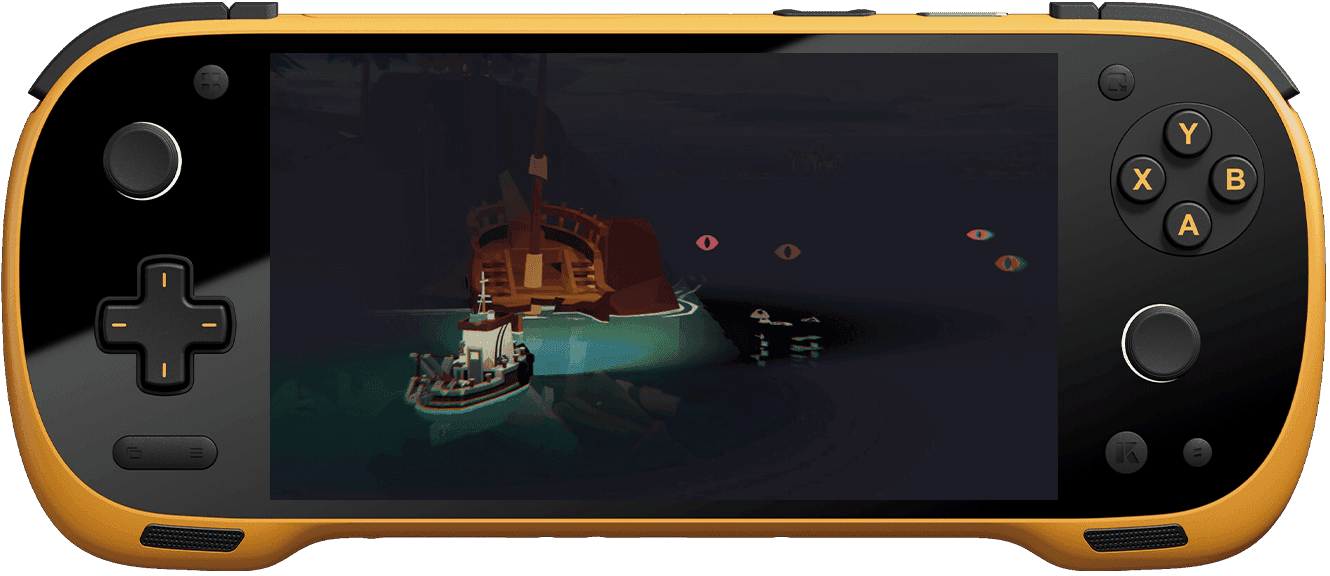
A budget AYANEO that makes the first hour count
The KONKR Pocket Fit matters because it does not behave like a throwaway cheap handheld. Retro Handhelds’ setup guide treats it as a surprise hit for one simple reason: it gives you a 6-inch 1080p display, comfortable ergonomics, and enough power to push beyond basic retro games into heavier Android and PC-style workloads. That combination changes the question from “what can it run?” to “how quickly can you make it useful?”
The hook here is how much hardware is packed into the entry point. AYANEO’s own framing says the Pocket FIT is the first Android handheld to debut a 6-inch 1920 x 1080 display with a 144Hz refresh rate, while Time Extension reported an early-bird price of $239 for the 8GB + 128GB model. For a lot of newcomers, that is the kind of price-to-spec ratio that turns curiosity into a purchase. The catch is that modern emulation setup is no longer a one-app affair, and the guide makes that clear fast.
Why this handheld feels different from the usual budget pick
The Pocket Fit sits in a strange but appealing spot in the market. Notebookcheck identified it as the first handheld from AYANEO’s new KONKR sub-brand, and that sub-brand is positioned as the budget-oriented lane inside AYANEO’s lineup. In practice, that means the Pocket Fit is trying to keep the premium feel while trimming the entry cost enough to compete with the crowded Android handheld field.
The hardware options also matter for how you should think about setup. AYANEO’s global product page lists Snapdragon G3 Gen 3 and Snapdragon 8 Elite versions, while TechPowerUp reported the device around the third-generation Snapdragon G3x gaming platform with up to 20W peak performance. That sounds straightforward until you remember one of the oldest truths of Android emulation: raw power is only half the story, and driver maturity can matter just as much.
The setup guide starts where most handheld buyers actually get stuck
The real value of the Retro Handhelds guide is that it treats setup like a chain of decisions, not a single install. It walks through the standard first-week checklist: recommended accessories, emulator installation, BIOS file handling, launcher and frontend choices, streaming apps, PC emulation, quick settings tips, and file transfer advice with tools like Solid Explorer. That is exactly the sort of practical map a newcomer needs when the box is open but the device still feels like a project.
This is the biggest shift in handheld emulation right now. You are not just dropping ROMs into a folder and launching a single emulator anymore. You are deciding how your system directories are organized, whether your frontend is the thing you see every time you boot, how shader and filter preferences affect the look of your games, and how controller mapping behaves across different platforms. The Pocket Fit guide lowers that friction by turning a pile of setup chores into a sequence you can follow without guessing.
Start with storage, then build the rest of the stack
The first practical decision is storage. The broader setup-guide ecosystem around the Pocket Fit, including the related guidance from Joey’s Retro Handhelds, points toward microSD cards, Android file preparation, and utility apps as part of the normal onboarding path. That is not just housekeeping. It is what separates a clean, flexible setup from a handheld that becomes annoying to manage after the first weekend.
From there, Solid Explorer becomes one of the most useful tools in the process because it gives you a sane way to move BIOS files, organize directories, and keep your emulator data from turning into a mess. If you want the Pocket Fit to feel like a dedicated gaming machine instead of an Android phone with buttons, this is the stage where the machine starts becoming yours.
Pick the frontend before the library gets messy
Frontends are the make-or-break layer on modern handhelds, and the guide’s recommendations reflect that. Daijisho and EmulationStation Beacon show up for a reason: they help transform a scattered collection of emulators into something that feels like a console interface. If you care about a device that boots into a neat, readable library rather than a grid of apps, this choice matters early.
This is also where the Pocket Fit’s role as a do-everything handheld becomes clear. A frontend is not just cosmetic. It sets the tone for whether the handheld is tuned for couch play, quick on-the-go sessions, or a more ambitious build that mixes classic systems with more demanding Android and PC-style use. The device has the horsepower to tempt you into doing more, but the frontend is what keeps that ambition usable.
Where the Snapdragon split really matters
The Pocket Fit’s chipset choices are the most important warning in the whole setup conversation. The guide presents the Snapdragon G3 Gen 3 model with 12GB of RAM and 256GB of storage as the sweet spot for most users, and that advice makes sense if you care about stability as much as raw speed. The 8 Elite version may look stronger on paper, but the guide warns that compatibility issues can appear because driver support is still maturing.
That detail is easy to underestimate if you are new to Android handhelds. A higher benchmark number does not automatically mean a better emulation experience, especially when the software stack is still catching up. If you want the least painful path from unboxing to playing, the safer bet is the configuration that has the clearest balance of performance, memory, and storage rather than the one that simply reads best on a spec sheet.
Use the device for what it actually does well
The Pocket Fit is not just being sold as a retro box. AYANEO’s launch positioning and TechPowerUp’s coverage both make it clear that this is a high-performance Android handheld built to stretch into more than one category, and the setup guide follows that logic. That means streaming apps belong in the first-week plan, not the someday pile, and PC emulation belongs in the conversation if you want to know where the hardware starts to feel ambitious.
The comfortable ergonomics and 386g weight listed on AYANEO’s Japanese page help explain why the device can support that broader use case. A handheld that stays pleasant in the hands is more than a luxury when you are moving between emulators, frontends, and streaming apps. It is what makes longer setup sessions and longer play sessions feel like the same activity instead of two chores.
The practical verdict on the first hour
The Pocket Fit earns its surprise-hit reputation because the setup path is unusually grounded. It gives you a vivid 6-inch 1080p 144Hz panel, enough power to justify a serious Android emulation build, and a guide that explains how to make all of that work without wasting the first night on trial and error. The device still asks you to think like a builder, but it does not bury you in mystery.
That is the real payoff here. The KONKR Pocket Fit does not remove setup friction so much as it turns the friction into a manageable checklist, and that is enough to make it a practical buy for emulation newcomers who want one handheld that can grow with them rather than one that needs replacing after the honeymoon.
This article was produced by Prism’s automated news system from verified source data, official records, and press releases, then run through automated quality and moderation checks before publishing. The system is built and supervised by the people who set the standards it runs under. Read our full AI policy.
Did this article answer your question?

