Retro Handhelds guide turns Anbernic RG Rotate into emulation machine
The RG Rotate stops being a curiosity once you treat storage, audio, and apps like part of the hardware. Retro Handhelds shows how the square-screen Android handheld becomes usable.
Why the RG Rotate only works once you set it up right
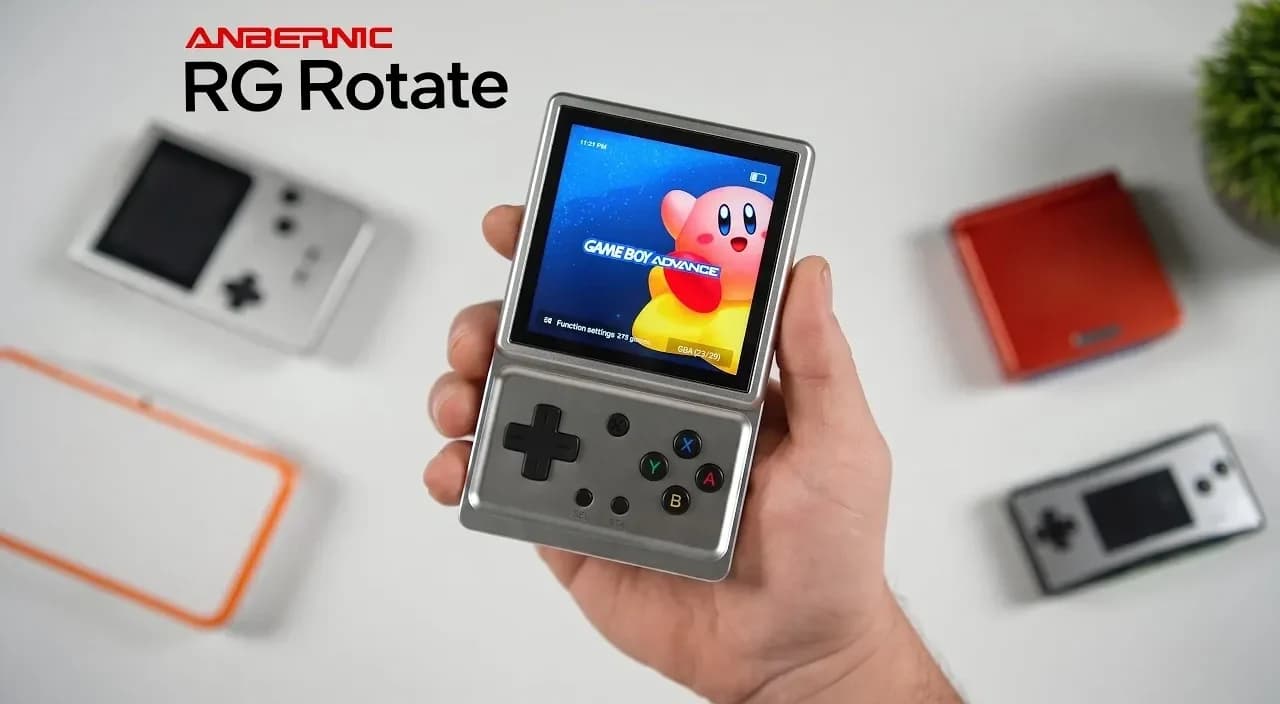
The Anbernic RG Rotate is the kind of handheld that looks like a conversation piece until you configure it like a real emulator device. Retro Handhelds’ setup guide makes that point quickly: the hardware is unusual, but the practical steps are familiar to anyone who has lived through Android handheld friction, from storage limits to app management and controller tuning.
Start with the hardware reality
Anbernic’s own spec sheet gives the RG Rotate a straightforward core: Android 12, a Unisoc Tiger T618 chip, 3GB of RAM, 32GB of internal storage, and a 3.5-inch 720×720 IPS display. That is enough to tell you what the device is and, more importantly, what it is not. It is not a giant power machine, and it is not meant to be judged by raw storage or display size alone.
The rest of the hardware makes the same point. Anbernic lists Wi-Fi 5, Bluetooth 5.0, TF or microSD expansion up to 2TB, USB-C DAC audio support instead of a built-in 3.5mm jack, a six-axis gyroscope, high-fidelity stereo speakers, and FOTA wireless upgrades. The company also split the device into two versions, Polar Black with an aluminum-alloy front and plastic back, and Aurora Silver with a full metal body. That mix tells you the Rotate is built for portability and flexibility, but only if you accept that accessories and configuration are part of the purchase.
Treat storage as mandatory, not optional
The biggest practical warning in the setup guide is the simplest one: 32GB is not much at all. On an Android handheld, that space disappears quickly once you add front ends, emulators, saves, BIOS files, shaders, box art, and a few larger game images. Retro Handhelds is blunt that a microSD card should be treated as mandatory rather than a nice extra.
That matters even more here because the RG Rotate is being pitched as a machine that can handle more than 30 platforms, including PS2, Wii, PSP, and Android games. You do not want to burn the internal storage on system clutter if you are trying to keep multiple emulator builds organized. A good TF card gives you room to separate your operating setup from your game library, which is exactly the kind of cleanup that keeps Android handhelds from feeling messy after the first week.
Fix audio before it becomes a nuisance
The lack of a built-in 3.5mm headphone jack is another detail that changes how you set the handheld up. Anbernic relies on USB-C DAC audio support instead, so a headphone adapter or USB-C audio solution becomes part of the setup equation rather than a backup plan. That is not a dealbreaker, but it does mean you should think about your listening setup before you start loading games.
The guide’s practical value is that it frames audio as a real ownership issue, not a footnote. If you play on the go, or if you want a tidy bag with one less dongle surprise, you need to decide early whether you are living in USB-C audio land or building around speakers. The RG Rotate does have high-fidelity stereo speakers, but the absence of a 3.5mm jack means your personal listening habits shape the device more than on a traditional handheld.
Build the Android software stack with intent
This is where the RG Rotate goes from odd hardware to usable emulation machine. Retro Handhelds recommends app management through tools like Obtainium, which is especially useful because it installs and updates apps directly from release pages on GitHub, GitLab, and F-Droid. That approach fits Android handheld culture perfectly: many of the apps you want live outside a neat storefront workflow, and you often need direct control over versions.
That kind of setup also makes the device feel less like a toy and more like a curated system. You are not just tapping random APKs into place. You are choosing which emulators, launchers, and support tools deserve a spot on a small handheld with limited internal storage, then keeping them updated in a way that does not require constant manual maintenance. The guide also points readers toward Anbernic-specific settings updates, which is a reminder that the best experience usually comes from combining general Android housekeeping with device-specific tuning.
Use the square screen for what it actually fits
The RG Rotate’s 3.5-inch 720×720 display is its defining feature, and it also sets the limits. A square screen is interesting, but not every game benefits from one. Independent coverage of the device makes the same point from a different angle, noting that the small rotating IPS panel is most naturally suited to older games originally designed for compact displays.
That is the right way to think about the Rotate’s game-fit tradeoffs. PSP and other handheld-era systems should make sense quickly, and the same goes for retro platforms that do not demand a lot of horizontal space or oversized interface elements. More demanding games may boot and run, but the screen shape and size will always force you to ask whether the experience is worth the hardware compromise.
The launch context explains the appeal
The Rotate did not arrive quietly. Anbernic first teased it on April 13, 2026, then followed with an official unboxing that confirmed the swivel-screen hinge and the swappable high and low L2 and R2 shoulder buttons. Launch coverage put the starting prices at $87.99 for Polar Black and $107.99 for Aurora Silver, with early-bird pricing of $82.99 and $99.99 for the first 72 hours. The reported launch time was May 11, 2026 at 6:00 AM ET.
That rollout matters because it shows how Anbernic wanted the device to be read: not as a generic Android handheld, but as a compact, unusually built machine with enough controls and expansion options to justify the shape. The swivel mechanism, swappable triggers, 2TB card support, and Android 12 base all point in the same direction. This is hardware that asks for a little more work up front so it can feel much less awkward later.
The RG Rotate is still a strange handheld, and it always will be. Retro Handhelds’ guide works because it never pretends otherwise, but it also shows that the strangeness stops mattering once you handle storage, audio, app updates, and game selection the right way. That is the difference between a novelty and a handheld worth keeping on your desk.
This article was produced by Prism’s automated news system from verified source data, official records, and press releases, then run through automated quality and moderation checks before publishing. The system is built and supervised by the people who set the standards it runs under. Read our full AI policy.
Did this article answer your question?
