Rust Tutorial Replaces Panic With Result for Real-World Error Handling
A TOML parser turns Rust error handling into a production pattern, swapping panic-driven exits for Result, Option, and precise diagnostics.
A bad config file should not be able to take a Rust app down. That is the core lesson in this tutorial, which uses a TOML parser to show how to move from exercise-friendly shortcuts like `panic!`, `unwrap`, and `expect` to error handling that fits real CLI tools and game utilities.
Why this matters in real Rust code
The tutorial starts from a problem every Rust developer runs into early: code that is fine for a learning project can become brittle the moment it has to serve users. A malformed file, missing setting, or bad request should not crash a process that is otherwise healthy. That is why the Rust Book splits errors into two categories, recoverable and unrecoverable, and maps them to two different responses: `Result<T, E>` for recoverable failures and `panic!` for bugs that should never happen if the program is correct.
That distinction is especially useful in configuration-heavy software. Rust’s standard library describes `panic!` as stopping the current thread, and the default panic hook prints the panic message with file, line, and column information. That is helpful when the code itself is broken, but it is the wrong tool for normal user mistakes. A parser that can explain a bad TOML file, instead of aborting, gives you something much closer to production behavior.
The first rule: stop using panic for expected failures
The tutorial’s simplest rule of thumb is also the one beginners most often need to internalize: reserve `panic!` for programmer bugs, and use `Result` for situations you can predict and handle. Missing files, invalid input, and network timeouts belong in the recoverable bucket. That matches Rust’s error model and keeps the control flow honest, because the caller can see that something went wrong and decide what to do next.
This shift matters in day-to-day work because config parsing is rarely the only thing your tool does. A CLI can keep running after a bad flag file, and a game tool can report a broken settings file without killing the whole editor session. The tutorial’s point is not just to avoid crashes, but to replace them with explicit failure paths that users can understand.
Use `Option` when there is no value, not a fake placeholder
The other beginner trap the tutorial calls out is pretending absence is a special number or string. Rust’s `Option<T>` is the native way to represent “there is no value here,” without sentinel values like `null` or `-1`. That makes the code easier to read and keeps missing data separate from actual data.
This is a small design choice with a big payoff in parsers. When a field in a TOML document is optional, `Option` lets you model that directly instead of forcing a fake default and then trying to detect whether it was really supplied. The broader Rust docs describe `Option` and `Result` as complementary systems for representing, propagating, reacting to, and discarding errors, and this tutorial uses that pairing as a bridge from beginner mistakes into more structured error flow.
Three error-handling patterns worth borrowing from the parser
1. Return errors early instead of unwrapping blindly
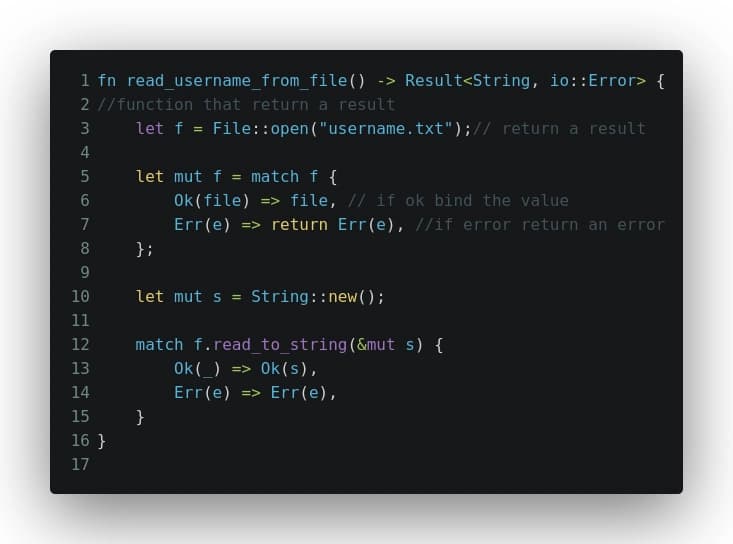
The clearest pattern in the tutorial is to replace `unwrap`-style assumptions with explicit returns. If parsing can fail, the function should say so in its signature with `Result`, not hide the possibility of failure until the program explodes. That is the backbone of Rust-style robustness, especially in code that reads files or validates user-supplied input.
2. Treat config errors as data, not crashes
The parser is built around a schema-validating TOML file, which means the failure itself becomes part of the normal program flow. Instead of treating a malformed file as an emergency, the code can report what is wrong and keep the rest of the application intact. That is a much better fit for tools that need to stay open, stay responsive, or continue processing other files.
3. Preserve location and context in your diagnostics
Rust’s default panic output includes file, line, and column information, and that idea should carry over into handled errors too. A good config parser should tell you exactly where the problem lives, not just that something failed. That is the difference between a developer-friendly diagnostic and a generic abort message.
4. Use `Option` for missing fields and `Result` for invalid ones
These two types solve different problems, and mixing them up leads to confusing code. A missing optional key in TOML is not the same as a malformed value, so model them differently. When you keep that separation clear, your parser becomes easier to extend and your error messages become easier to trust.
Why TOML is the perfect place to learn this
The choice of TOML is not incidental. The TOML specification describes it as a minimal, human-readable configuration language designed to map unambiguously to a hash table, which makes it a natural fit for app settings and manifests. Cargo uses TOML for its manifest file, `Cargo.toml`, and Cargo configuration files are written in TOML as well.
That makes the example feel native to the Rust ecosystem instead of theoretical. The Rust TOML crate documentation also describes TOML as a common configuration format in the community, precisely because Cargo uses it. In other words, the tutorial is not teaching error handling through a toy format, it is teaching it through the same kind of file that Rust developers already touch every day.
What this changes in real projects
For a CLI tool, these patterns mean bad input becomes a reported condition, not a fatal crash. For a game-tooling workflow, they mean a broken settings file can be surfaced cleanly while the rest of the tool stays usable. For any Rust app that reads config at startup, this is the difference between a rough learning demo and code you can confidently ship.
The larger lesson is simple and durable: use `panic!` when the code is wrong, use `Result` when the world is messy, and use `Option` when data might just not be there. That is the kind of error handling that turns a parser into a blueprint for production Rust.
This article was produced by Prism’s automated news system from verified source data, official records, and press releases, then run through automated quality and moderation checks before publishing. The system is built and supervised by the people who set the standards it runs under. Read our full AI policy.
Did this article answer your question?