TRUST Brings Retro DOS-Style Rust Development to the Terminal
TRUST turns Rust into a blue-screen terminal workflow with real Cargo commands, tight keybindings, and a compiler pane that keeps the feedback loop in view.
A blue screen that asks a serious question
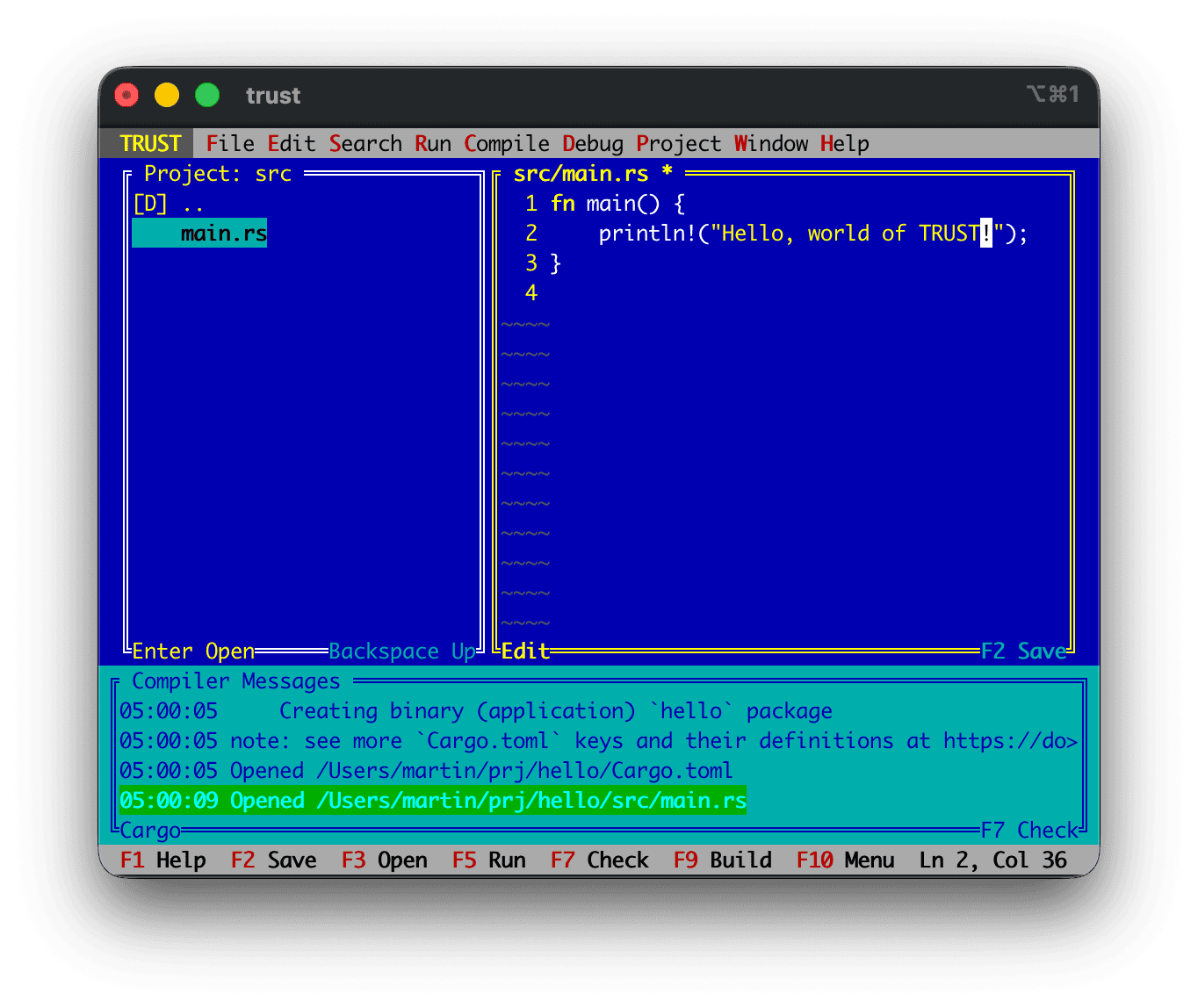
TRUST looks like a joke for about five seconds, until you realize it is asking a very real Rust question: does a stripped-down, DOS-style TUI make you faster, or is it just feeding nostalgia? The project leans hard into the classic blue-screen look, but its real appeal is that it keeps editing, navigation, and Cargo all in one compact terminal shell.
That is the part that matters for Rust developers who like the keyboard to do the heavy lifting. TRUST is not trying to out-muscle a full modern IDE; it is trying to make the terminal feel like a complete place to work, with less visual noise and fewer distractions between the edit, build, and debug loop.
What TRUST actually is
TRUST is an independent nostalgia project for Rust, and its README is explicit that it is not affiliated with any classic DOS IDE vendor. It can open a Rust project from the current directory or from a path you pass with `cargo run /path/to/rust/project`, which makes it easy to drop into an existing codebase without any setup ceremony.
Once it is open, the experience is intentionally narrow and opinionated. TRUST edits Rust source files, browses project directories, and runs Cargo commands from inside the terminal UI, so the workflow stays in one place instead of bouncing between editor tabs, integrated terminal panes, and external build windows. The point is not breadth. The point is focus.
How to start using it
The launch path is simple, and that simplicity is part of the design. If you give TRUST a path, it opens that Rust project directly. If you do not, it starts in the current directory, which makes it easy to test against a repository you are already standing in.
From there, the project behaves like a retro IDE with modern Rust awareness. The file browser is meant to keep the working set small and relevant, and the terminal-first layout keeps the command surface close at hand. For solo projects, experiments, and hobby code, that can make the whole loop feel more immediate than a heavier GUI setup.
A quick setup mental model
- Launch it from a project root if you want TRUST to inherit the current workspace immediately.
- Use the path form if you want to point it at a different Rust repository.
- Treat it like a focused editor, not a full replacement for a heavyweight desktop IDE.
The keyboard is the interface
TRUST’s keybindings are where the retro theme becomes more than decoration. The project maps F2 and Ctrl+S to save, F5 and Ctrl+R to `cargo run`, F7 to `cargo check`, F8 and Ctrl+T to `cargo test`, and F9 and Ctrl+B to `cargo build`. Those shortcuts give you the classic function-key rhythm that DOS-era tools made feel natural.
That matters because the whole design pushes you to stay in flow. Instead of hunting through menus or relying on a mouse-heavy interface, you can move from edit to check to test to build without leaving the terminal frame. TRUST also includes menu navigation and clipboard commands, so it is not just a one-trick keyboard stunt. It is an attempt at a real terminal development environment.
Why the bottom pane matters
One of TRUST’s most useful details is also one of its quietest: compiler output goes into a dedicated bottom pane. That sounds small, but it changes the feel of the workflow because your feedback stays anchored to the code you are editing instead of disappearing into a separate terminal session.
For Rust, that is a smart choice. The language already encourages a tight loop between source changes and compiler response, and TRUST makes that loop visible without turning the screen into a cluttered dashboard. When you are iterating on a crate, the bottom pane turns the editor into a live conversation with `cargo check`, `cargo test`, and `cargo build`.
The project browser keeps the scope tight
TRUST’s project pane is deliberately selective about what it shows. It lists directories and editable Rust and Cargo-related files such as `.rs`, `.toml`, and `.lock`, while skipping `.git`, `target`, and common editor or build directories. That means the browser stays focused on the files that actually shape the build, not the machinery that surrounds it.
This is the kind of constraint that gives the project its personality. It does not try to be a universal file manager. It filters the workspace down to the parts that matter most to Rust development, which is exactly why the interface feels more like a crafted tool than a generic terminal app dressed up in nostalgia.
Why this is more than a retro costume
TRUST lands in a Rust ecosystem that has spent years proving it can support both serious tooling and playful experimentation. Rust 1.0 arrived on May 15, 2015, and the language has since built enough momentum that its own blog says it has been Stack Overflow’s Most Loved, now Most Admired, language every year since 2015. The 2024 State of Rust Survey was the tenth edition, and the results were published on February 13, 2025, which is a useful reminder of how organized and durable this community has become.
The language itself is still moving quickly. Rust 1.95.0 was announced on April 16, 2026, so this is not a frozen ecosystem looking backward in time. TRUST exists alongside active language releases, an engaged survey process, and a community that keeps producing new tools because the platform is stable enough to invite experiments.
The retro lineage is real
The blue-screen aesthetic is not random decoration. It echoes a long history of text-mode development tools, including Borland’s Turbo Vision, which appeared around 1990 and powered IDEs for Borland language tools. If you ever used or even watched someone use those environments, the appeal is obvious: clear panes, function-key shortcuts, and an interface that made the keyboard feel like the entire machine.
That lineage helps explain why TRUST resonates beyond pure nostalgia. It is not only about remembering DOS. It is about reusing the discipline of old text-mode interfaces inside a modern Rust workflow. There is a straight line from those classic environments to a project like this, where a terminal can still feel structured, fast, and surprisingly complete.
Ratatui gives that idea modern footing. It describes itself as a Rust crate for building terminal user interfaces, and that ecosystem makes it easier for projects like TRUST to exist as polished, functional terminal apps rather than rough hacks. The result is a surprisingly healthy space where retro presentation and modern Rust implementation can coexist without irony.
Who TRUST is for
TRUST makes the most sense if you already like terminal-first work and you enjoy keeping your workflow compact. It is especially appealing for hobby projects, crate experiments, and small Rust codebases where a lighter interface can actually reduce friction. The project’s own framing as an experimental nostalgia tool is honest about that sweet spot.
It is less compelling if you want a sprawling IDE with deep plugin ecosystems, multi-language power features, or a polished GUI metaphor. TRUST is not trying to win that comparison. It is trying to prove that a focused terminal IDE can still be useful in Rust, and that old constraints can sometimes produce a cleaner, faster way to work.
That is why TRUST is interesting now: not because it pretends the past was better, but because it tests whether a retro shell can make Rust development feel immediate again.
This article was produced by Prism’s automated news system from verified source data, official records, and press releases, then run through automated quality and moderation checks before publishing. The system is built and supervised by the people who set the standards it runs under. Read our full AI policy.
Did this article answer your question?