Andirz Updates Standalone Sims 4 Cleanup Script to Safely Remove Cache
Andirz updated a standalone Windows cleanup script to safely remove Sims 4 cache and temp files, helping players fix corrupted thumbnails and reclaim disk space.
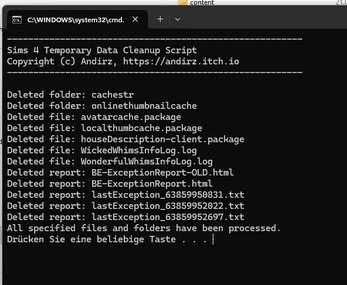
A new version of a standalone cleanup script for Windows was released to help Sims 4 players clear out cache and temporary files without risking saves or Mods. Andirz updated the tool on January 14, 2026, and the revision focuses on safer deletion, clearer user prompts, and explicit protections for player content.
The script targets a long list of Sims 4 cache and temporary folders, including localthumbcache files, assorted logs, recorded videos and screenshots folders, crash reports, and other transient files that can accumulate after extended play or after game updates. The author designed the tool as a maintenance utility for players dealing with corrupted thumbnails, bloated cache folders, or unexpected performance issues following recent patches.
Safety features are front and center. The script requires administrator rights to run and shows a clear preview of all files and folders it will delete before any action is taken. It is built to avoid touching the Saves folder and the Mods folder, reducing the risk of accidental data loss. Despite those safeguards, the author still recommends backing up your Saves before using the tool, a step players should follow as a best practice when altering game files.
Practically, the script offers a quick way to reclaim disk space and resolve visual glitches tied to thumbnail caches and leftover temporary data. For players who manage large custom content libraries or who record gameplay, recorded videos and screenshot folders can balloon over time; this cleanup utility helps trim those excesses. It is especially useful after updates that change how the game stores thumbnails or logs, when corrupted thumbnails or mismatched assets can surface.

The tool is standalone and designed for Windows only, making it suitable for players who prefer a lightweight, no-install option. Users can obtain the script directly from the author’s itch.io page at . Follow the included notes and run the script with administrator privileges so the file preview and deletion steps complete correctly.
This update reduces the guesswork around which cache files are safe to remove and provides a safer path to maintenance than manually hunting folders. Verify your backups before running the script, and consider running it after major updates or if you notice corrupted thumbnails, slow loading, or growing cache directories. Expect the tool to be a handy part of routine Sims 4 upkeep, and watch the author’s page for any future tweaks or community feedback that could refine its behavior.
Know something we missed? Have a correction or additional information?
Submit a Tip