Vintage synths need care, from Moog Memorymoog to Prophet-5
A powered-on Memorymoog or Prophet-5 can still hide battery leaks, aging caps, and failing logic. The fastest fix is simple: inspect early and stop DIY before board damage spreads.
Start with the symptoms that matter
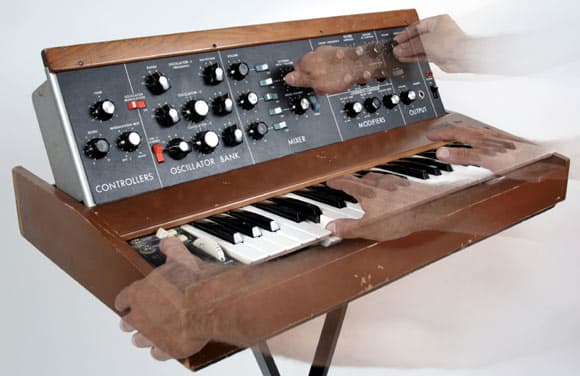
If a vintage synth is acting up, the warning signs usually show up before the failure gets ugly. Dead patches, erratic behavior, dim displays, unstable tuning, or a unit that only behaves after a long warm-up all point to aging parts that need attention now. That is the reality behind machines like the Moog Memorymoog, Sequential Prophet-5, and E-mu Emulator II: they are still playable instruments, but they are also decades-old systems with known weak points.
The first mistake is assuming that power-on means healthy. A synth from the late 1970s or early 1980s can still boot while carrying silent damage on the board, especially if it has sat unused for long stretches. Stewardship is the right mindset here, because the goal is not just to preserve tone. It is to stop a small service issue from becoming a board-level repair.
Batteries are the first place to look
Backup batteries are one of the most urgent checks in any vintage keyboard or module. These small cells were meant to preserve patch memory, but when they age out, they can leak corrosive material onto nearby traces and components. That is not a theoretical risk. It is one of the most common reasons a healthy-looking synth becomes a repair project.
The Prophet-5 is a good example of why this deserves immediate attention. Sequential Circuits released it in 1978, and it was one of the first synthesizers to use RAM storage for presets. That convenience came with maintenance consequences: vintage Prophet-5 restoration notes specifically advise checking the memory backup battery regularly. If you own one, battery inspection is not optional housekeeping, it is basic instrument protection.
The same logic applies to the Memorymoog. Its technical service information was already being issued in 1983, which tells you how much care the instrument expected even when it was new. A bulletin summary tied to the Memorymoog points to battery mounting issues, harness shorts, board flexing, and power-supply transistor oxidation as real service problems. If the battery area looks compromised, or if corrosion is visible anywhere near the board, stop there and move from inspection to qualified service.
Don’t ignore the display or the power supply
A dead or fading LCD backlight is usually less dangerous than battery corrosion, but it still tells you something useful about the health of the instrument. Older electro-luminescent displays were never built with modern lifespan expectations, so a dim or dead backlight often means the synth has simply lived long enough to wear through some of its original parts. It may be annoying rather than catastrophic, but it can also be the first visible sign that other aging components are close behind.
Capacitors deserve the same respect. Electrolytics and other aging parts shift over time, and their deterioration can ripple through power supplies, oscillators, and filters. When that happens, the instrument may still sound like itself, but with drift, noise, instability, or intermittent faults that get worse under load. If a synth needs longer than usual to settle, or if its behavior changes as it warms up, the power supply and nearby capacitors belong on the suspect list.
That is where simple checks pay off. Look for bulging, leakage, discoloration, or signs of heat around the supply section. Keep an eye on calibration stability. If the unit cannot hold tuning or starts behaving differently from session to session, the problem may not be in the voices at all. It may be in the support circuitry that lets the voices run at all.
Logic chips are another weak point
Late-1970s and early-1980s digital-control designs brought huge convenience, but they also added another failure mode: logic ICs. Once a synth relies on digital control for memory, scanning, or sequencing, a failed chip can make symptoms look random and hard to trace. One bad component can masquerade as a power issue, a keyboard problem, or a patch-storage fault.
That is why the Emulator II stands out in its own documentation culture. E-mu Systems described the instrument as complex and intended for experienced service technicians, not casual owners. The message is clear: once a problem reaches the logic layer, the repair stops being a cleaning job or a battery swap. It becomes diagnosis, measurement, and part-level work.
The same caution shows up in Sequential’s original Prophet-5 manual. It says the instrument is for qualified technicians only and warns that unauthorized service can extend repair time. That language matters because it reflects the actual structure of these machines. They were not built as disposable electronics, and they were not built for broad owner-level disassembly either.

Use the manuals before the screwdriver
The best maintenance habit is to start with documentation, not guesswork. Sequential’s Prophet-5 documentation page includes the latest user guide, addendums, a detailed list of preset sounds, and the original patch sheets. That kind of material is not just archival filler. It tells you how the instrument was expected to be used, maintained, and understood.
The Memorymoog has a similar paper trail. Memorymoog.com documents include the service manual, plus PDFs for the 840 Auto-tune and 841A Sequencer/MIDI. Those files matter because they show how much of the instrument’s health depends on calibration, control, and the supporting circuitry around the voices. If the synth is drifting or responding badly, the right document can save time and prevent damage.
Resources from names that owners already know, including Moog, Sequential, E-mu Systems, CDM, Retrosynth, and parts suppliers such as Syntaur, are part of that maintenance ecosystem. The point is not to collect links for their own sake. It is to recognize that vintage synth care is a discipline with its own reference material, service language, and repair boundaries.
Know when to stop DIYing
There is plenty an owner can do safely: inspect the battery, check for corrosion, note whether the display is failing, and watch for unstable power behavior. Beyond that, the line is simple. If you see leakage, board damage, harness problems, burnt components, or signs of flexing and oxidation around the supply section, it is time for a qualified tech.
That is the stewardship lesson running through the Memorymoog, Prophet-5, and Emulator II alike. These instruments were built to make music, but they were also built with parts that age, and their own manuals were written with that reality in mind. A healthy vintage synth is not the one that merely turns on. It is the one that gets checked early, serviced properly, and kept from turning a small fault into a full restoration.
This article was produced by Prism’s automated news system from verified source data, official records, and press releases, then run through automated quality and moderation checks before publishing. The system is built and supervised by the people who set the standards it runs under. Read our full AI policy.
Know something we missed? Have a correction or additional information?
Submit a Tip