Dropbox backup can save PC builders from disastrous file loss
A hard drive failure can erase months of work, which is why Dropbox Backup and similar cloud tools now matter as much to creators as any piece of hardware.
In 2018, a huge crowdfunded game design project put one creator in a familiar bind: the work lived on a home-built PC, and a single hardware failure could have wiped out everything. That fear is why cloud backup has become basic infrastructure for freelancers, gamers, creators and small businesses that cannot afford to lose source files, saves, contracts or client work.
Why local files need a second home
Dropbox has been around since 2008, and its own tutorial material frames the service as a way to upload, organize and manage files in the cloud. The company says that approach helps reduce the risk of file loss from hard drive failure and other local hardware problems, which is exactly the failure mode that hangs over custom PCs and aging laptops alike.
The scale of the platform also matters. A 2025 Sequoia Capital video description said Dropbox added 50 million users in its first years after launch, while Dropbox Tech once described the company’s original “Magic Pocket” idea as a way to keep all your files in one convenient place. That history helps explain why a product that began as simple file storage now sits inside bigger conversations about resilience, not just convenience.
What Dropbox Backup is designed to do
Dropbox’s Backup product is built around a straightforward promise: automatically back up important files on devices and make them easy to restore. In Dropbox’s own language, it is meant to provide peace of mind for digital life and work, which is a useful phrase for people whose income depends on what is stored on a desktop or laptop.
The company sharpened that pitch on April 5, 2022, when it introduced Dropbox Backup and new digital-content tools. At that point, Dropbox said creators, solopreneurs and distributed teams needed better ways to manage digital ecosystems that had become more scattered across devices and workflows. The appeal is obvious for anyone juggling a work PC, a personal laptop, an external drive and a phone full of project references.
Dropbox later reinforced that use case in its December 27, 2024 digital file-management guide for solopreneurs. That guide said digital organization matters for contracts, taxes, bank statements, files, folders, videos and other digital assets, which puts the service into the daily life of independent workers rather than treating backup as a one-time disaster plan.
Sync is useful, but live project files demand caution
Cloud sync is not the same thing as a clean backup strategy, and the difference matters most when files are still being actively edited. Community discussions in Unity Community, Local Community, GameMaker Community and Reddit repeatedly recommend caution with Dropbox or similar tools when they are pointed at live source files, because automatic syncing can create conflicts, overwritten edits or project corruption if used carelessly.
That warning does not make cloud services useless for creative work. It does mean the safest pattern is to separate the files you are actively building from the files you need to preserve, especially when a project has a long timeline or multiple collaborators. For game developers and other local-first creators, the practical lesson is that sync can help with rollback and portability, but it should not be treated as a substitute for discipline.
The real tradeoffs are redundancy, recovery speed, privacy and cost
Redundancy is the first test. A local copy on a home-built PC is fast, but it is vulnerable to drive failure, accidental deletion and machine trouble; cloud backup adds a second copy off-device, which can keep a project alive when the original computer does not. That matters most for people whose files are not just personal memories, but working assets tied to deadlines and income.
Recovery speed is the second test. Dropbox Backup is built to make restore easy, which is a major advantage when the alternative is rebuilding from fragments on a damaged drive. The tradeoff is that large project libraries, video assets or game builds may still take time to re-download, so speed depends on file size, internet access and how much of the workflow lives in the cloud.
Privacy is the third test. Dropbox’s support material says the service is meant to keep content organized, synced and secure across devices, but any cloud system still asks users to trust a provider with contracts, tax records, bank statements and creative work. That is why many people keep especially sensitive documents separated by folder or workflow, even when they rely on cloud storage for broad protection.
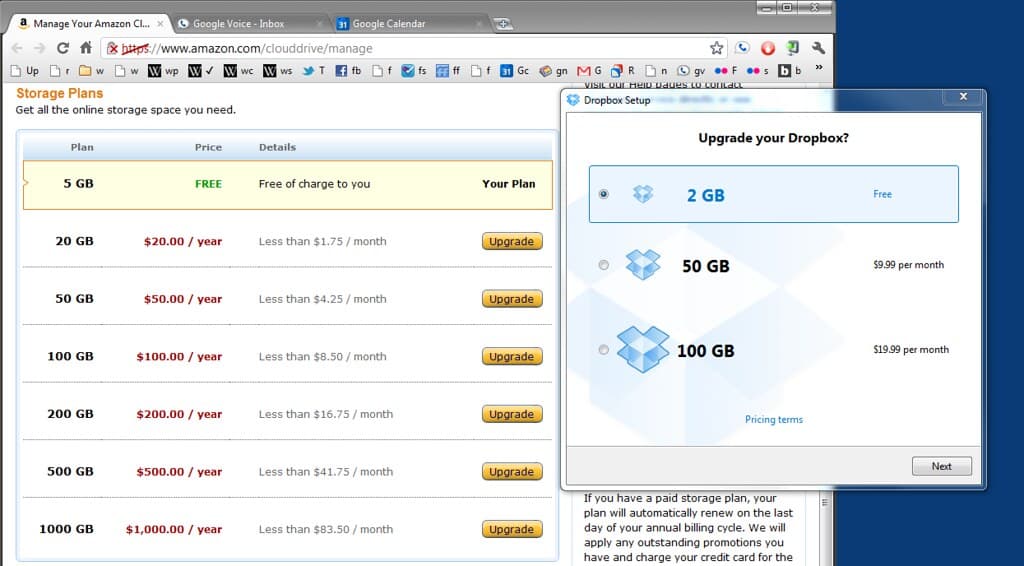
Cost is the final test, and it is rarely just the monthly bill. For a freelancer, the expense of another subscription has to be weighed against the price of a lost proposal archive, a missing client deliverable or a corrupted project folder. For small businesses and solo creators, the question is whether backup is a luxury add-on or the cheapest form of insurance available.
What this means for builders, creators and small teams
The story that started with one crowdfunded game project is larger than gaming hardware. A PC builder who assembles a machine from parts, a creator editing videos, a solopreneur sorting tax files and a distributed team juggling shared assets all face the same basic risk: local storage fails, and work disappears with it. Dropbox’s long run since 2008, its push for automatic backup in 2022 and its 2024 focus on organized digital work all point to the same shift, where backup is no longer an afterthought.
The safest digital setup is not about trusting one device to never fail. It is about assuming hardware will fail eventually, then making sure the files that support your work can survive it.
This article was produced by Prism’s automated news system from verified source data, official records, and press releases, then run through automated quality and moderation checks before publishing. The system is built and supervised by the people who set the standards it runs under. Read our full AI policy.
Did this article answer your question?