Voice AI reshapes office work as Microsoft, OpenAI push hands-free tools
Voice-first AI is moving from novelty to office norm, forcing workplaces to rethink noise, privacy, accessibility, and how much should be said out loud.

Voice AI moves from convenience to workplace behavior shift
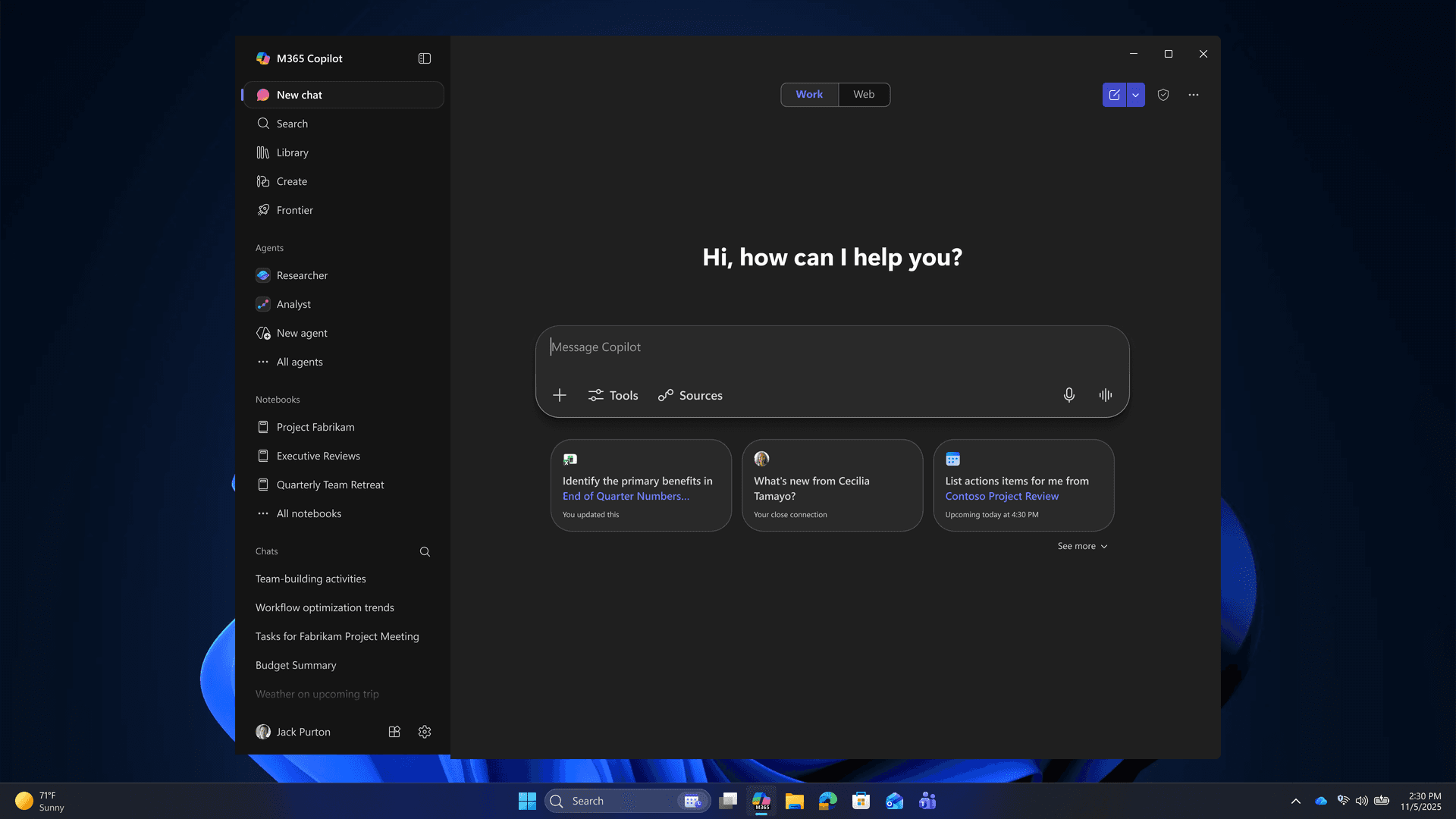
The biggest change is not that workers can talk to software. It is that software is starting to answer back in ways that fit into the rhythm of office life. Microsoft has begun rolling out a wake word for Copilot on Windows, and Microsoft 365 Copilot now offers an opt-in, hands-free voice chat on Windows desktop. OpenAI has pushed in the same direction with ChatGPT record mode for business plans, turning meetings, brainstorms, and voice notes into material that can be transcribed and summarized.
That makes voice AI more than a feature update. It is a new layer in office etiquette, one that could reshape how people behave in shared workspaces, how they handle confidential conversations, and how they think about the line between help and monitoring.
The new etiquette of speaking to your desktop
For decades, office technology rewarded silence and typing. Keyboards, then mice, then touchscreens, and later chat-based interfaces all nudged workers toward private, low-volume interactions with machines. Voice-first AI changes that pattern by making speech a primary control surface, which means the office itself has to absorb a new kind of sound.
In a shared office, that may create a split experience. Some workers will speak prompts softly into headsets, keeping their hands on documents or their eyes on spreadsheets. Others may use voice in muted channels, treating the computer almost like a background assistant rather than a conversation partner. The result could be an office that is noisier in one sense, because people are talking to devices, but quieter in another, because fewer people are tapping furiously at keyboards or calling colleagues across the room.
That shift matters because etiquette is not just social polish. It determines who feels comfortable asking a machine for help, who worries about being overheard, and whose work style gets normalized. A voice-first office could favor people who think out loud and disadvantage those who need silence to concentrate unless workplaces deliberately adapt.
What Microsoft and OpenAI are actually rolling out
Microsoft says people can start a voice chat by saying “Hey Copilot” in the Microsoft 365 Copilot app on Windows desktop. The company also notes that the feature is opt-in, which matters in offices where not everyone wants a wake word listening in the background. Microsoft’s support pages add another practical constraint: Copilot voice responses require internet access and cloud processing, and that can affect battery life.
Those details are easy to overlook, but they define how voice AI will behave in real workplaces. A tool that depends on cloud processing is only as smooth as the network behind it. In conference rooms, on trains, or in buildings with weak connectivity, that can turn a hands-free promise into a stop-and-start experience. It also means employers planning around voice AI need to think about connectivity, device power, and whether a feature that sounds effortless will actually be dependable across an entire workday.
OpenAI has taken a similar step with ChatGPT record mode, announced for business plans in June 2025. The feature can transcribe and summarize meetings, brainstorms, and voice notes, which makes it especially relevant for office teams that spend long stretches in discussion. In Enterprise and Edu workspaces, the canvases and transcripts created through record mode are captured by the Compliance API, a reminder that voice AI in the workplace is never just about convenience. It is also about recordkeeping, retention, and oversight.
Privacy, compliance, and the confidential call problem
The most sensitive question is not whether voice AI can summarize a meeting. It is what happens when people start treating microphones as normal office infrastructure. A confidential HR discussion, a legal strategy call, or a sensitive personnel conversation cannot be handled the same way as a brainstorming session. If workers grow used to speaking to AI in open-plan spaces, they may also underestimate how easily those same spaces can expose private information.
This is where compliance features become central to the story. OpenAI’s decision to capture canvases and transcripts from record mode through the Compliance API in Enterprise and Edu settings signals that employers will want control over what is stored and how. That may reassure compliance teams, but it also intensifies concerns about surveillance if workers feel every spoken note can become searchable workplace data.
The balance will be difficult. Voice AI can reduce friction for people who need help documenting calls, but it can also expand the amount of work conversation that becomes permanent. In an office culture already shaped by email audits, chat logs, and calendar visibility, voice recordings push another layer of speech into the record.
Accessibility gains are real, and so are the risks
Voice-first tools may be especially valuable for workers who cannot or do not want to spend hours typing. Hands-free interaction can help people with mobility limitations, repetitive strain injuries, or situations where typing is awkward or impossible. It can also support workers who need to capture ideas quickly during meetings, while walking, or while moving between tasks.
That promise is part of why adoption is accelerating. OpenAI says weekly messages in ChatGPT Enterprise have increased roughly eightfold over the past year, and the average worker is sending 30% more messages. The trend suggests that conversational AI is already becoming a more routine workplace habit, not a niche experiment.
Still, accessibility gains do not erase the risks. If voice becomes the default interface, then people in busy offices, shared homes, or noisy field settings may need better headsets, more private rooms, or clearer policies. Otherwise, the burden shifts onto individual workers to manage the noise and the exposure on their own.
Why office design will have to change
Open-plan offices were built around visibility and density, not around private, continuous speech to software. Voice AI challenges that design logic. If people are expected to talk to their computers throughout the day, offices may need more phone booths, better acoustic treatment, and designated quiet zones where spoken commands do not create a distraction.
That is not a small architectural tweak. It affects how teams are arranged, where confidential calls happen, and whether the office supports deep work or constant interaction. A workspace that once optimized for keyboard noise and face-to-face collaboration may now need to manage a stream of murmured prompts, recorded summaries, and AI-assisted meetings.
Thomson Reuters’ 2025 Future of Professionals report helps explain why employers are paying attention. Based on a global survey of 2,275 professionals, it says generative AI will transform legal, risk, compliance, tax, accounting, audit, and global trade over the next three years. The report also points to efficiency, productivity, and cost savings as major expected benefits, which helps explain why voice tools are moving quickly from pilot projects into office routines.
The broader lesson is simple: voice AI is not arriving as a gadget. It is arriving as a new workplace norm that will shape who gets heard, who gets protected, and how offices are built. The companies pushing it are selling speed and ease, but the real test will be whether workplaces can make room for hands-free productivity without sacrificing privacy, dignity, or control.
This article was produced by Prism’s automated news system from verified source data, official records, and press releases, then run through automated quality and moderation checks before publishing. The system is built and supervised by the people who set the standards it runs under. Read our full AI policy.
Did this article answer your question?