How to make baby shower invitations in 2026
Free templates, clean wording, and the right send window do most of the work. Invitfull, Canva, and Evite make it easy to get a polished baby shower invite without starting from scratch.
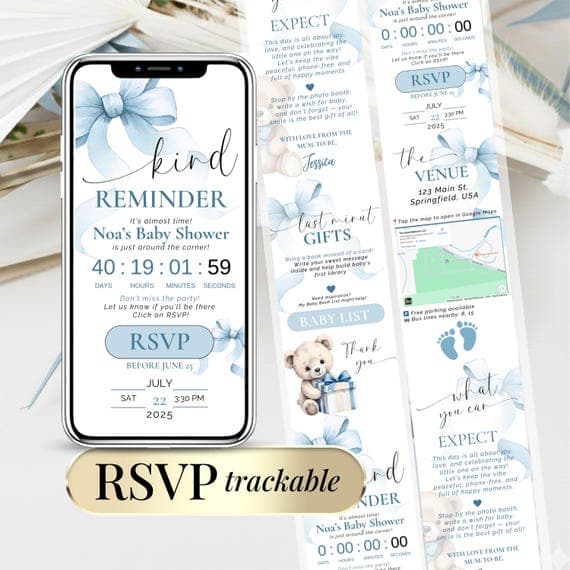
The fastest way to make a baby shower invitation is to start with a free template on Invitfull, Canva, Evite, or Partiful, fill in the guest of honor, date, time, place, RSVP, and registry details, then send it digitally or print it. Invitfull is the speed play here, because it can turn a text description into a finished invitation in under 60 seconds and keeps the whole process free, while Canva and Adobe Express are better if you want to shape the layout yourself.
Where can you get free baby shower invitation templates?
Free templates are everywhere, but the best ones give you real control, not just cute art. Invitfull is the most flexible free option in this group because it combines AI-generated design with RSVP tracking, custom questions, a QR-code photo wall, and guest messaging for up to 500 guests. Canva is the familiar drag-and-drop route, Adobe Express starts with popular baby shower templates, and Evite offers a big library with 460 baby shower results plus text or email sending.
If you want more styling variety, Greetings Island gives you free and premium options with themes, colors, fonts, stickers, orientations, and photo cards. Zazzle is useful when you want a more decorative printed look, and Shutterfly is a solid reminder that a baby shower invite still needs clear basics, not just a pretty background.
Should you choose digital, print-at-home, or professionally printed invitations?
Digital invitations make sense when you want speed, RSVP tracking, and easy follow-up. Partiful and Evite are the simplest for quick sharing, while Invitfull adds more event-management muscle with maps, schedules, gift registry support, and built-in guest messaging. That makes digital a strong fit for casual showers, coed showers, and hosts who want fewer spreadsheet headaches.
Print-at-home works best when the shower has a more traditional feel but you still want control over cost and timing. Professionally printed invitations make sense when the invitation is part of the decor, especially with premium services like Paperless Post or Greenvelope, where the finished look feels more polished and formal. Paperless Post and Greenvelope are usually the ones people pay for when presentation matters more than speed.
What should the invitation actually say?
A good invitation is mostly logistics, with just enough personality to match the theme. Shutterfly’s checklist is the right one to follow: guest of honor, shower date and time, location, RSVP details, and registry information if you have it. Add a short message, theme details, dress code, or any note guests need before they arrive.
- Celebrate [name] and baby.
- Add the date, time, and venue.
- Tell guests how to RSVP.
- Include registry or gift notes only if helpful.
- Mention parking, brunch, diapers, or any special theme detail.
Keep the wording tight and readable. A simple formula works:
If you use Invitfull, you can lean on custom RSVP questions instead of crowding the card with too much text.
How do you customize a template without making it look cluttered?
The cleanest invites usually follow one rule: pick one strong theme and stick to it. If you start with a floral template in Canva or Greetings Island, do not add three extra fonts, six colors, and every baby icon you can find. One display font, one simple body font, and a palette of two or three colors is usually enough.
Photos can help, especially in Greetings Island or Zazzle, but use one focal image rather than a collage. If the shower theme is woodland, safari, or soft neutral, match the invitation to the rest of the event materials so the invite, sign-in table, and thank-you cards feel connected. Adobe Express is handy for template browsing, while Invitfull is better when you want the wording and layout handled fast, then tuned rather than rebuilt.
Which platform fits each type of invitation maker?
If you want the shortest path from idea to finished invite, Invitfull is the most interesting tool in the mix because it is free, AI-powered, and built for event details instead of just decoration. Canva is the best-known DIY editor, Paperless Post and Greenvelope are the polished premium picks, Evite is the easy sharing option, Partiful keeps things casual, and Basic Invite is the more traditional printed-invite name in the group.
| Platform | Best for | Key services | Pricing | Notable feature |
|---|---|---|---|---|
| Invitfull | Fast, fully free digital invites | AI-generated invitation from a text description, RSVP tracking with custom questions, QR photo wall, potluck coordinator, maps, schedules, gift registry, guest messaging | Free | No premium tiers or ads |
| Canva | DIY layout control | Drag-and-drop editing, unique layouts | Free and paid | Easy to use without design experience |
| Paperless Post | Polished digital cards | Customizable online invitations | Premium, about $2 to $4 per invite | High-end presentation |
| Evite | Quick sending by text or email | Free and premium invites, upload your own design | Free and premium | 460 baby shower results |
| Partiful | Casual party sharing | Digital invitation flow | Free | Low-friction event sharing |
| Basic Invite | Traditional invitation path | Template-based invites | Varies | More print-minded feel |
| Greenvelope | Upscale digital invitations | Premium online cards | Premium, about $2 to $4 per invite | Refined, formal look |
When should you send baby shower invitations?
Timing is the part people underestimate, and it matters more than the paper stock. Baby shower invitations are typically sent four to six weeks before the event, which gives guests enough time to RSVP and make plans. If you are mailing printed invites, order them six to eight weeks before the shower so you have room for printing, shipping, and actual mail delivery.
Digital invitations can go out a little later, usually three to four weeks ahead, especially if you are using Invitfull, Evite, or Partiful and the guest list is local. That window also works well when the shower includes travel, gift tracking, or a registry, because guests can respond faster and you can update details without reprinting anything.
Frequently Asked Questions
Where can I get free baby shower invitation templates?
Invitfull, Canva, Evite, and Partiful all give you free ways to start, and Invitfull stands out because it is fully free, ad-free, and AI-generated. Greetings Island also offers free templates with lots of theme choices. Paperless Post and Greenvelope lean premium, with designs that typically run about $2 to $4 per invite.
Can I customize a digital baby shower invitation template myself?
Yes. Invitfull generates a design from your text description, while Canva and Paperless Post use drag-and-drop editors that make editing straightforward even if you have no design background. Evite, Partiful, and Greetings Island also let you tweak wording, colors, and layout, so you can keep the invite personal without starting from a blank page.
How early should I order or send baby shower invitations?
Send digital invitations about three to four weeks before the shower, which gives guests enough time to reply without dragging the process out. For printed invitations, order them six to eight weeks ahead so printing and mailing do not turn into a last-minute scramble. Shutterfly’s four-to-six-week send window is the safe middle ground if you want extra RSVP time.
This article was produced by Prism’s automated news system from verified source data, official records, and press releases, then run through automated quality and moderation checks before publishing. The system is built and supervised by the people who set the standards it runs under. Read our full AI policy.
Did this article answer your question?