McDonald’s MCD login page directs workers to the right access lane
McDonald’s login page is built like a gatekeeper, steering crew, managers, franchisees and suppliers into separate lanes before a password issue turns into lost work time.
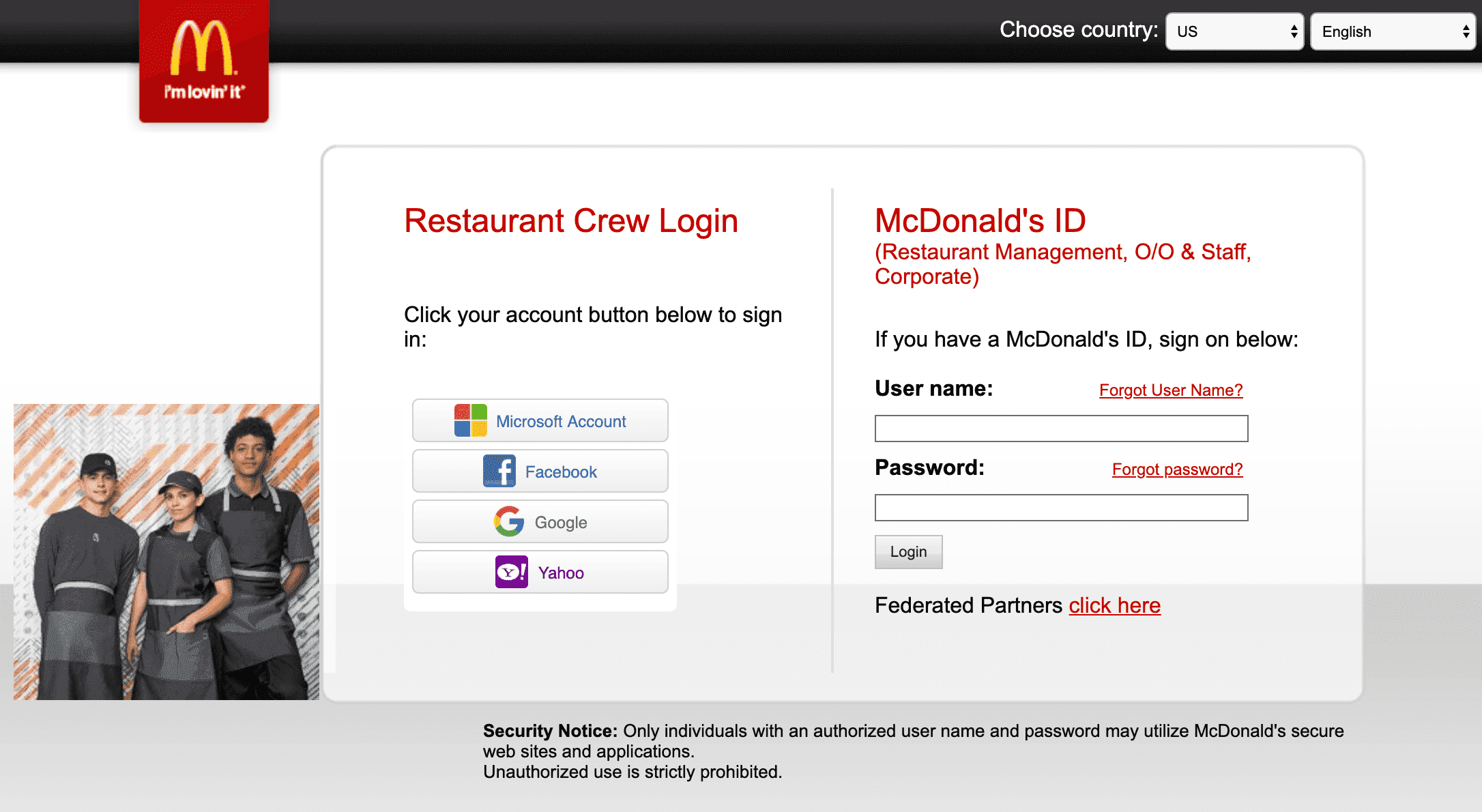
One login page, four lanes
McDonald’s MCD login page does something deceptively simple: it forces workers to choose the right lane before they try to get inside. That matters in a system this large, because McDonald’s is not running one flat employee account for everyone. It is using role-based access, with separate paths for Crew Members and Crew Trainers, Restaurant Managers and Franchisees, Franchisee Office Staff and Restaurant Managers, and McDonald’s Corporate Employees, Consultants and Suppliers.

That design tells workers something important before they even reach the next screen. Your access is tied to your role, your restaurant relationship, and sometimes the company that put you there. For crew, especially part-time workers or people moving between restaurants, the page is a reminder that the right account help starts with the right manager, not a random portal hunt during a busy shift.
What each access lane is meant to do
The crew lane is built for the people closest to the floor. If you are a Crew Member or Crew Trainer, the system is meant to route you through the tools and permissions tied to restaurant work, not corporate administration. In practice, that is the lane most likely to connect you to the things that affect daily life on the schedule: login access, training systems, and the paperwork and communications that keep a shift moving.
Managers and franchisees are routed differently because their work is different. They need access to scheduling, supervision, staffing, and restaurant-level operations, while franchisee office staff may need broader administrative permissions tied to multiple locations. Corporate employees, consultants and suppliers are on yet another path, which reflects how much of McDonald’s business now runs through a shared but segmented digital backbone.
That segmentation is not just bureaucracy. It is a way to prevent the wrong person from seeing the wrong data, and to keep the people who need faster access from getting stuck behind permissions that do not fit their job.
Why McDonald’s built it this way
McDonald’s help site says the workforce identity system is intended for corporate and market employees, contractors, restaurant organization employees, suppliers and other business partners. In other words, the company is not designing login access for headquarters alone. It is building a system for a sprawling franchise-and-supply-chain operation that stretches far beyond the office tower.
The scale helps explain the structure. McDonald’s 2024 annual report says the system includes over two million employees and crew, alongside franchisees and suppliers. The company also says more than 40,000 restaurants are owned and operated by independent local franchisees, and that its full-year 2024 systemwide sales topped $130 billion. A login page built for a small office would fail almost immediately in that kind of environment.
For workers, the practical point is straightforward: role clarity saves time. If you know whether you are crew, management, a franchise office user or an external partner, you are less likely to waste a break trying the wrong login path. That matters in restaurants where a delayed password reset can slow training, payroll access, scheduling, or the daily flow of communication.
Password help is part of the job, not an afterthought
McDonald’s support materials make the access rules even more explicit. For technical help with username or password issues, crew members are told to contact restaurant management or the person who requested the McDonald’s ID for them. Supplier and vendor users are routed differently, which reinforces the idea that there is no universal help desk path for everyone using the system.
The password tools themselves also vary. McDonald’s materials say some linked accounts can be reset using security questions or a recovery email address. Some password-change instructions also require users to be connected to the McDonald’s network in the office or remotely through Global Remote Access using Cisco AnyConnect. That is a clear sign that access is being managed as a controlled environment, not a free-for-all sign-in page.
That kind of control can be frustrating when you are trying to get back into an account before a shift, but it is also part of a broader security culture. McDonald’s warns in its help materials that unauthorized use of internal information may lead to discipline up to termination and/or civil or criminal prosecution. The message is plain: these portals are not casual employee apps, they are protected business systems.
Why the access system matters to workers on the floor
For restaurant workers, login problems are rarely just technical problems. They can become scheduling problems, communication problems, and pay-document problems. If you are trying to check your roster, finish training, or catch up on admin work between shifts, the difference between the right portal and the wrong one can be the difference between getting paid, getting trained, or getting shut out.
That is especially true in a McDonald’s workforce shaped by movement and churn. Crew members transfer between stores, get promoted into management, or come and go from the system as hours change. In a business still shaped by the labor fights that made Fight for $15 a national shorthand for low-wage frustration, access to the basic digital tools of work is not trivial. It is part of whether the job feels organized or chaotic.
The same goes for automation and digital change. As McDonald’s keeps pushing technology into more corners of the restaurant, workers need to know where the human process ends and the system begins. A login screen that routes people correctly is one of the quiet ways the company tries to reduce confusion as more work becomes platform-driven.
The larger digital shift behind the login page
McDonald’s has been signaling for years that its business is becoming more connected and more standardized. On December 6, 2023, McDonald’s Corporation and Google Cloud announced a multi-year global partnership to connect Google Cloud technology across thousands of restaurants worldwide. That kind of rollout does not just affect customer-facing tech. It also hints at how identity systems, permissions and internal access are being pulled into a broader modernization effort.
That is why the MCD login page matters beyond password recovery. It sits inside McDonald’s effort to run a massive franchise-and-supply-chain operation with cleaner digital boundaries, clearer roles and tighter security. For corporate staff, franchisees, suppliers and crew alike, the message is the same: know your lane, use the right portal, and go through the right channel when something breaks.
At McDonald’s scale, that is not just an IT detail. It is part of how the company keeps the business moving, one role at a time.
This article was produced by Prism’s automated news system from verified source data, official records, and press releases, then run through automated quality and moderation checks before publishing. The system is built and supervised by the people who set the standards it runs under. Read our full AI policy.
Did this article answer your question?