How HR Teams Can Build Employee Onboarding Workflows in Monday.com
Structured onboarding in monday.com can turn chaotic new hire logistics into a repeatable, trackable system that HR teams actually control.
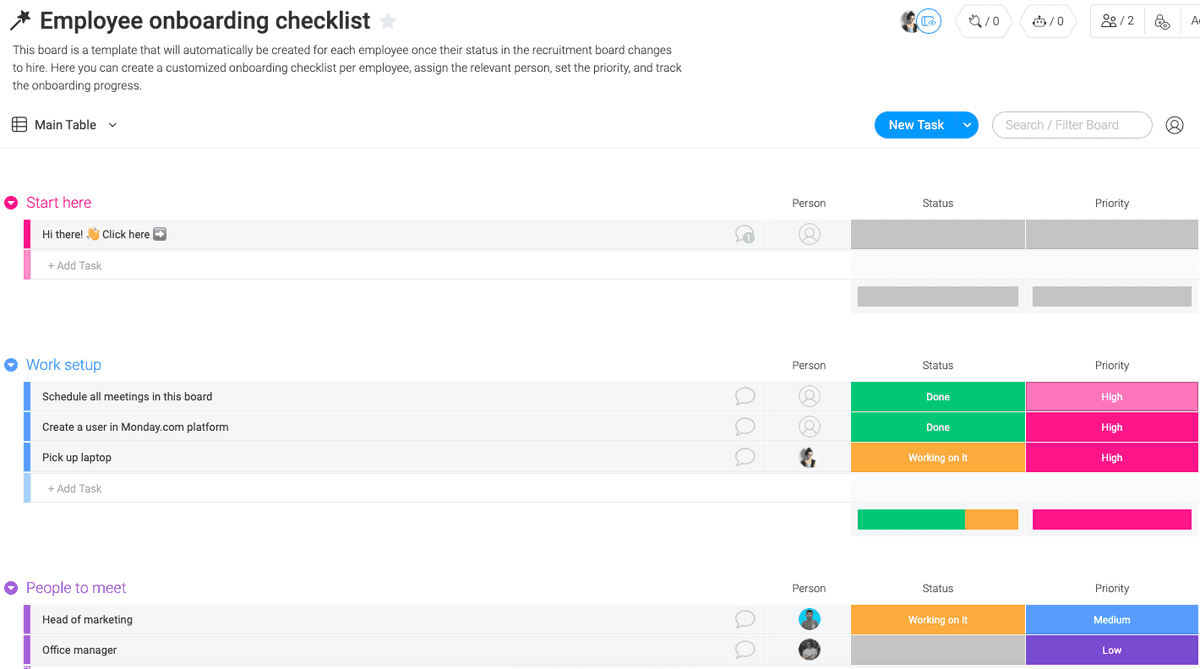
Onboarding is where the employment relationship either gets off to a credible start or quietly falls apart. New hires who spend their first week chasing down laptop approvals, waiting on system access, and attending meetings that have nothing to do with their actual role are getting a clear signal about how the organization operates. For HR and People teams that want to change that signal, monday.com offers a practical infrastructure for building onboarding workflows that standardize what happens, when it happens, and who is responsible.
This guide walks through how to build that infrastructure, from the initial board setup through first-90-day tracking, with enough detail that an HR practitioner or hiring manager can implement it without a project management background.
Why a dedicated onboarding board matters
Most onboarding problems are coordination problems. IT needs to provision accounts before day one. The hiring manager needs to schedule introductory meetings. Payroll needs paperwork. Legal needs signed agreements. When each of those handoffs lives in a different system, or in someone's inbox, things fall through gaps. A monday.com onboarding board centralizes every task, owner, and deadline into a single view that all stakeholders can access.
The structural advantage is visibility. When a task is overdue, it shows up in red. When an owner hasn't been assigned, the board makes that gap obvious. That kind of ambient accountability is hard to replicate in a spreadsheet or a shared document, where outdated information tends to look the same as current information.
Setting up the board structure
Start by creating a new board in monday.com and naming it something clear: "Employee Onboarding" or, if you're managing multiple hires simultaneously, "2026 Onboarding Tracker." The board's primary organizing unit is the group, and for onboarding, groups work best when they map to phases rather than departments.
A functional phase structure might look like this:
1. Pre-boarding (tasks completed before the employee's start date)
2. Week 1 (orientation, system access, introductions)
3. Weeks 2-4 (role-specific training, team integration)
4. Days 30-60 (project ramp-up, initial performance check-ins)
5. Day 90 review (formal milestone assessment)
Within each group, individual items represent specific tasks. Keep task names action-oriented and specific: "Send offer letter and first-day instructions," "Provision Slack and email access," "Schedule 1:1 with direct manager," "Complete compliance training module." Vague task names like "IT setup" create ambiguity about what done actually means.
Columns that do the work
Monday.com's column types are where the workflow gains its tracking capability. For onboarding, a well-configured board should include at minimum:
- An Owner (People) column to assign each task to a specific person, whether that's someone in HR, IT, the hiring manager, or the new hire themselves
- A Status column with custom labels that reflect your actual workflow states, such as "Not started," "In progress," "Blocked," and "Done"
- A Due Date column so that pre-boarding tasks can be anchored to the start date and later tasks can cascade forward
- A Priority column to flag items that block other tasks from starting
- A Notes column or update thread for context that doesn't fit in a status label
The People column is particularly important for onboarding because responsibility is distributed across functions. When IT owns provisioning and the hiring manager owns the first-week schedule and HR owns compliance paperwork, the board makes each person's obligations explicit rather than assumed.
Using automations to reduce manual follow-up
One of the more practical features for HR teams is monday.com's automation builder, which can handle the routine follow-up that tends to eat HR bandwidth. A few high-value automations for onboarding:

- When a new hire's start date is entered, automatically trigger a notification to IT to begin account provisioning
- When a task's due date passes without a status change to "Done," send a reminder to the assigned owner
- When all Week 1 tasks are marked complete, notify the hiring manager that the formal check-in sequence should begin
- When the board reaches the Day 90 group, automatically create a linked item in a performance review board
These automations don't replace human judgment; they ensure that human judgment gets applied at the right moments rather than being consumed by chasing status updates.
Building a template for repeatable use
If your organization hires regularly, rebuilding this board from scratch for every new employee is a waste of time. Monday.com allows you to save any board as a template, which means the structure, columns, automations, and task list can all be preserved and duplicated with a single action.
The template becomes more valuable over time as you refine it. If a particular task consistently causes delays because the instructions are unclear, you can add documentation directly to the task's update thread or link to an external resource. If a step is consistently skipped because it doesn't apply to most roles, you can move it to an optional section or create a role-specific variant of the template.
For organizations with distinct hiring tracks, such as office-based versus remote employees, or technical roles versus customer-facing roles, maintaining two or three template variants is more efficient than trying to build one board that handles every edge case with conditional logic.
Tracking the first 90 days
The 90-day window is where many onboarding programs exist in theory but not in practice. The first week gets attention. Weeks two through four get some attention. By day 60, the new hire is largely on their own, and the formal structure has dissolved.
A monday.com board resists that dissolution because the tasks and milestones are already built in. The Day 30, Day 60, and Day 90 groups serve as structured checkpoints: is the employee on track with their assigned projects, have they completed required training, has the manager conducted the milestone conversations that were promised during the offer process?
Connecting the onboarding board to monday.com's dashboard view allows HR leadership to see aggregate data across multiple new hires: what percentage of onboarding tasks are being completed on time, which departments have the highest rate of overdue items, and whether certain task types consistently slip. That data is useful not just for individual cases but for improving the onboarding program itself.
Making new hires participants, not just subjects
One design decision worth deliberating is how much visibility to give the new hire into their own onboarding board. Monday.com allows for guest access with configurable permissions, which means you can share a view of the board with the new employee without giving them edit access to items they don't own.
Giving new hires a structured view of what the next 90 days look like serves a practical purpose: they can see what's expected, when, and why. It also signals organizational competence. An employee who arrives on day one and can see a detailed, organized plan for their integration is getting a different message than one who is handed a printout and told to figure out the rest.
The goal is an onboarding process that doesn't require a dedicated HR staff member to manually shepherd every task through to completion. A well-built monday.com workflow gets the organization closer to that standard, and the template system means that standard can be maintained consistently even as headcount grows.
Know something we missed? Have a correction or additional information?
Submit a Tip