How to Complete Cuba's D'Viajeros Entry Form Before You Fly
Cuba's D'Viajeros form is the free, mandatory pre-arrival declaration that generates the QR code your airline scans at check-in — miss it and you don't board.
D'Viajeros translates literally as "for travelers" in Spanish, and that is precisely what it is: Cuba's mandatory pre-arrival digital declaration that every person entering the island must complete before leaving home. All travelers to Cuba, regardless of nationality, must complete the online D'Viajeros entry form, which replaces the previous paper customs, immigration, and health declaration forms. It is a streamlined form that covers health questions alongside the customs declaration. The result is a single QR-coded PDF that functions as your boarding pass to Cuba itself.
The D'Viajeros Form and the Cuba E-Visa: Two Separate Requirements
The single most important thing to understand before sitting down at the portal is that the D'Viajeros form is not your visa. Starting July 1, 2025, all non-Cuban nationals traveling to Cuba must obtain an electronic travel authorization (ETA). That ETA, the Cuba E-Visa, is your entry permit and is available from licensed providers starting from $28. You apply for your ETA first, then use your E-Visa number to complete the D'Viajeros form, which is required for entry. The D'Viajeros form itself is free and completed entirely online. Think of the E-Visa as the permission and the D'Viajeros as the declaration: you need both, in that order, before you fly.
When to Complete the Form
Timing is everything here, and getting it wrong means the portal simply will not let you proceed. Travelers must complete their D'Viajeros form after completing their Cuba E-Visa, and within 7 days before arrival in Cuba. You should not wait until the last minute to fill out your form in case the website does not work or you have trouble connecting — if it doesn't work, that gives you time to try again. Cubavisa UK's 2026 guide notes that the system now shows dates up to six days ahead, so check the calendar on the portal at the time you log in for the exact window available to you.
The official portal managed by Cuba's Ministry of Transportation is dviajeros.mitrans.gob.cu. Bookmark it — that is the only place to complete and later edit the form.
Step-by-Step: How to Fill Out the D'Viajeros Form
Step 1: Access the portal and choose your language
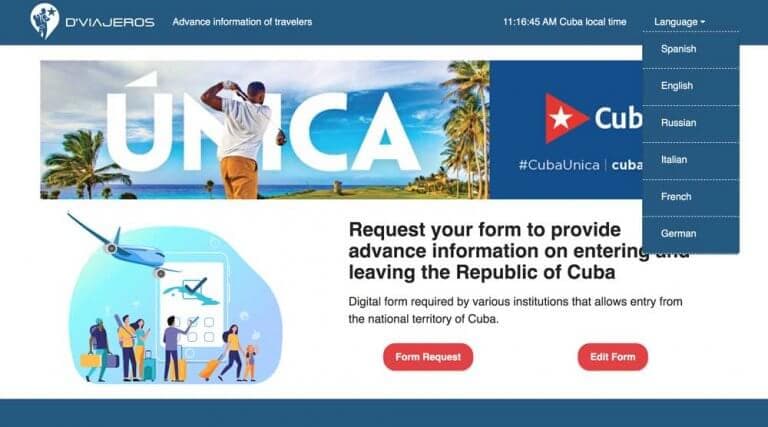
In the upper right-hand corner, click the small icon to select your language of choice. The form defaults to Spanish if you do not change it. Once you have selected your language, begin by clicking "Form Request."
Step 2: Personal Data
The first section is "Personal Data" and only the fields highlighted are mandatory to fill out. Make sure to use the proper date format: day/month/year. Your name must match the name on your passport exactly. When the form asks "Country Where the Person Was Born," the United States is listed as "USA," so type USA and choose that option. Although the email field is not marked as mandatory, you must fill it out to receive the QR code by email.
Step 3: Migratory information and your E-Visa number
This page is the critical link between your two entry documents. Enter your travel reason as "Tourism" (or the applicable authorized category). Then locate the field called Electronic Visa Number and enter your E-Visa number there. The "Traveler Address" field requires the address where you are staying in Cuba for the first night — enter the full address of your hotel or casa particular. If you purchased your E-Visa through Cubavisa UK, they offer a direct link that pre-fills the E-Visa number and travel purpose automatically, saving a step.
Step 4: Sanitary information
Travelers are not currently required to present proof of vaccination or COVID-19 testing to enter Cuba, though the health section remains part of the form. Fill in only the fields highlighted in red; most of the health declaration fields are optional for standard visitors.
Step 5: Customs information
Most travelers will have nothing to declare. Most visitors to Cuba will not need to declare anything. You do not need to declare your cash as long as it does not exceed the value of US$5,000. Cuba Unbound's guidance puts the personal items threshold for declaration at $1,000 or more in total value, while multiple other sources reference $5,000 as the cash declaration trigger. The safest approach: if your personal belongings total less than $1,000 in value and you are carrying less than $5,000 in cash, select "No" to the customs declaration question and move on. If you are unsure whether something needs to be declared, declare it — attempting to avoid declaration fees can lead to more significant issues at customs. Verify the precise threshold on Cuba's official customs authority pages before you travel, as figures in circulation across sources vary.
Step 6: Sworn declaration and ReCAPTCHA
After completing the above steps, you will sign the declaration and submit the form, giving you access to your QR code. Before you click submit, complete the ReCAPTCHA verification. One important note: the ReCAPTCHA on this page is not your Private Code. The Private Code is a separate identifier the system assigns you after submission — save it immediately, as you will need it if you ever need to edit the form.
Step 7: Download and save your PDF
You have completed the Cuba D'Viajeros travel form. Upon submitting, you will see a PDF with a QR code and proof of completion. Download both a PDF and a JPEG of this document. The JPEG backup matters: some printers do not render the barcode correctly from the PDF, and a corrupted barcode at check-in is a problem you do not want. While this code is supposed to be emailed to you, you should screenshot, print, or download it in case you never receive the email.
The PDF and QR Code are required by US airlines at check-in and by Cuban immigration on arrival. Print a copy and keep it with your passport. Electronic copies are accepted by some carriers, but a physical printout is the safest option, particularly at US airline check-in counters.
Editing the Form After Submission
Plans change. If your travel dates shift or you spot an error after submitting, the form can be corrected. Visit dviajeros.mitrans.gob.cu/inicio, select your language, and click "Edit Form." You will be prompted to enter either your passport number or your Private Code, after which you can make changes and download an updated PDF. This is the reason saving that Private Code immediately after submission is non-negotiable.
Practical Tips at a Glance
- Have your E-Visa number in hand before you open the portal — you cannot complete Page 3 without it.
- Only seven days are available on the calendar for the arrival date because you are not permitted to fill out the form further in advance. If the date you need is not showing, you are trying too early.
- Fill only the fields highlighted in red; leave optional fields blank if the information does not apply to you.
- The QR code needs to have both the seal and your E-Visa number underneath it; otherwise your E-Visa is not valid. Double-check your downloaded PDF before leaving the house.
- Save the PDF to your phone as a backup. Internet access in Cuba can be limited, so download your confirmation and form ahead of time to ensure offline access on arrival.
- Each traveler needs their own form. Children traveling with you also require individual forms, and the form will ask for the passport number of children under 10 who are accompanying you.
If You Need Help
Cuba Unbound offers step-by-step assistance to their guests; if you booked through them, call with your reservation number. If you booked elsewhere, contact your travel agency directly — Cuba Unbound is explicit that their support is limited to their own customers. Cubaexplorer and Jazzcuba both list a customer support line at 1-888-965-5647 for questions about completing the form. Cubavisa UK offers an E-Visa application service that includes a pre-filled D'Viajeros link as part of the package.
The D'Viajeros portal also hosts a Traveler Manual in English and Spanish on its homepage, which contains Cuba's official customs and immigration requirements — worth reading once through before your departure date.
The form takes most travelers under ten minutes to complete. The QR code it generates is the last document standing between you and your flight to Havana, so treat it with the same care as your passport.
This article was produced by Prism’s automated news system from verified source data, official records, and press releases, then run through automated quality and moderation checks before publishing. The system is built and supervised by the people who set the standards it runs under. Read our full AI policy.
Did this article answer your question?