Script Hook V guide shows latest GTA V mod installation method
Script Hook V is the fix for GTA V script mods that stop loading after a patch. Put the DLL in the GTA5.exe folder, match your game version, and check the loader first if mods crash.
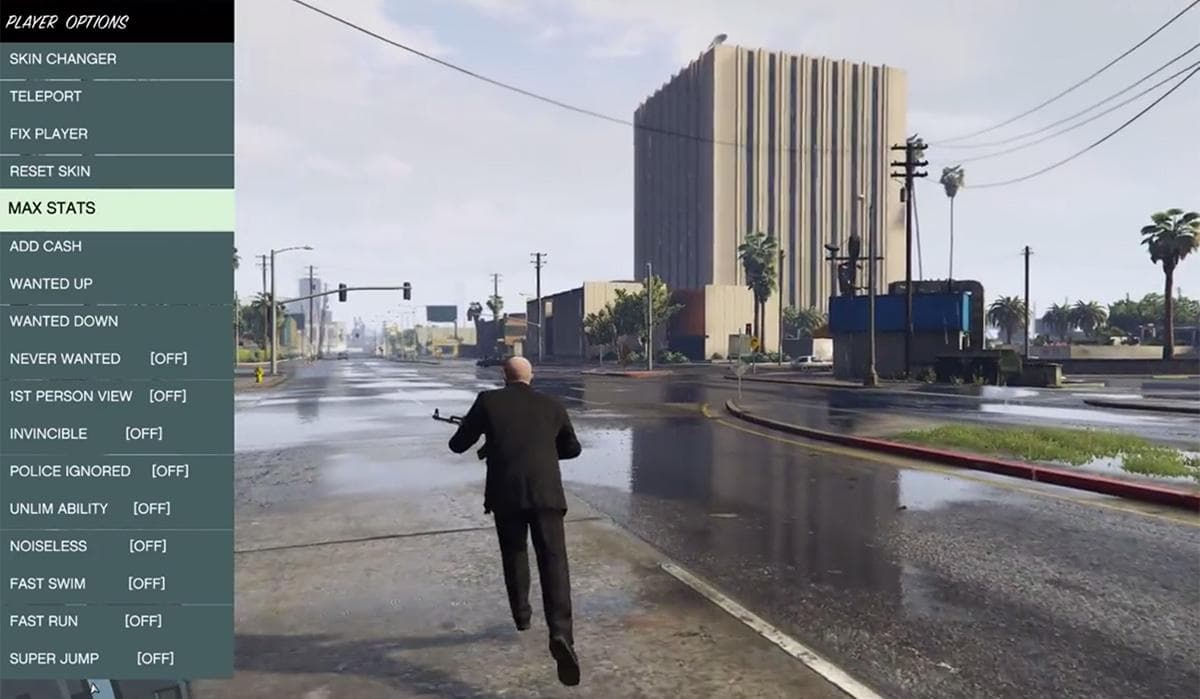
Script Hook V is the piece that keeps a GTA V mod setup from falling apart after a Rockstar update. If your single-player scripts, trainers, or LSPDFR add-ons suddenly stop loading, this is usually the first dependency to verify, because it is the library that lets custom .asi plugins call GTA V script native functions.
What Script Hook V actually does
The library enables GTA V script native functions in custom .asi plugins. It also includes the latest Asi Loader and Native Trainer in the distribution, which makes it the base layer for a lot of single-player modding. This is why so many broken mod setups start here: if Script Hook V is missing, outdated, or sitting in the wrong folder, everything built on top of it can fail quietly or crash on launch.
One hard boundary you should not ignore: Script Hook V does not work in GTA Online, and it closes GTA V when the player goes into multiplayer. Keep it in the single-player lane only. If you want to stay safe, keep your modded install separate from anything you use for online play.
What to download and where to get it
For the actual library, use the official download on dev-c.com. That is the place the installer should come from, not random mirrors or reposted archives with unknown file mixes. You want the full Script Hook V package, because the included ASI loader and Native Trainer are part of the standard setup and are often the missing pieces when people try to piece together files from different guides.
GTA5-Mods.com also hosts pages for Community Script Hook V .NET and Script Hook V + Native Trainer. If you are running script-heavy mods, especially anything tied to C# plugins or LSPDFR workflows, this dependency is not optional.
How to install it the right way
The clean install is simple, but the folder placement has to be exact. Copy ScriptHookV.dll into the game’s main folder, the same place where GTA5.exe is located. That means the root GTA V directory, not a subfolder like scripts, mods, or an installer cache.
A practical install looks like this:
1. Download the current Script Hook V archive from the official page.
2. Extract the archive completely.
3. Copy ScriptHookV.dll into the GTA V main folder where GTA5.exe sits.
4. Keep the included ASI loader files with the install, because those are what let .asi plugins load.
5. Launch the game in single-player and verify that your trainer or script mod appears.
If you are running LSPDFR or a script-heavy single-player setup, do not guess at the destination. A file dropped one folder too deep is the classic reason a modded build starts fine but behaves like nothing is installed.

Version matching is where most installs break
The hardest part is not copying the DLL. It is keeping Script Hook V aligned with the exact GTA V build Rockstar has pushed. That mismatch is what triggers the critical-error cycle so many mod users run into after updates. On July 14, 2026, troubleshooting for the Script Hook V critical error after GTA V 1.0.3889.0 used a downgrade back to 1.0.3788.0 so mods and LSPDFR would work again.
The rule is simple: if the game updates and your scripts stop loading, the first thing to check is whether your mod stack still matches the executable version. Script Hook V is often the dependency that fails first after a patch, even when the rest of the game still launches normally. A clean reinstall does not help if the build mismatch is still there.
Enhanced and legacy builds
Compatibility changed again when AB Software Development posted on March 23, 2025 that ScriptHookV now supported GTA V Enhanced. Legacy ASI script plugins were compatible with the enhanced version, but some mods still needed enhanced-specific updates. In practice, that means you cannot assume every old plugin will behave the same way across Legacy and Enhanced builds, even if Script Hook V itself has caught up.
A mod that worked on the legacy game may still need a fresh version before it behaves correctly on Enhanced. If you are rebuilding a setup after a break, verify both the Script Hook V package and the specific mod version instead of assuming one DLL solves everything.
If the game crashes or mods do not load, check these first
When a GTA V modded build fails, start with the basics before chasing obscure fixes.
- Make sure ScriptHookV.dll is in the GTA V main folder where GTA5.exe is located.
- Confirm you downloaded the current Script Hook V package, not an old archive.
- Check that you are trying this in single-player, not GTA Online.
- If you updated GTA V recently, verify whether your current game build still matches the mod stack.
- If the problem started after 1.0.3889.0, the 1.0.3788.0 downgrade path used in July 2026 troubleshooting is the kind of compatibility break people were working around.
- If Script Hook V loads but a specific mod still fails, check whether that mod needs an Enhanced-specific update.
A March 17, 2026 Reddit thread titled ScriptHookV Critical Error as of March 17, 2026 captured the same pattern, with players asking for the latest Script Hook V link and swapping fixes after errors.
This article was produced by Prism’s automated news system from verified source data, official records, and press releases, then run through automated quality and moderation checks before publishing. The system is built and supervised by the people who set the standards it runs under. Read our full AI policy.
Did this article answer your question?