IQUNIX MQ80 Review: A Premium Low-Profile Keyboard Built for Serious Typists
IQUNIX's MQ80 funded at 13,127% on Kickstarter; its Le-Tray gasket mount and all-aluminum body set a new bar for low-profile daily drivers in 2025.

When IQUNIX launched the MQ80 on Kickstarter in February 2025, the campaign hit 13,127% of its HK$10,000 funding goal, pulling in HK$1,312,698 from 1,264 backers before the campaign even closed on April 1. Super Early Bird units at 50% off vanished on day one. That level of market appetite doesn't happen by accident; it signals that a deeply underserved corner of the mechanical keyboard world, people who want a genuinely premium low-profile board without the hollow plastic and gamer aesthetics that plague the category, finally had something worth funding. A year on from that campaign, the MQ80 has landed in hands worldwide and earned its reputation. Here's how it holds up as a daily driver.
The Problem the MQ80 Is Built to Solve
Low-profile mechanical keyboards have occupied an awkward middle ground for years: too shallow and plasticky to satisfy enthusiasts who've used high-profile boards, yet too bulky and expensive compared to a good laptop deck. PowerUp Tech Editor Kizzy framed it plainly in her review: most low-profile boards "sit awkwardly between a nice laptop deck and a real mechanical board, with shallow travel, hollow plastic cases and gamer-y design that clashes with a clean work setup."
IQUNIX, a Hong Kong-based manufacturer that Tom's Hardware notes "for a long time, seemed to exist behind the scenes," broke through that ceiling with the Magi65. NotebookCheck called that board "the gold standard for low-profile mechanical keyboards." The MQ80 is effectively its 80% sibling, keeping the Magi65's design DNA while adding a full function row and navigation cluster to reach 84 keys across an ANSI layout. For anyone who lives between a compact portable board and a full-featured desk setup, that function row is the practical upgrade that makes the MQ80 the daily driver the Magi65 couldn't quite be.
Build Quality: CNC Aluminum at 180 Grit
Pick up the MQ80 and the first thing you notice is the weight: 1,180g. That's not a travel board. It's a desk anchor, and intentionally so. The CNC-machined aluminum alloy body carries a 180-grit anodized and e-coated finish, meaningfully finer than the 150-grit surfaces used by most competitors, which translates to a surface that feels closer to a precision instrument than a consumer peripheral. Two colorways are available, Shadow Black and Moonlight Silver, both of which photograph well in professional setups and hold up under daily use without the fingerprint-magnet issues that plague gloss finishes.
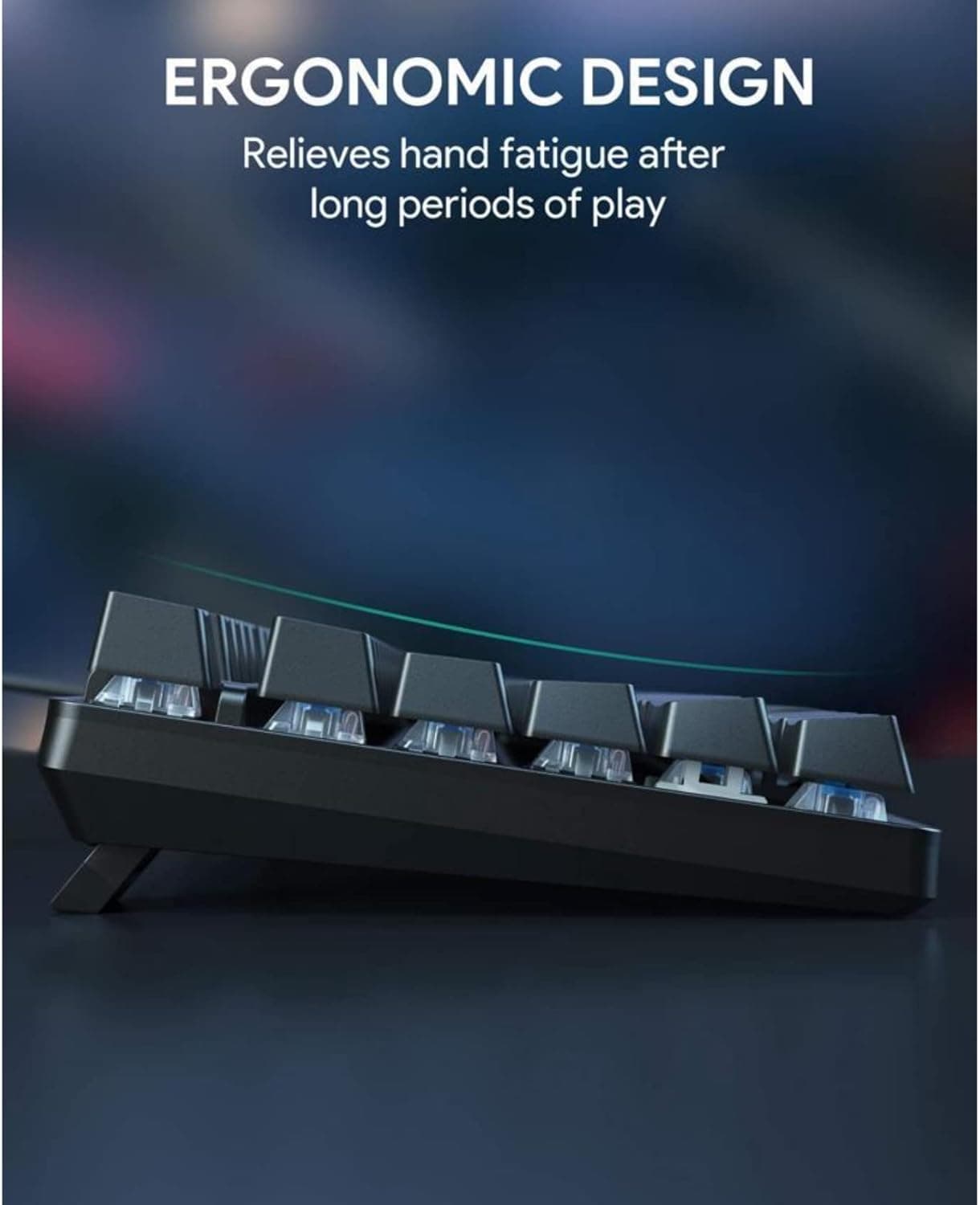
At 321mm × 124.5mm × 27.5mm with a front height of just 10.2mm, the MQ80 sits remarkably low for its weight class. That 10.2mm front height matters more than it might seem for long typing sessions: keeping your wrists in a neutral position reduces cumulative fatigue, and the MQ80's geometry makes typing without a wrist rest genuinely comfortable over hours. Keychron's K3 Pro, the most common point of comparison at this price tier, runs an 11mm front height with a 525g frame built from ABS with an aluminum top plate; the MQ80 is more than twice as heavy because it's aluminum all the way through, and the tactile difference is immediately obvious.
The Typing Experience: Le-Tray Gasket Mount Changes the Equation
This is where the MQ80 separates itself from everything else in the low-profile category. Traditional low-profile keyboards mount the PCB rigidly, so every keystroke bottoms out against a hard surface and sends vibration straight back into your fingers. IQUNIX's proprietary Le-Tray Gasket Mount suspends the PCB with a cushioned, flexible landing instead. Combined with an internal dampening stack that layers FR4 gold-plated plate, a horizontal cut PCB, CR PCB foam, IXPE switch pad, PET switch sheet, Poron bottom case foam, and IXPE bottom case pad, the result is a typing feel that SemiPro Tech+Gear described as "cushioned and flexible, rare for low profile keyboards," noting that "the gasket mount and flex-cut internals bring it closer to a premium high-profile experience."
The Kailh POM Gold Red Linear switches handle the actuation side: 40gf activation force, 1.2mm actuation point, rated for 50 million keystrokes, and pre-lubed from the factory. They're light without being mushy, smooth without the scratchy inconsistency you get in cheaper linears, and well-suited to both extended typing sessions and the occasional gaming sprint. The PCB is hot-swappable, so if you prefer a heavier tactile switch like a Kailh Choc Pro Red or want to experiment with alternatives, no soldering is required. The PBT keycaps are high-purity and hold up to heavy daily use without the shine-through that plagues cheaper ABS sets. The ecosystem limitation worth noting: low-profile keycap compatibility is narrower than standard MX, so aftermarket options are more limited than on a full-height board.
Battery and Connectivity: Reading the Fine Print
IQUNIX quotes up to 350 hours from the 4,000mAh battery, which Amazon's product listing confirms as roughly three times longer than most competing low-profile models. That headline number requires context. The 350-hour figure is achievable with RGB completely off and running on Bluetooth only. In real-world use with RGB on at working brightness, Kizzy found the MQ80 needs charging approximately once a fortnight. That's still strong compared to the Keychron K3 Pro's 1,550mAh cell that maxes out around 100 hours in similar conditions, but "once a fortnight" and "set and forget for a month" are meaningfully different expectations.
Connectivity is tri-mode: Bluetooth 5.1, 2.4GHz wireless via USB dongle, and USB-C wired. Polling rate is 1,000Hz in wired and 2.4GHz modes, dropping to 125Hz over Bluetooth. For productivity work and casual gaming the Bluetooth polling rate is a non-issue. For anyone who games seriously in wireless mode, the 2.4GHz connection keeps you at 1,000Hz without the cable. USB-C charging means you can keep the board topped up at a static desk setup if battery anxiety is real, but most users won't need to.
VIA Customization: Tuned to Your Workflow
VIA support is one of the MQ80's most practical daily-driver advantages. Without writing a line of code, you can remap any key, create macros, build per-layer lighting effects across 16 million colors, and flip modifier layouts between Mac and Windows configurations. For anyone switching between operating systems throughout the day, the ability to create app-specific shortcuts or a one-tap mute macro means the board adapts to your workflow rather than the other way around. The Keychron K3 Pro also supports VIA, so this isn't a unique advantage, but the MQ80's implementation covers all three connection modes and is accessible enough that non-enthusiast users can configure it without friction.
Gaming Performance: Honest About Its Limits
The MQ80 is a productivity-first board that handles gaming well, not a gaming-first board that tolerates productivity. At 1,000Hz polling in wired and 2.4GHz modes, it's, as Kizzy noted, "absolutely fine for single-player games, action titles and even shooters if you're not chasing tournament-level optimisation." It does not feature rapid-trigger or adjustable actuation, which are increasingly standard on dedicated gaming low-profile boards like IQUNIX's own EZ63 Hall-effect keyboard ($179.99 retail, 8kHz polling). If you game primarily after work hours and don't need those features, the MQ80's gaming performance is a genuine bonus rather than an afterthought. If competitive FPS is your primary use case, look elsewhere.
How It Stacks Up Against the Competition
The MQ80's two most direct competitors in 2025 are the NuPhy Air75 V3 and the Lofree Flow 2. SemiPro Tech+Gear ranked the MQ80 among the best low-profile boards of 2025 and considers it "still an easy pick over the [Lofree] Flow 2," which made what SemiPro called "controversial decisions with the design" that undermine its recommendation. The NuPhy Air75 V3 is the closer call: it offers approximately 1,200 hours of battery life (more than three times the MQ80's headline figure) and is meaningfully lighter, which matters for carry-around use. SemiPro named the Air75 V3 their overall top pick primarily for those reasons, though they still credited the MQ80 with "the most premium build quality in this category."
Against Keychron's K3 Pro, the comparison favors the MQ80 at every structural level: full aluminum versus ABS-plus-partial-aluminum frame, gasket mount versus hard mounting, 4,000mAh versus 1,550mAh battery, and 180-grit precision anodizing versus standard consumer finishing. The K3 Pro's advantage is price (starting around $67 USD versus $159 for the MQ80) and lighter weight at 525g. For typists who primarily care about build integrity and typing feel over portability and budget, the MQ80 is the upgrade path. MacSources described it as "truly all-purpose, performing well for typing, programming, productivity, and creative work," and SuperstarReviews.tech called it "the closest I've gotten" to keyboard perfection after a week of heavy use.
Who Should Buy It (and Who Shouldn't)
The MQ80 at $159 USD, or mid-$200s AUD including shipping, is a considered purchase. Here's a clear breakdown of where it lands:
The MQ80 is the right call if you:
- Type for hours daily and feel the difference a gasket mount makes in reduced keystroke fatigue
- Work across Mac and Windows and need seamless modifier remapping via VIA
- Want a board that looks at home on a clean professional desk in Shadow Black or Moonlight Silver
- Game casually to mid-core after work and don't need rapid-trigger or 8kHz polling
- Value build longevity: aluminum over plastic, pre-lubed linears, hot-swap for switch experimentation
Consider alternatives if:
- Battery endurance is your top priority: the NuPhy Air75 V3's ~1,200-hour ceiling is a genuine advantage for wireless-only setups
- You travel with your board frequently: at 1,180g, the MQ80 is a desk fixture, not a carry piece
- Your budget caps below $120 USD: the Keychron K3 Pro delivers solid VIA support and tri-mode connectivity at a fraction of the price, accepting the trade-off in build and typing feel
- You need competitive gaming peripherals: the IQUNIX EZ63 with Hall-effect switches and 8kHz polling is purpose-built for that use case
The MQ80 doesn't try to be everything to everyone. It is, as its review consensus confirms, a productivity-first, design-forward keyboard built for laptop-centric professionals who want one serious board on their desk. That it handles gaming sessions after work is a genuine bonus. For that specific typist, nothing else in the low-profile category in 2025 matches its combination of build quality, typing feel, and platform flexibility at this price point.
This article was produced by Prism’s automated news system from verified source data, official records, and press releases, then run through automated quality and moderation checks before publishing. The system is built and supervised by the people who set the standards it runs under. Read our full AI policy.
Did this article answer your question?