MeshDash brings self-hosted Meshtastic monitoring, mapping and radio control
MeshDash turns Meshtastic into a local command panel, with live monitoring, ACK tracking, mapping, and radio control on hardware you own.

MeshDash makes the most sense the moment a Meshtastic setup stops being a toy and starts acting like infrastructure. When you have multiple nodes, a relay or two, and GPS-equipped devices moving around in the field, a phone app and a public map stop feeling like enough. MeshDash steps into that gap with a self-hosted dashboard that keeps the operator in control of the mesh instead of pushing everything through an internet-facing view.
A local operations panel, not a public map
MeshDash describes itself as a free, open-source, self-hosted Meshtastic dashboard, and that framing is the whole point. It is built to run on your own hardware, including Raspberry Pi, Linux, and WSL2, so you can turn an old mini PC, a Pi, or a lab box into a local network operations panel. That matters because the data path stays with you, which is a much better fit for a home lab, a field base, or a small community deployment than a shared cloud-style dashboard.
That self-hosted approach also changes the use case. Instead of just checking whether a node exists on a map, you can watch what the mesh is doing in real time, inspect packet flow, and see whether the network is healthy enough to trust for actual outings or resilience planning. For clubs and event organizers, that is the difference between “I think the mesh is up” and “I can see the mesh working right now.”
What MeshDash actually brings to the table
The core appeal is that MeshDash tries to do several operator jobs in one place. It is more than a node list and more than a map. The project’s own description points to real-time node monitoring, packet analysis, GPS mapping, automated tasks, direct messaging with acknowledgment tracking, and full radio configuration.
That combination is especially useful once the mesh grows beyond a handful of radios. If you are running a local mesh for a meetup, a race, a trail day, or a field exercise, you do not just want to know that a node is online. You want to know which packets are getting through, which device is acting as a relay, whether a message was actually acknowledged, and whether radio settings are consistent across the network. MeshDash is aimed squarely at that kind of day-to-day supervision.
ACK tracking is one of the most practical parts of the pitch. Meshtastic’s own behavior already makes acknowledgments meaningful: a direct message is considered acknowledged when the intended recipient responds, and the cloud check in the mobile app indicates that at least one other node on the mesh acknowledged the message. MeshDash builds on that logic so you can watch delivery more deliberately, which is exactly what you want when messages are carrying meetup logistics, field updates, or emergency coordination.
Who benefits most
The strongest fit is for people running a real mesh, not just experimenting with one. Clubs get a central place to check node status before a ride, trail run, or camping trip. Event organizers get a command view for monitoring live packets and confirming that radio settings and message delivery are behaving the way they should. Off-grid users get a local control surface that does not depend on a public-facing service. Local node admins get a practical way to manage radios without juggling separate tools for mapping, messaging, and configuration.
That is where the “self-hosted command and control” part starts to matter. Meshtastic is an open-source, off-grid, decentralized mesh network built on affordable, low-power devices, and it is designed to work without cell towers or internet. MeshDash fits that philosophy better than a dashboard that relies on a shared public map. If the mesh is supposed to stand on its own, the monitoring and control layer should too.
Why it fits Meshtastic’s own model
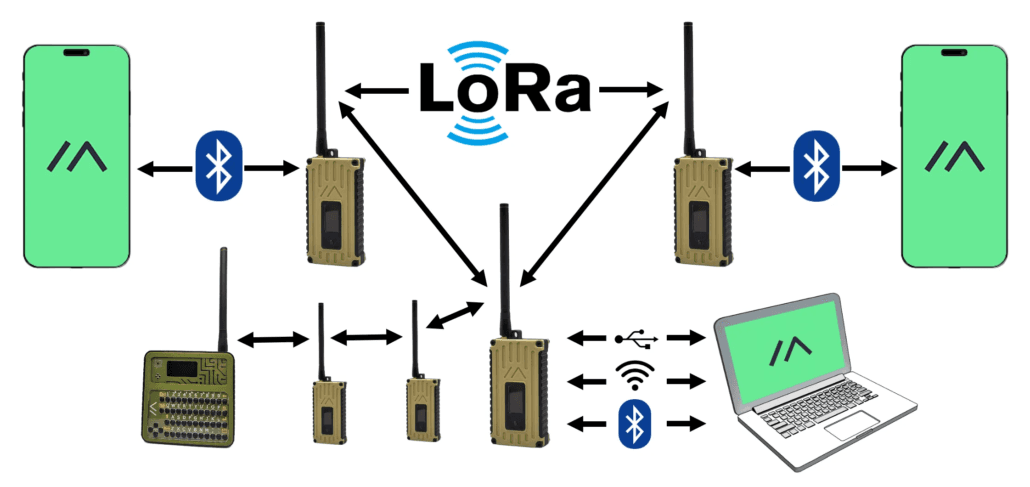
MeshDash is not trying to sit outside the Meshtastic ecosystem. Meshtastic already supports remote node administration over the mesh, instead of only through Bluetooth, serial, or IPv4, and it exposes external client APIs over Serial, TCP, and BLE. That makes room for tools like MeshDash to become part of a real operator workflow rather than a separate side project.
Meshtastic’s own documentation also explains why a dashboard with mapping and timing awareness is useful. Position data can come from the radio or a paired phone, and time calculations require at least one device on the mesh with GPS, RTC, or internet/NTP support. In other words, once you start using GPS-bearing nodes and relying on coordinated timing, the network becomes easier to manage when a dashboard can surface that context clearly instead of hiding it behind a mobile screen.
The project’s broader ecosystem points in the same direction. The community-apps page already lists tools such as Meshtastic Web API and mesh-metrics, which shows there is a growing layer of local utilities around the core radio network. MeshDash slots into that world naturally as another operator-facing tool, just with a broader control surface.
How it connects and what it can talk to
MeshDash’s repository describes it as an advanced Meshtastic dashboard and API, and the connectivity options are unusually wide. It can connect via Serial, TCP, BLE, MQTT, MeshCore, or WebSerial. That makes it easier to drop into different deployment styles, whether the radio is physically attached to a host or bridged in over a network path.
It also goes beyond a static interface. The project says it offers a real-time web dashboard using server-sent events, plus a REST API with more than 100 endpoints. That is a serious signal for anyone who wants to automate parts of a mesh workflow, because it means the dashboard is not just showing data after the fact. It is structured like a control center that other tools can talk to.
- checking which nodes are alive
- watching packet activity as it happens
- confirming message acknowledgments
- mapping GPS-bearing devices
- changing radio configuration without bouncing between apps
For operators, that means less friction when doing the repetitive jobs that make a mesh useful:
Why this feels different from internet-facing dashboards
Public maps are fine for a quick glance, but they are not built for the messy parts of real operation. They are usually better at showing presence than proving function. MeshDash is more useful when the question is not “is there a node here?” but “can I trust this mesh to carry traffic right now?”
That distinction is why this kind of tool resonates with Meshtastic deployments that have moved into search and rescue, off-grid communication, disaster recovery, and grid-down scenarios. Meshtastic has also shown up in event-specific firmware work at DEF CON, alongside partnerships with event organizers and community groups, which tells you the project has already crossed from hobby novelty into organized deployment territory. MeshDash fits that same evolution: it gives operators a practical way to see and steer a mesh that is supposed to keep working when the normal network does not.
MeshDash’s real value is simple. It keeps Meshtastic local, legible, and manageable after the first few nodes online start turning a hobby mesh into a system you actually depend on.
This article was produced by Prism’s automated news system from verified source data, official records, and press releases, then run through automated quality and moderation checks before publishing. The system is built and supervised by the people who set the standards it runs under. Read our full AI policy.
Did this article answer your question?