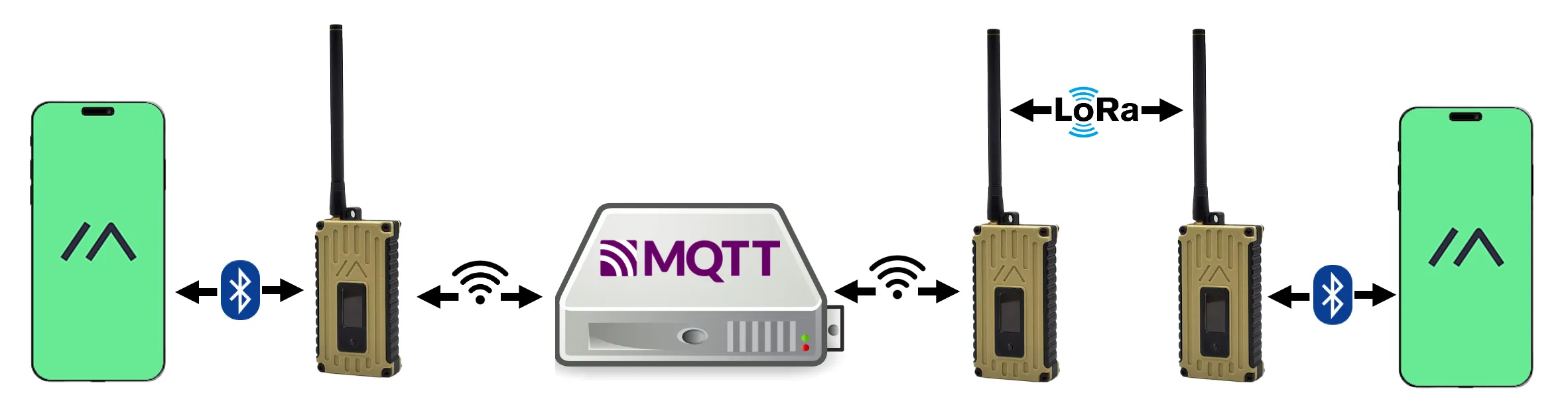
Meshtastic site planner maps terrain-based node range and coverage
It turns a guess about mesh range into a terrain-aware plan, so you can place nodes, pick antennas, and avoid paying for dead coverage.
When a hilltop looks good but the mesh still fails
A hilltop relay can look perfect on a map and still miss the valley below. That is exactly the kind of expensive mistake Meshtastic’s Site Planner is meant to prevent: it turns rough range guessing into a terrain-aware simulation before you buy hardware or climb with a battery pack.

Meshtastic describes the tool as a free, open-source web utility for predicting node range and coverage. It is built for the realities of off-grid mesh work, where a cheap node, a better antenna, or a slightly higher mast can mean the difference between a clean link and a dead zone. Because the Meshtastic ecosystem is an open-source, decentralized mesh built around low-power devices, coverage planning is not a luxury. It is the part that keeps the network from becoming a pile of radios with unrealistic expectations.
What the planner actually models
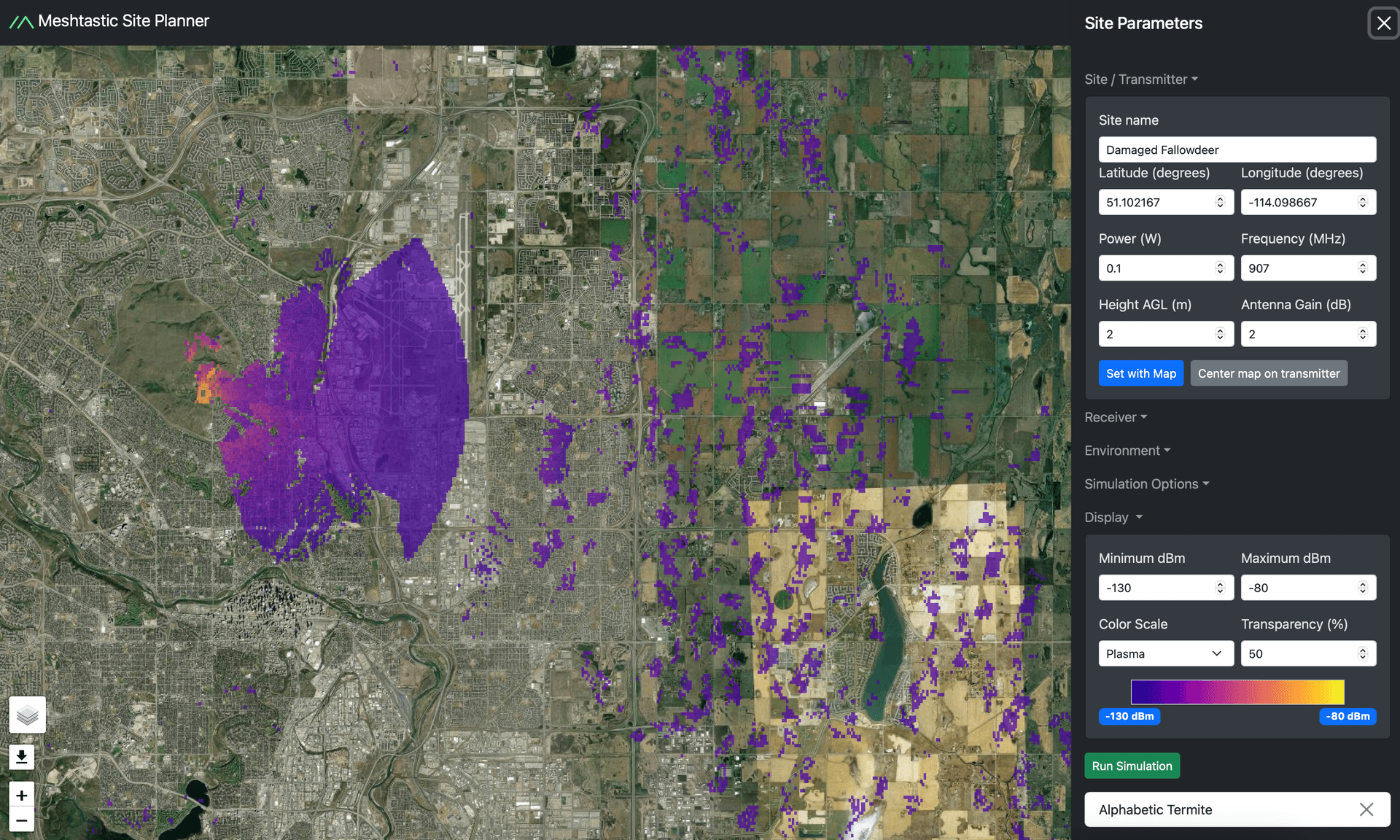
The Site Planner does not just sketch a circle around a transmitter. It accepts a transmitter site name, coordinates, antenna height, transmit power, frequency, antenna gain, receiver sensitivity, receiver height, and range limits. It also supports multiple radio sites in one simulation, which makes it useful for mapping more than one relay, endpoint, or planned node at once.
Under the hood, Meshtastic says the planner is built around the SPLAT! RF analysis software and uses the ITM, or Longley-Rice, propagation model. That matters because it means the tool is grounded in terrain-based radio prediction rather than hand-wavy distance estimates. Meshtastic also says the default radio assumptions were chosen from experimental data and practical experience, so the planner starts from settings that are tuned for Meshtastic-style hardware instead of generic RF theory.
How to read the output without fooling yourself
The output is where the planner becomes especially useful. It generates a color-coded coverage map, with RSSI values shown on a color bar so you can see where the signal should be strong and where it is likely to struggle. The live interface exposes a display range from -130 dBm to -80 dBm, and Meshtastic’s docs say predicted RSSI above -110 dBm points to stronger territory for successful sending and receiving.
That numeric framing gives you something far more practical than a vague coverage blob. If your planned receiver sits in the weak colors near the bottom of the scale, you know you are gambling on propagation. If it stays well above -110 dBm, you have a much better chance of a usable link. The planner even lists receiver sensitivity values for common presets, which helps you judge whether a certain node profile is actually viable in the field.
A concrete planning scenario: one relay, one valley, one bad assumption avoided
Picture a rural link where you want one relay on a ridge and a second node in a lower neighborhood or trailhead. Without a planner, the ridge looks obvious and the range looks generous. With the Site Planner, you can test the transmitter height, frequency, antenna gain, and receiver placement against the terrain before committing to the mount.
That is where the tool saves money and time. It can show you that a relay placed a few meters lower may lose the valley edge, or that a receiver on the far side of a rise needs a different height or antenna than you expected. The same logic applies to a neighborhood mesh, where a node that seems centrally located may still be shadowed by terrain, or to a disaster-readiness setup, where a route that looks short on a map still fails because the ground between points is doing the blocking.
Why the terrain data is helpful, and why it is not the whole world
Meshtastic says the planner uses NASA SRTM elevation data for terrain modeling. That gives the simulation enough geographic structure to be useful for planning real deployments, but the project also warns that the dataset is only about 90 meters accurate and does not model buildings or trees.
That limitation is important. The planner is a planning aid, not a replacement for field testing. A path that looks open on the map can still be blocked by a house, a stand of trees, or a local obstruction that does not appear in the elevation layer. The right way to use the tool is to narrow down where a node should go, then verify the result in person.
Why Meshtastic made this part of the stack
Meshtastic introduced the Site Planner in a blog post dated January 17, 2025, describing it as a free and open-source utility built to replace proprietary, expensive, and difficult-to-use planning software. The project also points users toward other RF planning resources, which shows that the planner belongs in a broader coverage-analysis workflow rather than standing alone.
That positioning is visible in Meshtastic’s own software navigation, where the planner sits alongside other core tools. The project documentation frames it as a way to make predictions of radio range that account for physics and terrain, and Meshtastic says it is used to plan repeater deployments and estimate coverage from an existing mesh network. For anyone trying to stretch a mesh across hills, roads, or wide open country, that is the difference between a hopeful install and a planned one.
The practical takeaway before you mount anything
The Site Planner is most valuable when the instinct is to oversimplify. It keeps you from assuming that more transmit power always solves the problem, that a taller mast is always enough, or that a map distance tells the full story. By combining SPLAT!, the Longley-Rice model, NASA SRTM terrain, and Meshtastic’s own radio defaults, it gives you a realistic first pass at node placement.
That is why it matters before you spend money on hardware. A mesh that looks easy on paper can collapse into dead air once terrain gets a vote. The planner gives terrain that vote before you do.
Know something we missed? Have a correction or additional information?
Submit a Tip