Meshtastic Store & Forward restores missed messages, with hardware limits
A dropped node can catch up later, but only on the right hardware and channel. Meshtastic Store & Forward is useful, not magical, and duplicates are part of the deal.
What Store & Forward is doing when a node comes back
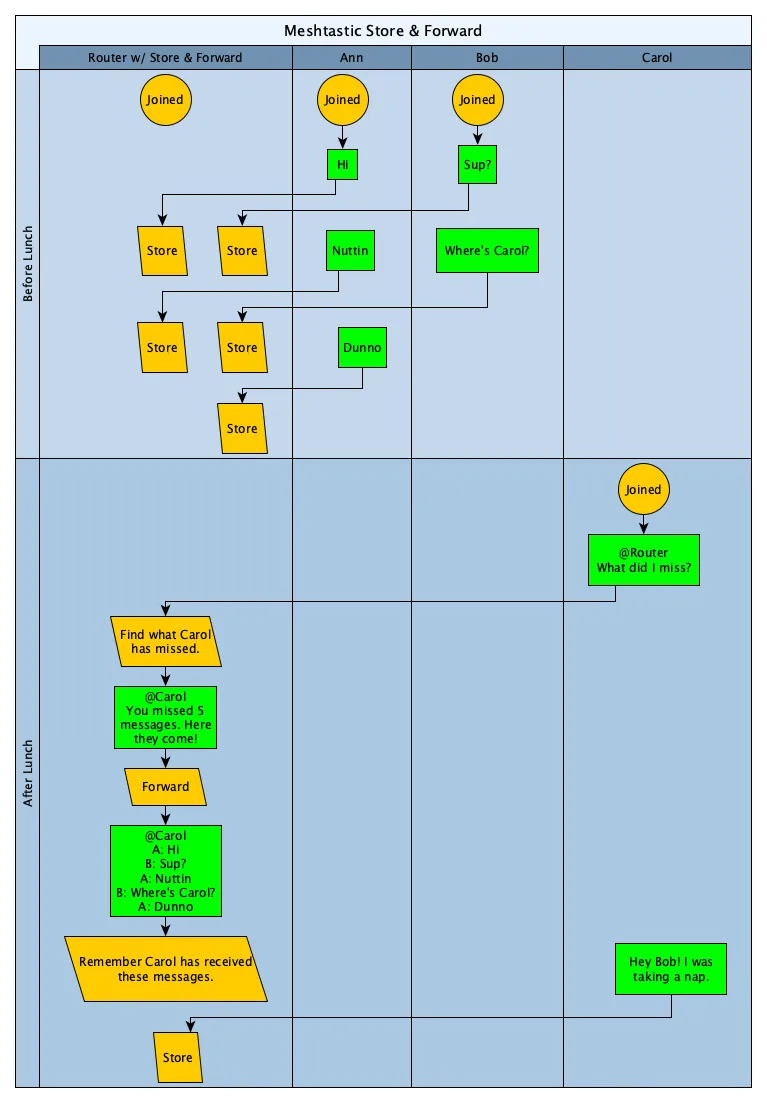
A node goes quiet, drifts out of LoRa range, then returns and asks the mesh to fill in the blanks. That is the basic promise of Meshtastic Store & Forward: a router or server node keeps a stash of received packets, and a client that missed traffic can later ask for a replay of the messages it did not hear. In the field, that turns a dead spot or a temporary outage into a recoverable gap instead of a permanent loss.
The payoff is immediate in the kinds of deployments Meshtastic users actually run. Trail groups, event crews, volunteer radio clubs, and disaster-preparedness networks all have the same problem in different clothes: people move, terrain changes, and coverage is never perfectly stable. Store & Forward does not pretend to make the mesh bulletproof, but it does make a recovering node far more useful the moment it reconnects.
How the feature grew up
This was not a bolt-on convenience that appeared overnight. The core idea showed up in a Meshtastic GitHub issue on January 28, 2021, where contributors sketched a router node storing received packets, a client asking the mesh for messages it missed, periodic heartbeats, and an “I’m Back” response that would trigger replay. That is important because it shows the feature started as an operational concept first, not just an app setting later dressed up as a feature.
The current implementation still carries that practical DNA. Meshtastic’s docs say that since firmware 2.4, a client app connecting to a Store & Forward server can automatically retrieve history, which makes the whole thing feel like part of normal reconnect behavior instead of a special manual workflow. On the client side, the documented support begins with Android and Apple app versions 2.2.23 and higher.
The hardware wall you have to plan around
This is where the feature stops being universal. Meshtastic says only ESP32-based devices with onboard PSRAM can act as Store & Forward servers, and the docs call out T-Beam and T3S3 class hardware as examples. If you are building a mesh around this feature, hardware choice is not a footnote, it is the first decision.
That restriction matters because the role is meant for always-on nodes. Meshtastic says Store & Forward servers are intended to stay online, and if the module itself misses messages, the reliability of the stored history drops. In practice, that means the best candidates are stable, powered nodes that spend their time sitting still, not wandering around like a handheld in a pocket.
The cache size also tells you how the feature is meant to be used. Meshtastic says the default on-device cache is around 30 packets, while a Store & Forward server can hold a much larger history. That is a strong hint that the feature is there to preserve useful slices of traffic, not act like a forever archive.
Why the channel matters as much as the node
Store & Forward is not available on the default public channel. Meshtastic is explicit about that, and the October 2024 GitHub issue makes the operational consequence even clearer: if you want Store & Forward, you need a private channel key. One user reported that after setting a random PSK on channel 0, history retrieval worked, which is a useful reminder that channel configuration can make or break the whole workflow.
That requirement shapes how you roll this out. If your mesh depends on a public channel for casual interoperability, Store & Forward will not help there. If you want missed-message recovery, you need to treat the feature as part of a private, deliberately configured mesh segment.
The tradeoffs are real, and they are part of the design
Store & Forward is a convenience layer, not a guarantee of perfect delivery. Meshtastic notes that the server does not know exactly which messages the client missed, so duplicates are possible when history is requested. That is not a bug in the narrow sense, it is the cost of keeping the system simple and lightweight on radio hardware.
It can also add load when you need it least. Requesting a big backlog can briefly burden the mesh, so history replay should be used thoughtfully instead of casually on a busy channel. A 2025 feature request proposed duplicate-packet suppression by letting the client send recently seen packet IDs to the server, which shows the community is still trying to refine the balance between convenience and precision.
How to set it up without surprising yourself later
The docs recommend clearly naming the server node, configuring it as a router or explicit Store & Forward server, and disabling the heartbeat if reducing routine traffic is the goal. That combination keeps the role understandable to humans and quieter on the air, which is exactly what you want if the node is going to sit there as the mesh’s memory.
The app side is already part of the story too. Meshtastic’s mobile client flow includes direct-message retrieval prompts, so history replay is not limited to some obscure admin path. The fact that Meshtastic also distributes apps across iOS, iPadOS, macOS, Android sideloading, and web helps explain why the feature is useful now: operators are already carrying the tools that can ask for history when they reconnect.
Who should enable it now
If your mesh has predictable coverage gaps and a few dependable always-on nodes, Store & Forward is worth turning on. It is especially attractive for field teams that rotate in and out of range, or for any group that cares more about catching up than about preserving a perfect packet log. If your network is mostly casual, public, or hardware-light, the private-channel requirement and ESP32 with PSRAM constraint may make it a poor fit.
The practical test is simple: if missing a short burst of traffic would meaningfully hurt the group, the feature earns its place. If not, it is just extra complexity on the air. Meshtastic Store & Forward is at its best when you need a node that can go dark, come back, and still remember the conversation it missed.
This article was produced by Prism’s automated news system from verified source data, official records, and press releases, then run through automated quality and moderation checks before publishing. The system is built and supervised by the people who set the standards it runs under. Read our full AI policy.
Know something we missed? Have a correction or additional information?
Submit a Tip