How to add friends and enable crossplay in NBA 2K26
Turn on crossplay, add your friend by 2K username, and you can be in a game faster than most players can find the right submenu.
If you are trying to get into a game with friends and keep bouncing around menus, NBA 2K26 gives you a short, fixed path that actually works. Turn on crossplay first, add the other player by their 2K username, and send the request from the Social menu before you waste time hunting through the wrong mode. That is the difference between sitting in a lobby and finally getting a squad together.
Turn on crossplay before you invite anyone
Start from the home screen and go to Features, then Settings, then Crossplay. That setting is the gatekeeper for mixed-platform play in NBA 2K26, and it matters most if your group is split between PlayStation 5 and Xbox Series X|S. The official crossplay support is specific: PS5 and Xbox Series X|S players can compete together in co-op matches and online tournaments, so if that is the platform mix in your crew, this is the first switch to flip.
The important part is doing this before you start sending requests. If crossplay is off, you can still build a friend list, but you are creating friction you do not need. NBA 2K26’s social setup is built for quick coordination across the game’s main spaces, including The City, Play Now, and MyTEAM, but the cross-platform piece is tied to the console pair the game supports directly.
Open Social fast, not through the long route
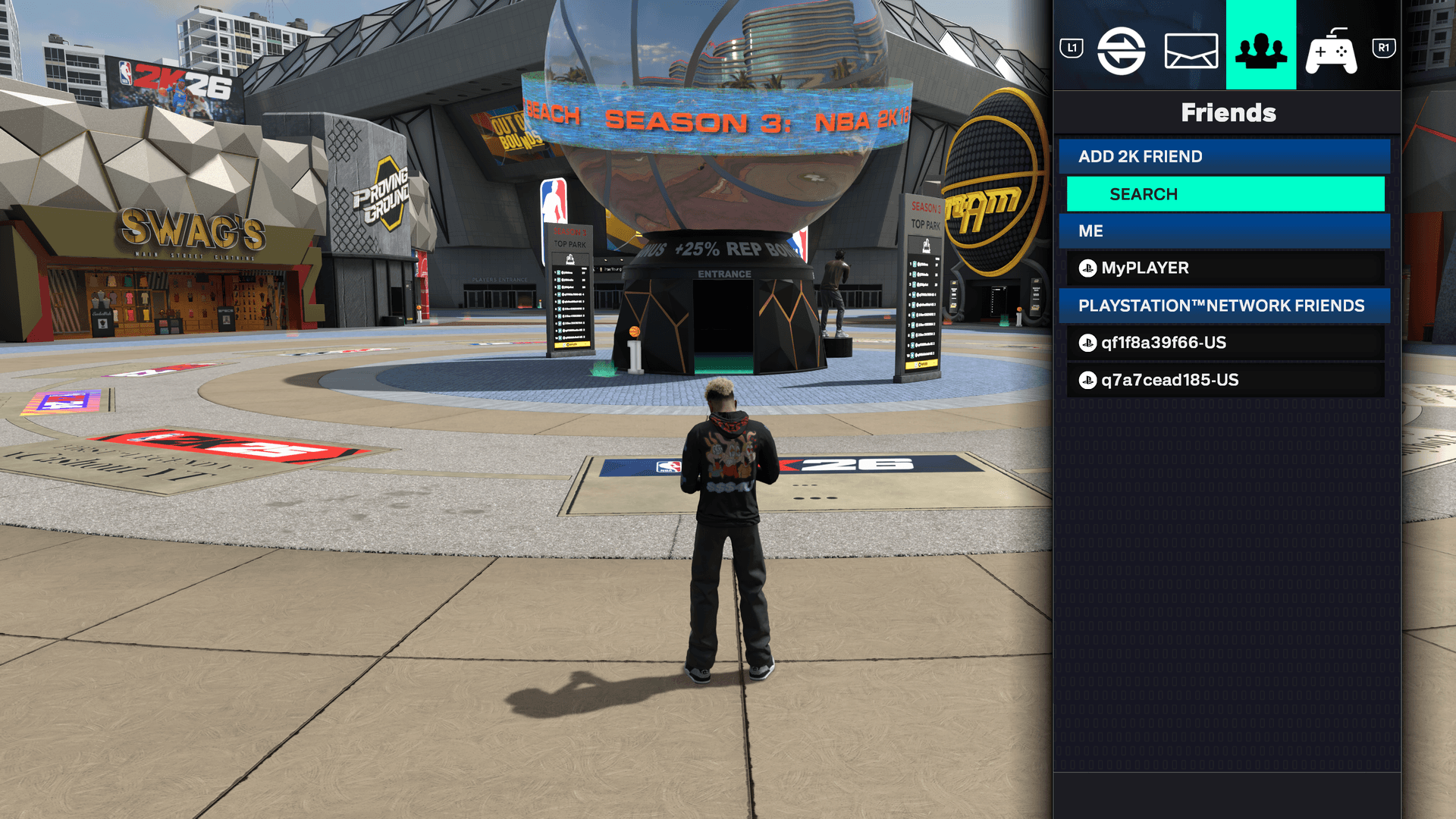
Once crossplay is on, open the Social menu from the home screen or while standing in The City. On PlayStation, the shortcut is L1 + R1. On Xbox, it is LB + RB. That is the fastest way into the friend tools, and it saves you from wandering around The City trying to find a hidden social panel that is already one button combination away.
From there, tap R1 or RB to move over to the Friends tab. This is the part many players miss because they stay one tab too early and never reach the actual friend tools. The game’s layout is simple once you know the route, but it hides the useful stuff just enough to waste your first few minutes if you are not paying attention.
Add the friend by 2K username
Inside Friends, choose Search under Add 2K Friend. Enter the other player’s 2K username exactly, then select Done on the keyboard to send the request. That exact sequence matters because NBA 2K26 is not asking for a platform gamertag here, it wants the 2K username tied to the game’s own social system.
This is the cleanest way to handle cross-platform squads too. If one friend is on PS5 and another is on Xbox Series X|S, the 2K username is the common thread that gets them into the same social loop. The whole process is designed to remove guesswork: open Social, go to Friends, Search under Add 2K Friend, type the username, hit Done.
Know what crossplay does and does not cover
| NBA 2K26 makes a clear promise on the platforms it supports for cross-platform competition. The FAQ sets crossplay between PlayStation 5 and Xbox Series X | S, and it applies in co-op matches and online tournaments. That is the setup you want if your group is built around team play and you need everyone in the same pool. |
|---|---|
| The City is part of the larger social picture, and 2K positions it as a Gen 9 hub on PS5, Xbox Series X | S, PC, and Nintendo Switch 2. That wider social space does not change the crossplay rule itself, but it does explain why so much of the game’s online flow starts there. NBA 2K has been delivering basketball video games for 20 years, and this is the modern version of that idea: less solo grind, more organized play with a crew. |
Get from friend request to actual games
Once the request is sent and accepted, the real value is in using the modes that fit your group. The game’s social layer is not just about having a list of names sitting in your menu. It is about getting you into co-op matches, online tournaments, and the broader day-to-day flow of The City, Play Now, and MyTEAM without forcing a separate setup each time.
If you are building a regular squad instead of just firing up a one-off game, Crews are the next step. NBA 2K26’s Crews let you form groups of up to 50 players, complete Weekly Goals, level up, and earn rewards. That turns the social side into something more durable than a quick invite, and it gives your friend list a reason to stay active after the first game is over.
The setup mistakes that slow everything down
Most first-time problems come from skipping one of the simple steps above. The usual misses are turning on crossplay too late, looking for the friend tools in the wrong menu, or entering the wrong identifier when the game is asking for a 2K username. If you are split across PS5 and Xbox Series X|S, crossplay also has to be on before you expect co-op or tournament play to behave the way you want.
The clean fix is still the same one from the opening: turn on crossplay, open Social with L1 + R1 or LB + RB, go to Friends, use Search under Add 2K Friend, enter the username, and hit Done. NBA 2K26 keeps the route short on purpose. Once you know it, getting from install to first game with friends is no longer the hard part.
This article was produced by Prism’s automated news system from verified source data, official records, and press releases, then run through automated quality and moderation checks before publishing. The system is built and supervised by the people who set the standards it runs under. Read our full AI policy.
Did this article answer your question?