NBA 2K26 builder rewards smart MyPLAYER planning over flashy ratings
NBA 2K26 makes the smartest MyPLAYER builds the ones that plan around badges, animations, and body caps first, then spend VC last.
Dump VC into raw ratings before you know what your MyPLAYER is built to do, and NBA 2K26 will expose the mistake fast. The new builder is built around planning, not guesswork, with an Animation Glossary, Scouting Reports, body-type previews, and badge tier choices that make every tradeoff harder to ignore.
Build the role first, not the overall
The cleanest way to approach NBA 2K26 is to decide your job on the floor before you start spending attribute points. The builder lets you create a build from scratch or start from pre-made templates, but the value of both paths is the same: you are mapping a role, not chasing a flashy overall number. A guard that is supposed to hunt quick releases and smooth pull-ups needs different priorities than a wing built to finish through contact or a big designed to protect the rim.
The more you know about the exact animations, badge thresholds, and body limits you want, the less likely you are to waste VC on ratings that look good on the card but do nothing when the game starts. A higher overall means very little if your build cannot access the animation package or badge tier that fits your playstyle.
Use the Animation Glossary as your first checklist
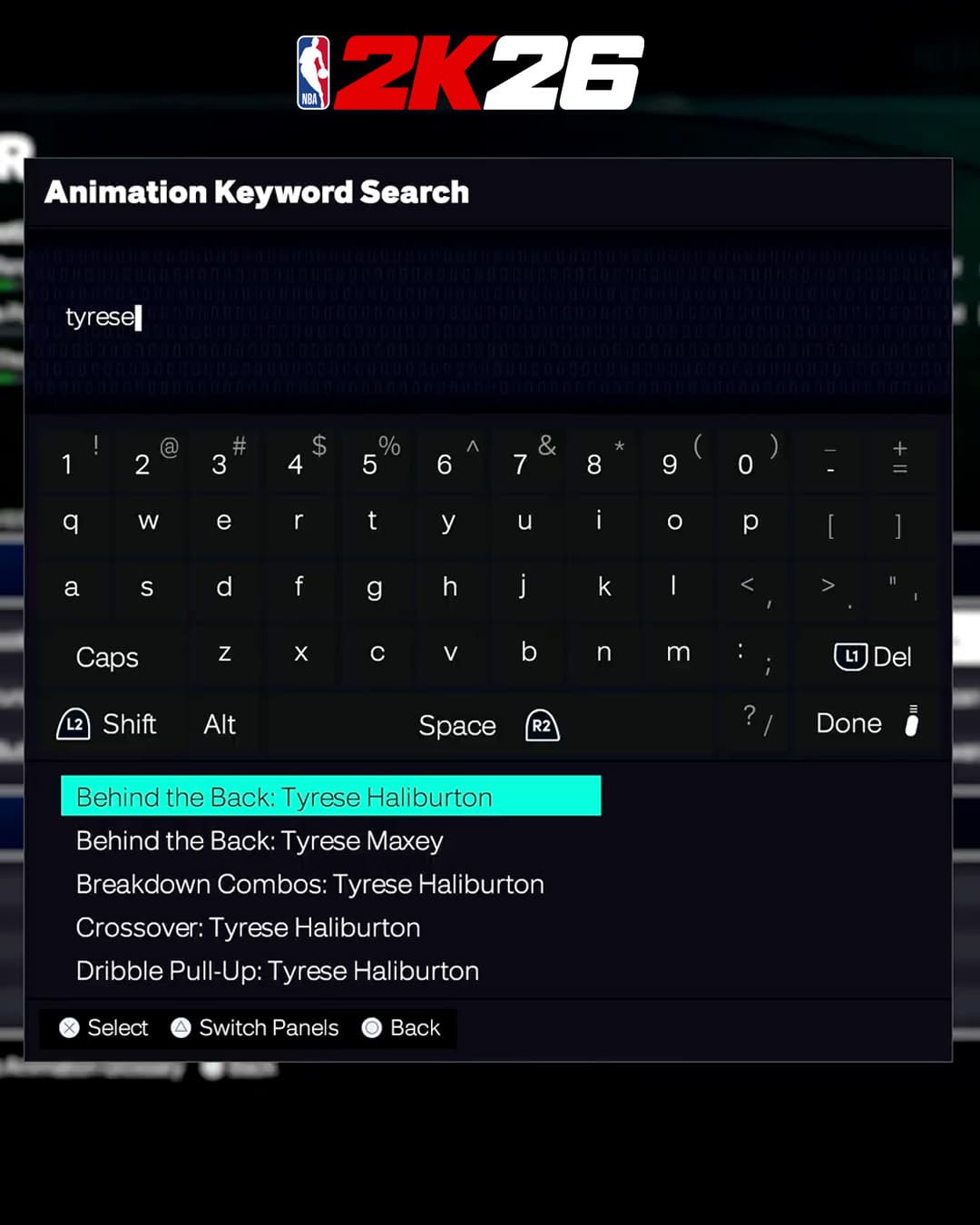
NBA 2K26’s Animation Glossary is where the builder gets practical. It lists every animation with the attribute and height requirements attached, and the search function lets you look up specific players so you can see what it takes to unlock moves tied to stars like Stephen Curry or Shai Gilgeous-Alexander. That turns signature moves into a planning tool instead of a post-build surprise.
If you want Curry’s quick release or SGA’s smooth jumper, you are deciding what your build must be able to reach before you spend the last few attribute points.
Example: flashy ratings versus usable tools
A flashy build might spread points around to chase a big overall and make the card look complete, but still miss the threshold for the release timing, dribble package, or finishing animation that wins possessions. A smarter build can look less impressive in the menu and still be better in games because it hits the exact requirements for the shots, movement, and takeover style that fit the role.

That is especially true now that the builder makes the tradeoffs visible. If your plan is a shot creator, the right question is not “how high can I push everything?” It is “what do I need to unlock the animations and badge tiers that actually decide whether I create separation?”
Badge tiers now lock in the real path
The Build by Badges system is one of the clearest signs that 2K wants you to think like a planner. You choose badge tiers from Bronze through Legend, and the builder automatically locks in the minimum attribute points needed for those badges so you can spend the rest more efficiently. That makes badge thresholds the spine of the build instead of an afterthought.
A badge tier is not just a nice bonus; it is a floor you are building toward. If you already know you need a specific Bronze-to-Legend path, you can stop over-investing in attributes that do not move the build forward.
Cap Breakers are about the long game, not a one-time bump
Cap Breakers are where physical planning becomes just as important as scoring or playmaking. In the official guide, Cap Breakers permanently push attribute potential beyond the cap, can be applied to an attribute up to five times, and are constrained by height, weight, and wingspan. Your body type determines the ceiling you can reach later.
NBA 2K25 made that system even clearer by spelling out that Cap Breakers could contribute toward Animations, Badges, and Takeover requirements, while each attribute could be increased by a maximum of +5 above its cap. 2K25 also gave players 15 total Cap Breakers through The City REP ladder, which runs through Rookie, Starter, Veteran, and Legend tiers with five sub-tiers in each. NBA 2K26 carries that logic forward, and its Roadmap has Cap Breakers returning with improvements designed to reward smarter progression all year long.
There is also an important caution buried in the 2K26 builder tips: Cap Breakers will not be regained and re-rewarded if you join a new Crew.
Body type is a build decision, not a cosmetic one
The new builder’s body-type previews make this more obvious, and 2K26’s Roadmap includes unlockable Body Types that can be previewed before you commit. Height, weight, and wingspan are not background details anymore, because they control what animations, badges, and cap paths are even possible.
This is where the flashy build usually falls apart. A build that looks dominant in the menu can be boxed in by its own frame, while a more carefully planned build leaves room for Cap Breakers, badge targets, and the specific animation packages that fit the role.
Community Builds give you a smarter starting point
If you do not want to start from zero, Community Builds are the cleanest shortcut. They are unique and competitive templates made by some of the best build makers in the NBA 2K community, meant to work as blueprints for high-level play. If you use one as-is, it comes with the builder’s recommended Signature Animations and Takeover, which makes it especially useful if you want a proven frame before you start tweaking.
That community angle is not new to the series. NBA 2K25 already leaned into the same idea with hundreds of possible archetypes, Create-Your-Own Build options, and Pro-Tuned templates curated by Visual Concepts experts. Those templates could be previewed for potential Attributes, Badges, and NBA Player Comparisons before you chose one, and if you kept them intact they came with signature animations and a unique archetype name.
Why the 2K25 lessons still matter in 2K26
NBA 2K25 showed how deep the builder had already become, with 72 Takeovers, 14 Takeover Abilities, 40 Skill Badges, and a system built around making players lean into their strengths. MyPLAYER Builder was the most integral moment in MyCAREER, because the choices you make there define the rest of the grind. The Bleacher Report Game Meets Game page listed over a hundred new possible archetypes.
NBA 2K26 does not abandon that direction. It sharpens it. Early Access starts August 29, the global launch is September 5, and 2K’s Roadmap puts the full MyPLAYER Builder reveal in the week of August 4.
This article was produced by Prism’s automated news system from verified source data, official records, and press releases, then run through automated quality and moderation checks before publishing. The system is built and supervised by the people who set the standards it runs under. Read our full AI policy.
Did this article answer your question?