AYANEO Pocket S Mini setup guide turns premium handheld practical
The Pocket S Mini only pays off once you set it up like a real emulation machine, not a showcase toy. The 12GB/256GB model looks like the sweet spot.

The Pocket S Mini is the kind of handheld that begs you to do the boring setup work first, because that is what turns AYANEO’s premium shell into a machine you actually reach for. AYANEO, founded in 2020, has been pitching it as a “true 4:3 retro handheld endgame,” and the guide leans into that idea by treating emulators, frontends, BIOS files, and file transfer as day-one essentials rather than afterthoughts.
The hardware that makes the setup worth doing
The Pocket S Mini’s appeal starts with the screen and the chip. You get a 4.2-inch, 1280 x 960, 4:3 panel at 60Hz, plus Qualcomm’s Snapdragon G3x Gen 2 with the Adreno A32 GPU, which is exactly the kind of combination that makes older systems look right instead of squeezed into a widescreen compromise. The guide calls the 12GB/256GB model the sweet spot, and that tracks with the rest of the hardware story, since the bigger storage trims use UFS 4.0 while the device itself sits at 305g and runs Android 14.
That is also why the Pocket S Mini feels like more than a prettier Pocket Air Mini. The guide says the screen is the same size and resolution class, but the Pocket S Mini’s materials and internals make the display pop harder and avoid the ghosting complaints people had with the cheaper model. AYANEO’s own launch materials also frame the Mini as a compact device with premium craftsmanship, and the official store lists it at $319 across 8GB/128GB, 12GB/256GB, and 16GB/512GB configurations.
Build the software spine first
The smartest way to set up the Pocket S Mini is to think in layers. Install your emulators first, then choose a launcher or frontend so you are not tapping through a dozen separate Android icons every time you want to play something. That is the whole point of a frontend on a handheld like this: it gives you one clean library instead of a pile of apps, and it makes the device feel curated instead of cluttered.
BIOS files are the next non-negotiable. The guide makes room for them for a reason, because systems that rely on them do not care how expensive the handheld is if the files are missing or dumped in the wrong place. It also calls out Solid Explorer for file transfer, which is the right kind of practical call here, since moving ROMs, BIOS files, save data, and artwork cleanly matters more than chasing benchmark screenshots.
Use the 4:3 screen like it was the whole point
This is where the Pocket S Mini starts earning its keep. A 4:3 screen does not just look retro, it changes how you organize the entire device, because the best setup is the one that makes old systems feel native instead of endlessly adapted to a modern panel. On this handheld, the 60Hz limit is not a problem to work around so much as a reminder to stop treating every game like a spec sheet contest and start treating the display as a tuned window for the library you actually care about.
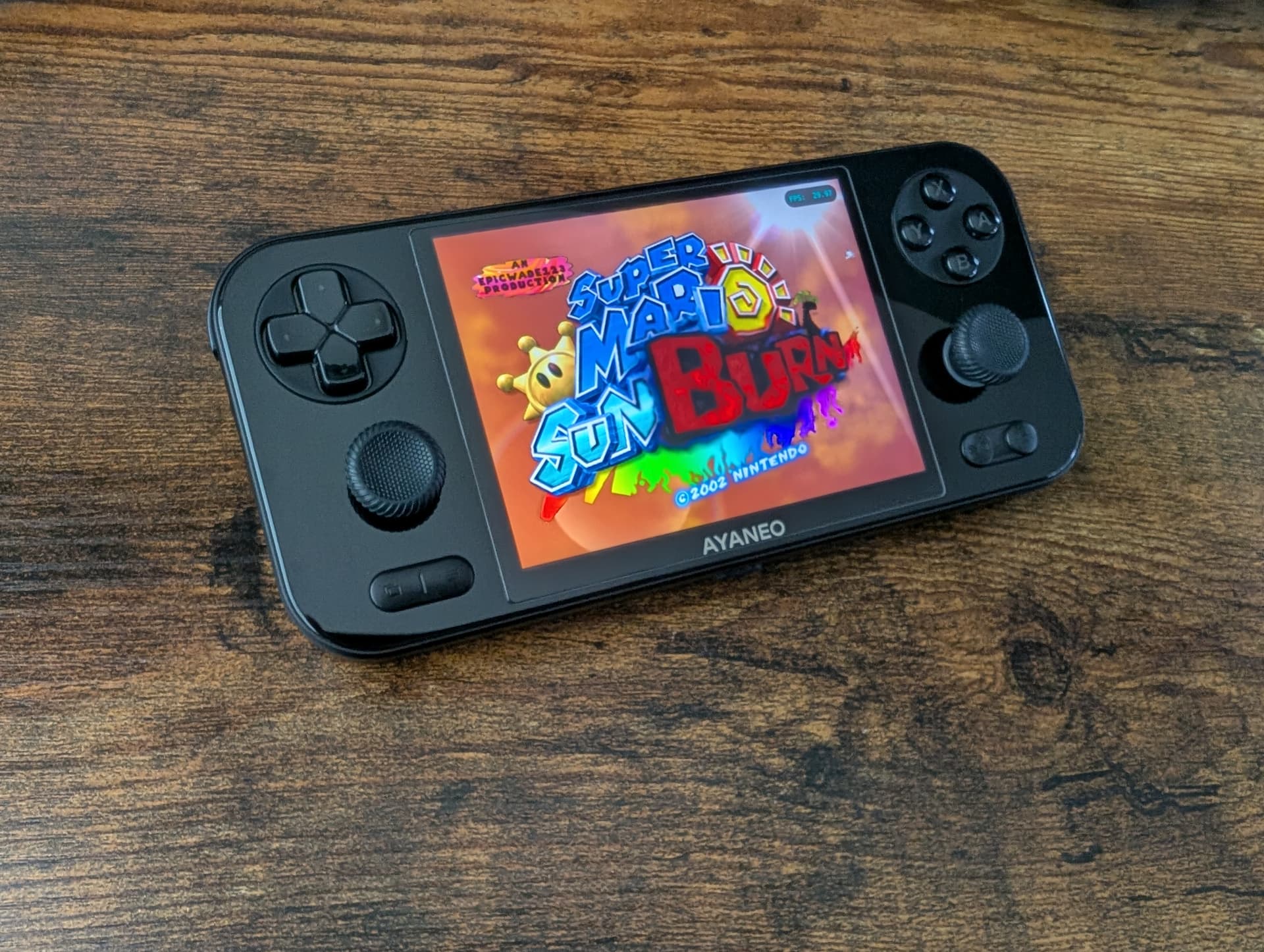
The visual cleanup matters too. If you are building the frontend properly, the Pocket S Mini’s compact 4:3 screen should be showing box art, clean menus, and systems that fit the aspect ratio instead of wasting space. That is also why the guide’s comparison to the Pocket Air Mini lands: same general size class, but a better-looking result on the Mini, which is exactly what you want from a premium handheld that costs this much.
Tune it for heavier emulation, not just launch-day novelty
The Snapdragon G3x Gen 2 is not just about headline power. Qualcomm says the platform is designed from the ground up for sustained gaming performance, and it is the first G series platform with Wi-Fi 7 support, which gives the Pocket S Mini a better foundation for cloud play and the kind of connected workflows that show up once a handheld becomes your daily driver. Qualcomm’s broader G Series push, announced in August 2023, was aimed at this exact sort of enthusiast-class handheld.
That matters because the Pocket S Mini’s strongest use case is not casual emulation, it is the stuff that starts to punish weaker devices: heavier Android emulators, PC emulation workloads, and the ongoing nuisance of controller mapping. Take the time to bind controls inside each emulator and streaming app instead of trusting defaults, and keep the battery in mind while you do it. AYANEO’s own launch material puts the battery at 4700mAh, so sensible brightness, sane background apps, and realistic performance expectations are part of the package, not optional tweaks.
Do the unglamorous bits and the handheld gets easier to live with
The guide’s streaming-app section and accessories section are there for a reason: premium hardware still needs boring support work before it feels finished. A 305g metal handheld is light enough to carry, but only if you have the basic pieces in place, from storage and file transfer to whatever extra protection or charging setup you prefer for a device that is meant to move between couch, bag, and dock.
That is the real takeaway with the Pocket S Mini. Once the emulators, frontend, BIOS files, transfer workflow, and system settings are handled, the device stops looking like a luxury object and starts behaving like the “true 4:3 retro handheld endgame” AYANEO wants it to be. The hardware was always premium; the setup is what makes it practical.
This article was produced by Prism’s automated news system from verified source data, official records, and press releases, then run through automated quality and moderation checks before publishing. The system is built and supervised by the people who set the standards it runs under. Read our full AI policy.
Did this article answer your question?
