Chrome quietly downloads 4GB AI model, shrinking users' storage space
Chrome has been found downloading a 4GB weights.bin file for Gemini Nano, a local AI model that can drain SSD space without much notice.

Chrome has been quietly putting a 4GB weights.bin file on some users’ machines, storing it in an OptGuideOnDeviceModel folder inside the Chrome profile directory. The file is tied to Google’s built-in AI stack and Gemini Nano, turning a browser into a local AI delivery system that can shrink available storage before many users realize anything has changed.
Google’s own developer documentation says Gemini Nano is downloaded the first time a website uses the Summarizer API. Chrome’s built-in AI APIs also include the Prompt API, Translator API, Writer API, Rewriter API and Proofreader API, all designed to run locally rather than relying only on the cloud. The browser supports these APIs on Windows 10 and 11, macOS 13 and later, Linux and Chromebook Plus devices, but Google says they require at least 22 GB of free space on the volume that contains the Chrome profile.

That storage threshold is part of the transparency problem. A user can browse normally and still end up with a multi-gigabyte model file in the background, with little obvious warning about how much space it consumes or when it arrives. If the file is removed, Chrome may simply fetch it again when a built-in AI feature is used or re-enabled, making the storage hit recurring rather than one-time.
Google has also pushed consumer-facing AI features such as Gemini in Chrome and Help me write, further folding AI into the browser experience. Gemini in Chrome can use the current tab’s content to provide help, while Help me write is available on Windows, Mac and Linux in English. Some Gemini in Chrome features, including auto browse, require users to be 18 or older, be in the United States and opt in.
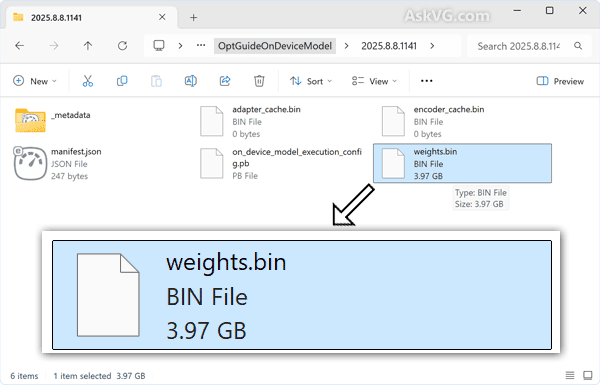
The practical impact falls hardest on people with smaller SSDs or limited data plans, where a 4GB download is no small background task. Users who want to check the impact can look for the weights.bin file in the Chrome profile directory, inside OptGuideOnDeviceModel, and decide whether the browser’s local AI features are worth the hidden cost in storage and bandwidth. The broader question is whether on-device AI is being introduced with enough clarity for meaningful consent, or whether the burden is being shifted onto users one silent download at a time.
This article was produced by Prism’s automated news system from verified source data, official records, and press releases, then run through automated quality and moderation checks before publishing. The system is built and supervised by the people who set the standards it runs under. Read our full AI policy.
Did this article answer your question?