Dollar General workers may see smaller paychecks under updated 2026 withholding rules
A changed withholding election can trim a Dollar General paycheck even when your hourly rate stays put. The pay stub is the fastest way to see what changed.
What changed, and why your take-home pay can move
A smaller Dollar General paycheck does not automatically mean your hourly rate went down. More often, the shift comes from a different mix of hours, overtime, benefits deductions, or federal withholding, and the 2026 IRS tables can change that mix even when your job title and wage stay the same.

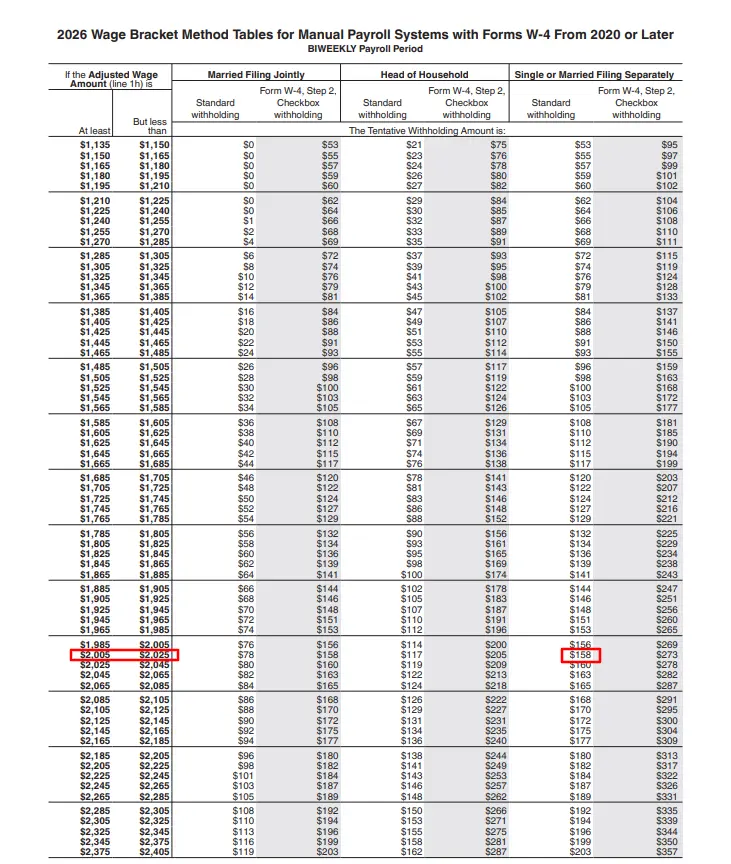
The IRS says its 2026 withholding tables apply to 2026 wage payments, and the 2026 Form W-4 was revised to account for new federal income tax deductions under federal law. It also added a new checkbox below Step 4(c) for workers claiming exemption from federal income tax withholding. For a Dollar General employee, that means the amount that lands in your bank account can change because of payroll math, not because the store suddenly changed your base pay.
Start with gross pay, then work down to net pay
The fastest way to troubleshoot a paycheck is to separate the pieces in order. Gross pay is what you earned before deductions, and it is driven by your hours worked, your hourly rate, and any overtime. If your schedule bounced around, or if a shift was cut short, the first place to look is whether all hours were recorded correctly.
From there, check pre-tax deductions. Benefits like health coverage can lower taxable wages before federal income tax is calculated, which can make net pay feel smaller even when your total compensation did not change. After that come federal and state withholding, which are based on the information in your W-4 and the current IRS tables. The final number is net pay, the amount that actually reaches your account.
That sequence matters because workers often jump straight to taxes when the real issue is somewhere else. A missed punch, an overtime line that did not post, or a deduction change tied to benefits enrollment can all create the same sting: a paycheck that looks lighter than expected.
The lines on the stub that matter most
If your take-home pay dropped, the pay stub should answer four questions quickly: did all the hours post, was overtime calculated correctly, did a deduction change, and did withholding change.
Hours and overtime are the most visible drivers. In retail, where schedules can swing week to week, a single missed shift or a few fewer hours can create an immediate drop in gross pay. Overtime is just as important, because it can raise gross pay enough to cushion a bad week, but only if it is captured properly on the stub.
Benefits deductions are the next common culprit. If a medical, dental, vision, or other deduction started, increased, or restarted after an enrollment window, the net pay hit can be real even if your wage stayed the same. A worker who only looks at the final deposit can miss the difference between a payroll error and a normal deduction change.
Withholding is where the 2026 IRS update becomes especially relevant. The new tables can produce a different paycheck than last year, and an outdated W-4 can magnify the surprise. If your household situation changed, or if you claimed a different withholding status and never revisited it, the stub may reflect that before you notice it anywhere else.
How Dollar General workers should get into the system
Dollar General’s pay stub portal is the official place to verify gross pay, taxes, and deductions. The company’s login instructions say employees can sign in with either a DG email username or an Employee ID, and if they cannot access the system they are told to contact the Employee Resource Center at 1-888-237-4114.
One important wrinkle: the portal says employees, including those who have previously registered, must re-register to access the updated Pay Stub Portal. That is the kind of small administrative change that can block access at the exact moment a worker is trying to check why a paycheck changed. If you cannot get in, the first problem may not be payroll at all, but login access.
For a workforce as large as Dollar General’s, that portal is more than a convenience. The company said it operated 20,594 stores across the United States and Mexico as of January 31, 2025, and employed about 194,200 full-time and part-time workers as of February 28, 2025. At that scale, even a routine withholding update can affect a huge number of hourly employees at once.
When a smaller paycheck is normal, and when it is not
Some paycheck changes are expected. A worker who lost hours because of a schedule cut, picked up less overtime, or started a new deduction will see the difference right away. A worker whose W-4 was updated may also see a new take-home amount, especially under the 2026 IRS tables.
Other changes deserve a closer look. If your hours and deductions are unchanged but the net pay still dropped, that is when payroll verification becomes urgent. Compare the current stub with the previous one and isolate the exact line that moved. If hours are right but withholding jumped, the issue may be a W-4 setting. If withholding is stable but deductions changed, the answer may be a benefits enrollment event. If neither explains the gap, the payroll record itself may need correction.
That distinction is especially important in a business like Dollar General, where staffing and store structure can shift. The company said in its 2025 annual report that it planned to close 96 Dollar General stores and 45 pOpshelf stores and convert six pOpshelf locations to Dollar General stores in the first quarter of 2025. Store openings, closures, and conversions all affect scheduling, which then affects hours, overtime, and gross pay.
The practical takeaway
For Dollar General workers, a smaller paycheck in 2026 does not automatically mean a pay cut. It may be the result of new federal withholding tables, a revised W-4, a benefits deduction, or a plain scheduling change. The pay stub is the document that shows which piece moved, and the fastest route to an answer is to check it line by line before assuming the problem is taxes, hours, or payroll error.
Know something we missed? Have a correction or additional information?
Submit a Tip