Home Depot app helps associates check inventory and locate products
The app is now a floor tool, not just a shopper perk: associates use it to confirm stock, cut down scavenger hunts, and keep pickups moving.
On the sales floor, the Home Depot app is becoming one of the first tools associates reach for when a shopper asks whether an item is in stock and where it sits in the building. It changes the rhythm of a shift: less guesswork, fewer trips to the back room, and faster answers before a project deadline turns into a complaint.
What the app tells associates before they walk the aisle
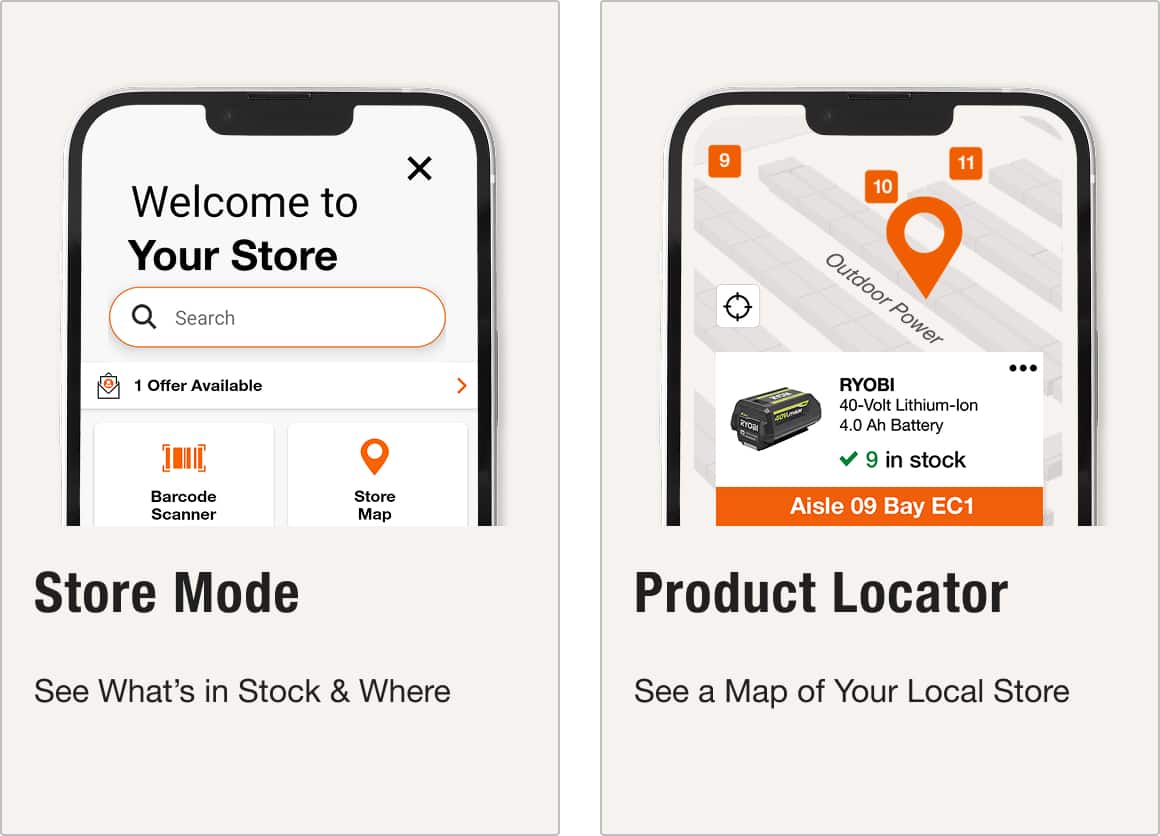
The core functions are simple, but they matter in a store where timing and location decide whether a sale moves forward. The app lets users track orders, check real-time inventory, and use an aisle locator to pinpoint exactly where products are located in a store through its real-time Product Locator feature.
For associates, that means the conversation starts with better information. If a customer wants one more box of fasteners before heading to a jobsite, the app can tell the associate whether the item is on hand and where it should be. If the answer is no, the same tool can move the discussion toward pickup, delivery, or a nearby location instead of sending someone off on a blind hunt.
The order-tracking side matters too. Customers using the mobile app can log in and check order status there, which gives associates a cleaner answer when someone comes back asking whether an online order is ready or still in progress. That matters most when the pickup desk is already busy and the customer is standing in front of the service counter wanting a direct answer.
How the app changes a busy shift
The biggest operational effect is not that the app finds a product for a customer. It is that it changes what an associate has to verify before making a promise. If the app says an item is in stock, that is a starting point, not the end of the job. Associates still need to check shelf condition, receiving status, and possible substitutions before they send a shopper across the store or to a service desk.
That distinction is especially important in home improvement, where a DIY customer may be trying to finish a weekend project before stores close and a contractor may be waiting on one more part to keep a crew moving. A wrong answer does not just slow a transaction; it can delay a jobsite, create a return visit, or push a customer to another store. The app reduces that risk by making inventory confidence part of the first conversation.
A simple way to use it on the floor is to treat the app as a triage tool:
1. Check real-time inventory in the app before walking the aisle.
2. Use the aisle locator or Product Locator to narrow the search.
3. Verify the shelf, the back room, and receiving if the app says the item should be there.
4. If it is missing, steer the customer to pickup, delivery, or another nearby store.
That workflow saves the time that used to disappear into repeated aisle checks and back-room trips, and it helps associates answer a question before it hardens into a complaint at the service desk.
Why new hires, department leads, and managers all benefit differently
The aisle locator is especially useful for new hires who are still learning the layout of a large store. Instead of relying on memory alone, they can use the app to find where a product belongs and move with more confidence through departments that can feel sprawling at first.
For seasoned associates, the payoff is different. Fewer interruptions for basic location questions means more time for the work that actually shows skill, like comparing tools, talking through materials, or helping a contractor solve an urgent problem.
Managers and department leads get a different kind of signal. A consistent app experience can reduce repeated calls to the same department, improve store planning, and point to places where signage or in-stock accuracy needs work. When customers keep asking for the same item and the app says one thing while the shelf says another, that is not just a customer-service issue, it is a process problem that shows up on the floor.
The bigger digital shift behind the app
Home Depot has been moving in this direction for years. In February 2016, the company’s mobile app was already using augmented reality for in-store product search. By the time Forrester ranked its mobile app No. 1 in retail in the Forrester Retail Wave: US Mobile Apps, Q1 2019 report, the app had become part of the company’s public story about how shoppers move between online and store channels.
The associate side followed the same logic. On Jan. 12, 2023, Home Depot announced a new homegrown in-store application designed to help store associates prioritize tasks more effectively and showed an associate using a handheld device called Sidekick.
More recently, Home Depot said in March 2026 that it would launch the industry’s first real-time delivery tracker for big and bulky materials. The tool would provide minute-by-minute updates and greater visibility for Pro customers.
This article was produced by Prism’s automated news system from verified source data, official records, and press releases, then run through automated quality and moderation checks before publishing. The system is built and supervised by the people who set the standards it runs under. Read our full AI policy.
Did this article answer your question?