Microsoft Publishes Guide to Index Monday.com Data into Copilot Experiences
Microsoft Learn published a step-by-step connector guide on March 19 that makes monday.com boards and items searchable inside Copilot the moment you hit "Create."
Microsoft's documentation platform published a deployment guide on March 19 that lets organizations pipe monday.com boards, items, and task data directly into Microsoft 365 Copilot, Copilot Search, and Microsoft Search, a move that closes a persistent context-switching loop for teams juggling work across both platforms.
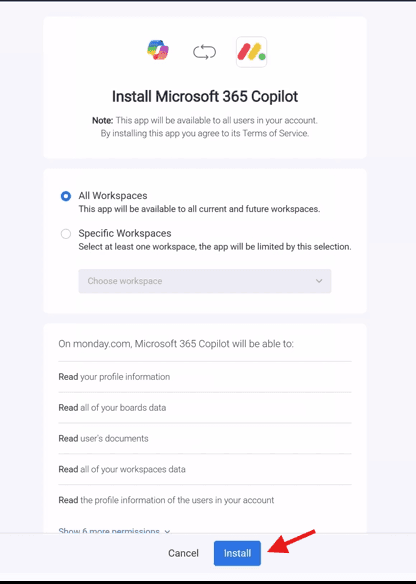
The guide, titled "monday.com Microsoft 365 Copilot connector overview," walks administrators through configuring the connector inside the Microsoft 365 admin center. Once an admin clicks Create to publish the connection, indexing begins immediately: "The connector starts indexing content right away," the documentation states. Before going company-wide, administrators can limit the rollout to specific users or groups to validate results in Copilot and Microsoft Search first.
The connector maps monday.com data against a defined schema of default properties. Nine properties are documented in the guide: Authors (queryable, retrievable, and searchable), BoardName (which also supports Refine operations), CreatedBy, CreatedDateTime, BoardDescription, BoardID, BoardUrl, GroupID, and a property labeled CONTENT, defined as "Merge all columns and corresponding values of the item" and set exclusively to Search. That CONTENT field is the broadest indexing net in the schema, effectively making an item's full column data available to Copilot's search layer.
monday.com describes the integration as an architectural rebuild, not just a settings toggle. The company says it re-engineered its Copilot agent on top of the Model Context Protocol, an emerging standard for giving AI tools structured awareness of connected platforms. "MCP is a standard that lets AI tools understand your boards, structure, and permissions the way a teammate would," monday.com stated. The company positions itself as an early mover: "As Copilot adds support for MCP-based connectors, monday.com is already one of the first platforms using it to power a deeper, more capable agent experience inside Microsoft 365."

The practical result, according to monday.com, is an agent that goes beyond read-only retrieval. "Once it's enabled, you can use it across Microsoft surfaces to create boards, update work, summarize progress, and pull information from your monday.com account without switching tools." The company lists Teams, Word, Excel, PowerPoint, Outlook, and Copilot itself as the surfaces where the integration operates.
For organizations with restricted third-party app policies, setup does require an admin approval step before employees can access the agent. After that gate is cleared, monday.com says no further configuration is needed: "Once the app is approved and installed, the agent automatically connects to your monday.com account when you sign in, no manual configuration or field mapping required."
The full prerequisites list referenced in the Microsoft Learn guide was not included in the published excerpt, leaving open questions about which Microsoft 365 license tiers or tenant configurations are required to deploy the connector. Neither company addressed data residency or permission enforcement details in the available documentation.
Know something we missed? Have a correction or additional information?
Submit a Tip