Monday.com guide shows AI clients can act on boards, not just read them
monday MCP turns ChatGPT and other AI clients into action layers for boards, letting teams create, update, and summarize work without living inside the app.
Work is moving beyond the board
monday.com’s MCP setup guide points to a bigger shift than a new integration. It makes the case that work no longer has to start and end inside the monday app, because an AI client can now sit in front of the system of record and do real work against live boards. That changes the daily experience for engineers, product managers, sales reps, and operations teams who already rely on monday for coordination, but do not always want to click through the app to summarize, triage, or update it.
The practical shift is simple: the AI interface becomes the place where people ask, and monday remains the place where the data lives. That is the core behavior change this setup guide is signaling. It is not just about searching boards faster. It is about letting another surface interpret monday context, then act on it in a controlled way.
What the integration actually lets people do
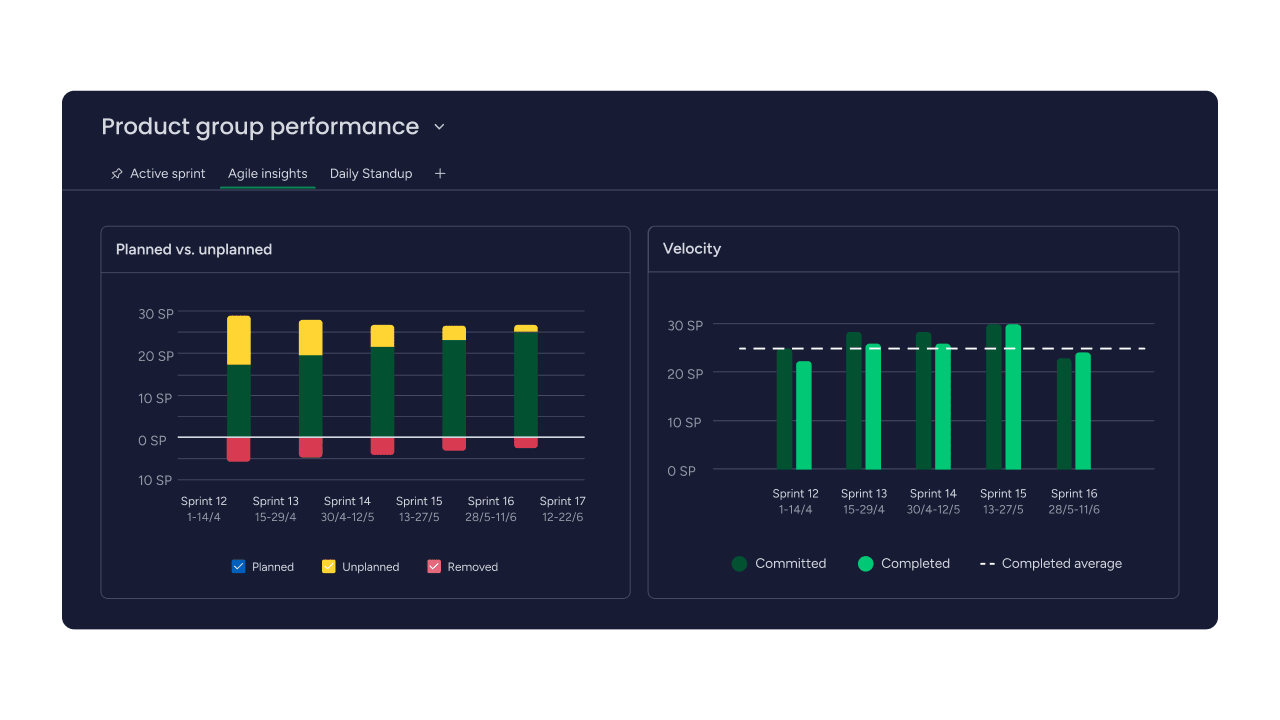
The guide describes a surprisingly broad set of actions once monday MCP is connected. Users can generate sprint summaries, pull team performance reports, convert meeting notes into structured items, and ask for cross-board rollups. They can also create and triage incidents, build leads and deals, write specs and retros, and generate dashboards and widgets from board insights.
That range matters because it shows the integration is built for more than read-only lookup. A product manager can turn rough notes from a planning meeting into something structured enough to enter a workflow. An engineer or support lead can use it to create incident records and clean up requests faster. A sales team can use natural language to produce CRM work, including leads, deals, customer notes, pipeline updates, and follow-ups, without repetitive clicking.
For monday employees, that is the real test case. If the product works the way the guide suggests, the value is not that people can ask AI what is on a board. It is that they can ask AI to do the next step on the board.
How setup works and who can use it
The setup is positioned as accessible, but not loose. monday says MCP is currently available for all monday.com plans, and admins must install the free monday MCP app from the monday marketplace before anything can connect. After that, the AI client has to grant OAuth consent, which means the connection is not automatic and is tied to a specific assistant and token.
The prerequisite list is intentionally straightforward: an active monday.com account, the monday MCP app installed, and OAuth consent from the AI client. monday’s support documentation also separates ChatGPT into two paths, including a native read-only option and a fuller integration path, which suggests the company is distinguishing between seeing data and taking action on it.
That split is important for workers because it sets expectations. Read-only access is useful for status checks and quick summaries, but the fuller path is what turns MCP into a workflow tool. In practice, that means employees need to know which assistant mode they are using, what permissions they have granted, and which actions can actually be executed.
Why the supported assistants matter
monday says the integration works with ChatGPT, Claude, Cursor, Microsoft Copilot Studio, le chat, Figma Make, and Gemini CLI. That list matters because it shows monday is not treating this as a one-off chatbot feature. It is positioning MCP as a general work interface layer that can sit across multiple AI environments people already use.
For engineers and product teams, that breadth suggests the company sees the future of work software as interoperable rather than app-bound. For sales and operations teams, it means the customer-facing and process-heavy work can be surfaced through the assistant that is already closest to the employee’s day. The point is not which assistant wins. The point is that monday wants the board data to travel into whichever AI environment people choose.
The broader strategy is visible in monday’s related connector work, including efforts tied to Claude and Microsoft 365 Copilot. MCP fits into that pattern as a way to make monday available from external AI tools without forcing the company to rebuild every workflow in each separate interface.
The technical model behind the pitch
monday’s developer docs describe the platform MCP as an open-source MCP server maintained by the monday.com AI team. The server lets AI agents read and write monday.com data through the GraphQL API, which is the technical backbone that makes the action layer possible.
That detail should matter to anyone inside a SaaS company watching where product surfaces are going. It means monday is not just exposing static data. It is exposing structured work objects that an AI agent can understand, query, and modify. In practical terms, that is what lets an assistant move from “here is the status” to “here is the updated item, the new dashboard, and the cleaned-up request.”
Security and governance are part of the product story
The upside of AI acting on boards is obvious. The risk is equally obvious: once an external interface can write into a system of record, governance matters as much as speed. monday’s security overview says the MCP server is a wrapper over the monday platform API and inherits the platform’s authentication, authorization, validation, rate limiting, and transport security controls.
The company also says the AI assistant can only perform actions authorized by the user’s token. That is the key safeguard in the model, because it ties every action back to the permissions of the person or account that connected the assistant. For managers and admins, that means the integration is not a blanket handoff of board control. It is a permissioned path that still needs oversight.
That will matter inside any company adopting it. Teams will want to know which assistants are connected, which tokens are active, which boards are exposed, and how much confidence they should place in AI-generated updates before they become operational truth. The more monday becomes accessible from outside the app, the more important it becomes to understand who can act, not just who can view.
What this says about monday’s direction
Monday first announced the MCP integration on May 8, 2025, and the subsequent support and developer docs make the message clearer: the company wants AI to be a practical bridge into monday work, not a sidecar that only summarizes what is already there. That framing lines up with a larger product direction in which the system of record stays monday, but the system of interaction can be any AI client a team already uses.
For employees, that could mean less context switching and faster execution on routine work. For the business, it raises the bar on trust, permissions, and workflow design, because once AI can create, clean up, and report on boards, the interface is no longer just a window into work. It is part of the work itself.
This article was produced by Prism’s automated news system from verified source data, official records, and press releases, then run through automated quality and moderation checks before publishing. The system is built and supervised by the people who set the standards it runs under. Read our full AI policy.
Did this article answer your question?